Cart abandonment is a major issue for online stores, with an average of 70.19% of shoppers leaving without completing their purchase. One effective way to reduce this is by using checkout progress bars. These visual indicators guide shoppers through the process, showing how many steps remain. Here's why they work:
- Motivation through progress: Progress bars use the goal gradient effect, encouraging users to complete their purchase as they see how close they are to finishing.
- Clarity and trust: They reduce uncertainty by showing exactly where customers are in the checkout process, lowering anxiety.
- Improved design matters: A "fast-to-slow" progress bar can reduce abandonment rates to 11.3%, while poorly designed bars can increase drop-offs.
For businesses, improving checkout design with tools like progress bars can boost conversion rates by up to 35.26%. By addressing common barriers like complexity and anxiety, progress bars create a smoother shopping experience and help recover lost revenue.
How to Optimize Your Shopify Checkout (Step-by-Step Tutorial)

How Progress Bars Affect User Behavior
Progress bars tap into key psychological principles to encourage users to complete tasks, such as finishing a purchase, by visually showing their progress.
The Goal Gradient Effect
The goal gradient effect explains why people tend to speed up as they get closer to completing a task. Essentially, the closer they are to the reward or finish line, the more effort they’re willing to put in to reach it.
In the context of online checkouts, this effect creates a sense of urgency. When a progress bar makes the end feel within reach, customers are more likely to push through the remaining steps. This is tied to how people perceive distance: as the goal feels closer, their motivation to finish increases.
"The goal-oriented nature of progress bars aligns harmoniously with the innate human drive to reach milestones, making them a pivotal tool for guiding users through onboarding with heightened motivation." – Sophie Grigoryan, Content Project Manager, Userpilot
Another related concept, the endowed progress effect, gives users a psychological boost by marking early steps as completed. This makes the remaining steps feel shorter and more doable.
Beyond motivation, progress bars also play a role in building trust by reducing uncertainty during the process.
Building Trust and Reducing Anxiety
Progress bars help ease customer anxiety by showing exactly where they are in a process, offering clarity and a sense of control.
This transparency brings several benefits. First, it empowers users by letting them know what to expect next, making the overall experience feel manageable rather than overwhelming. Second, it reassures them that the system is functioning properly. A visible progress bar confirms that the application is working, rather than leaving users wondering if something has gone wrong.
The data backs this up. Usability testing revealed that users who saw encouraging early progress (a fast-moving progress bar at the start) had a breakoff rate of just 11.3%, compared to 21.8% for those who experienced slower initial progress. This shows that a smooth and positive start can significantly reduce abandonment, while slow progress early on can have the opposite effect.
"When progress seems to outpace users' expectations, feedback can improve their experience... when progress seems to lag behind what users expect, feedback degrades their experience and lowers completion rates." – Frederick G Conrad, Institute for Social Research
Research Findings on Checkout Progress Bars
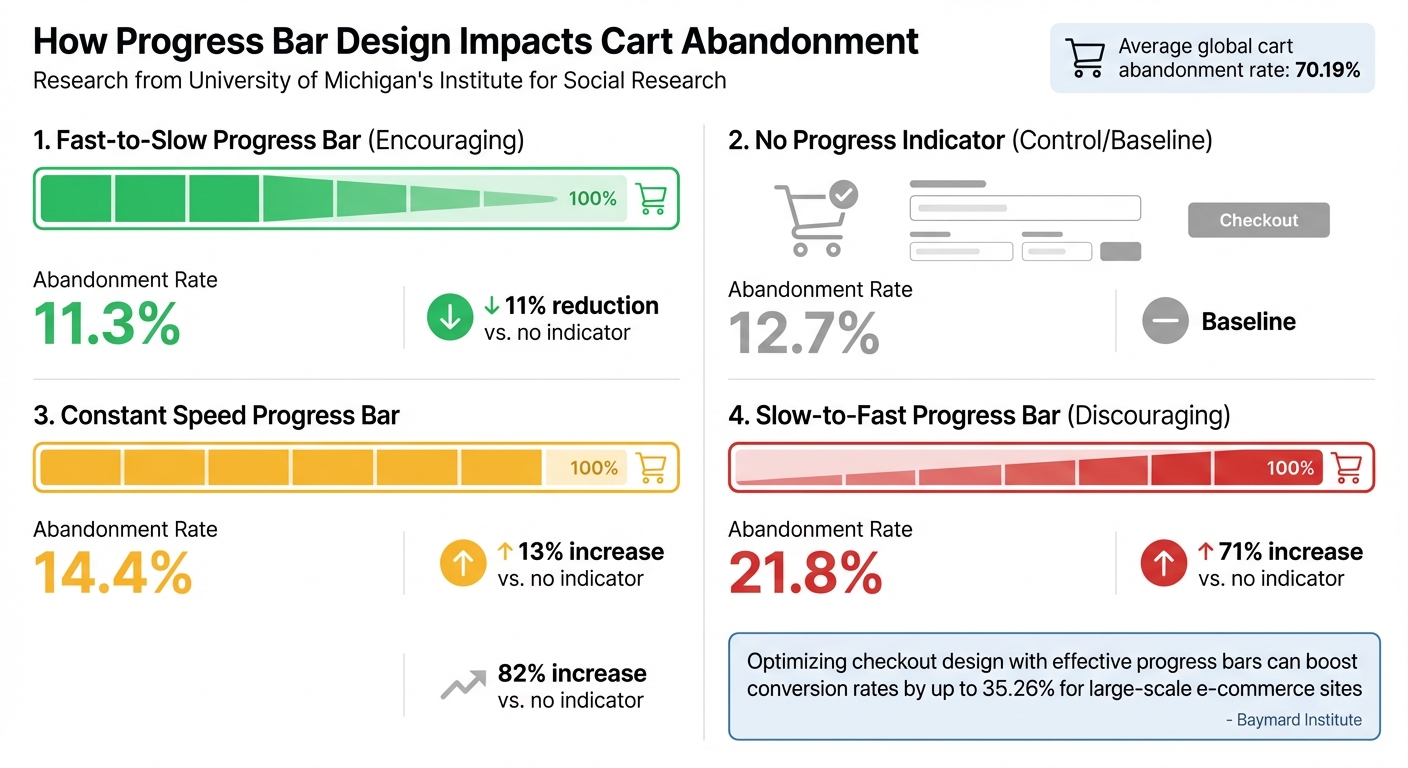
Progress Bar Design Impact on Cart Abandonment Rates
Cart Abandonment Reduction Statistics
Progress bars have been shown to significantly improve checkout completion rates. Considering the global cart abandonment rate averages a staggering 70.19%, even modest improvements can lead to meaningful revenue increases.
A study by the University of Michigan's Institute for Social Research highlighted how the design of progress bars can dramatically influence user behavior. For example, a "Fast-to-Slow" progress bar - where the bar moves quickly at the start - reduced cart abandonment to just 11.3%. In contrast, a "Slow-to-Fast" progress bar nearly doubled the abandonment rate to 21.8%.
Interestingly, a constant-speed progress bar had an abandonment rate of 14.4%, which was worse than having no progress indicator at all (12.7%). This highlights that the way progress is displayed matters as much as having a progress bar in the first place.
| Progress Indicator Type | Abandonment Rate | Impact vs. No Indicator |
|---|---|---|
| Fast-to-Slow (Encouraging) | 11.3% | ~11% Relative Reduction |
| No Indicator (Control) | 12.7% | Baseline |
| Constant Speed | 14.4% | ~13% Relative Increase |
| Slow-to-Fast (Discouraging) | 21.8% | ~71% Relative Increase |
This research emphasizes how critical progress bar design is to reducing cart abandonment. For instance, the Baymard Institute reports that optimizing checkout design - where progress indicators play a key role - can boost conversion rates by 35.26% for large-scale e-commerce sites. These findings illustrate how early progress feedback can shape user decisions and reduce friction during checkout.
User Behavior Insights
The way progress bars influence user behavior goes beyond simple visuals. Research shows that early feedback from a progress bar significantly impacts a user's willingness to complete the checkout process. Customers form their expectations within the first moments of seeing the progress bar, and this initial impression often determines their level of commitment.
However, progress bars aren't always a guaranteed win. Their success depends on whether users find the feedback motivating or discouraging. For example, slow initial progress can double abandonment rates compared to fast, encouraging feedback. This suggests that users prefer no progress indicator at all over one that confirms their checkout process will take longer than anticipated.
Christian Holst, Research Director at the Baymard Institute, highlights the practical implications of this: 18% of US online shoppers abandoned orders in the past quarter due to overly complex checkouts. Progress bars help mitigate this by breaking the process into clear, manageable steps, reducing the sense of overwhelm.
sbb-itb-d9e5b3a
How CheckIt Applies Research-Backed Insights
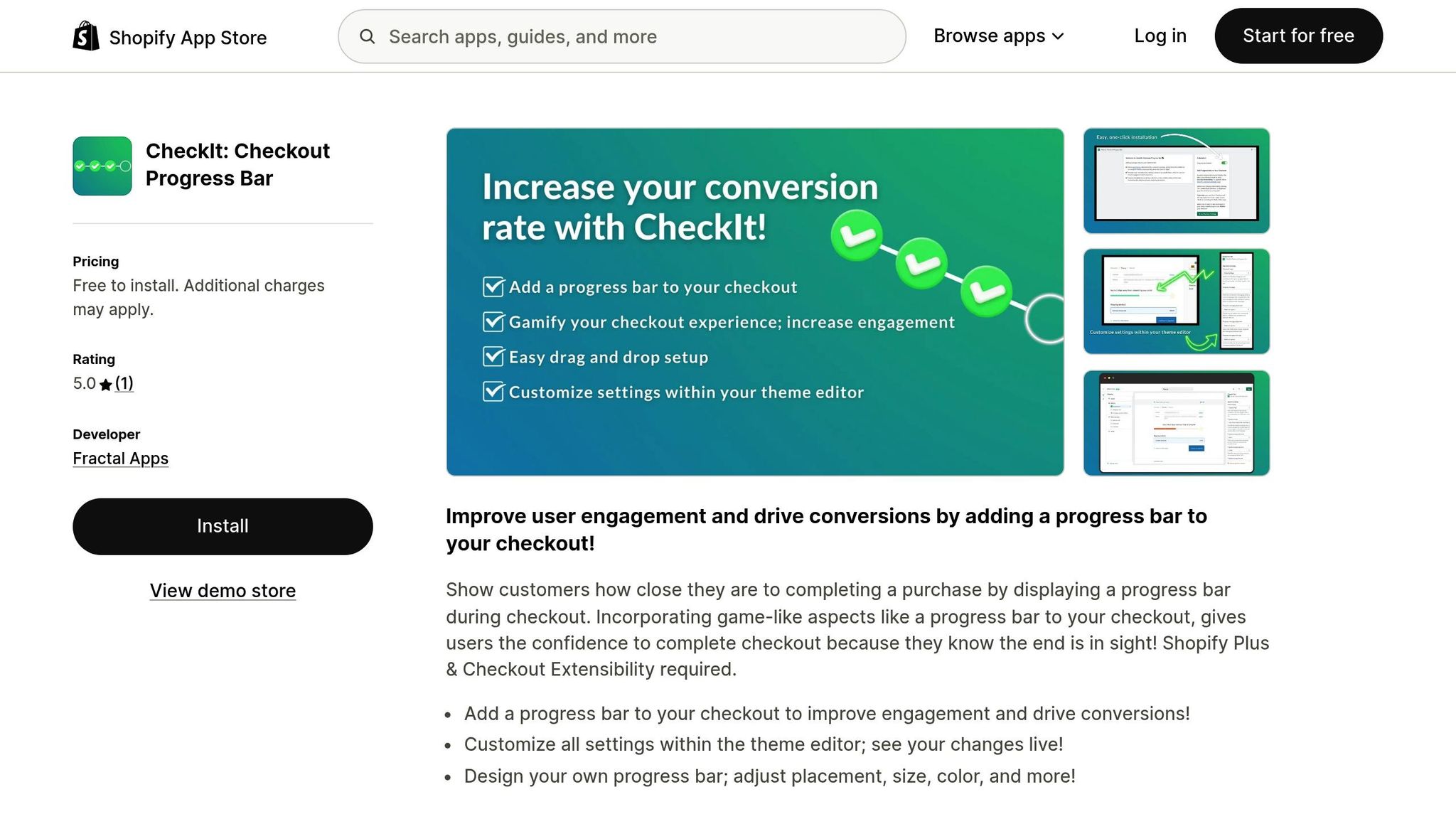
CheckIt: Checkout Progress Bar uses proven research to help Shopify Plus merchants improve their checkout process. The app takes advantage of the goal gradient effect, a psychological principle that motivates customers by showing them how close they are to completing their purchase [8, 15].
By providing constant feedback, CheckIt helps reduce the perceived complexity of the checkout process and lowers user anxiety - two major factors that often lead to cart abandonment. This approach not only simplifies the task but also boosts shopper confidence. In essence, CheckIt turns academic insights into practical tools for smoother and more effective checkouts.
In July 2023, Tammy Sons, the owner of TN Nursery, shared her experience after implementing CheckIt on her Shopify store. She noted, "This app has dramatically increased our conversions." During the setup, developer Sean from Fractal Apps worked closely with her to ensure the progress bar matched her store's branding seamlessly.
Customizable Progress Bar Features
CheckIt’s design is rooted in research and offers flexible customization options that blend effortlessly with a store’s branding. Merchants can tweak settings directly within Shopify’s theme editor, making the progress bar feel like an integral part of the checkout experience rather than an external add-on. This focus on brand consistency is vital, as studies reveal that 71% of shoppers actively look for security and encryption markers during checkout. A mismatched or clunky design can erode trust.
Additionally, these customization tools enable merchants to provide encouraging feedback early in the process. Research supports this tactic as an effective way to reduce cart abandonment rates.
Shopify Integration
To address the anxiety often associated with multi-step checkouts, CheckIt integrates seamlessly with Shopify Plus stores. Built using Checkout Extensibility, it ensures a secure and streamlined connection to Shopify’s modern checkout system. What’s more, merchants don’t need technical expertise - there’s no need for custom coding or complex backend adjustments.
This smooth integration also tackles a common challenge: the uncertainty of multi-page checkouts. Research shows that when customers can’t estimate how much longer a process will take, their anxiety rises, and they’re more likely to abandon their cart. CheckIt solves this by offering a visual progress indicator that updates as customers move through each step, helping to set clear expectations and keeping them engaged.
Real-Time Editing Capabilities
CheckIt includes a live preview feature within the Shopify theme editor, allowing store owners to see changes in real-time as they customize the progress bar. This instant feedback ensures that the design aligns perfectly with the brand before it goes live, reducing the chance of errors during implementation.
With a 5.0/5 star rating on the Shopify App Store, CheckIt continues to receive praise from merchants for its impact on conversions and the developer’s hands-on, responsive support.
Conclusion
Checkout progress bars are a powerful tool to reduce cart abandonment and increase conversions by tapping into well-established psychological principles like the goal gradient effect. With the global cart abandonment rate sitting at a staggering 70.19%, even small improvements in the checkout process can make a big difference. Progress bars work by creating a sense of momentum, motivating customers to follow through with their purchases.
The numbers speak for themselves: progress bars that provide encouraging feedback early on can lower abandonment rates to just 11.3%, compared to 21.8% when the progress appears slower at the start. These results highlight how applying behavioral research can make checkout design more effective.
For businesses using Shopify Plus, CheckIt makes implementing these strategies straightforward. Its seamless integration and customizable features let you design progress bars that not only reflect your brand but also build trust and reduce anxiety during checkout.
Considering that 18% of shoppers abandon their carts due to long or complicated checkouts, a well-designed progress bar can simplify the process. It breaks the checkout into clear, manageable steps, showing customers exactly how close they are to completing their purchase. By turning psychological insights into actionable results, progress bars help create a smoother, more satisfying shopping experience.
FAQs
How do checkout progress bars help reduce customer anxiety during online shopping?
Checkout progress bars play a key role in reducing customer anxiety by showing exactly how many steps are left in the process. This clear visual guide helps set expectations, removes uncertainty, and gives shoppers a sense of reassurance as they move closer to completing their purchase.
Fractal Apps’ CheckIt app takes this idea and runs with it, offering Shopify stores a way to create a smoother, more reassuring checkout experience. By keeping customers informed and engaged, it helps encourage them to finish their transactions.
What is the goal-gradient effect and how does it impact online shopping behavior?
The goal-gradient effect is a psychological concept that explains how people’s motivation increases as they near the finish line of a goal. In the world of shopping, this means customers are more likely to complete a purchase when they feel they’re just steps away from a reward - whether that’s free shipping, a discount, or simply finalizing their order.
E-commerce platforms often use tools like checkout progress bars to tap into this behavior. For example, the CheckIt bar from Fractal Apps: Exclusive Shopify Apps visually highlights how close shoppers are to completing their order. As the bar fills up, it gives a clear sense of progress and adds a little urgency, nudging customers to finish their purchase. This simple visual cue can help reduce cart abandonment and drive more conversions.
How does a progress bar help reduce cart abandonment during checkout?
A well-crafted progress bar can play a big role in cutting down cart abandonment by making the checkout process feel quicker and more straightforward. It gives customers a clear, visual cue about their progress, which helps reduce any uncertainty or frustration they might feel.
By splitting the process into smaller, easy-to-follow steps, progress bars give shoppers a sense of achievement as they complete each one. This not only boosts confidence but also motivates them to complete their purchase, tackling common hurdles like confusion or the impression that the process is too complicated.