Video marketing isn’t optional anymore - it’s essential for Shopify success.
Here’s why:
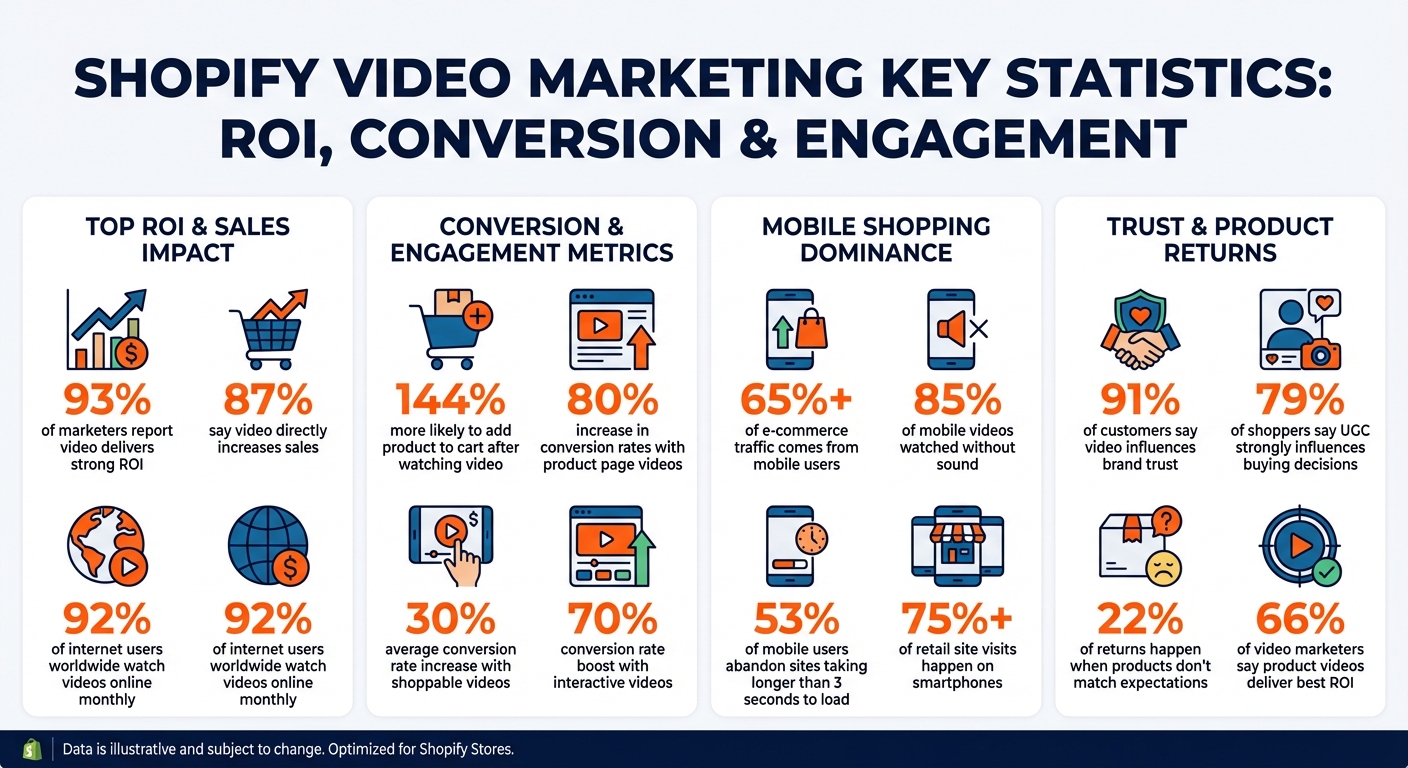
- 93% of marketers report video delivers strong ROI, and 87% say it directly increases sales.
- Shoppers are 144% more likely to add a product to their cart after watching a video.
- Product pages with videos can see conversion rates increase by up to 80%.
Without video, Shopify stores face challenges like low engagement, poor conversions, and high bounce rates. Mobile users, who account for over 65% of e-commerce traffic, expect quick, engaging content. Static images and text just can’t compete.
Adding videos solves these issues by:
- Boosting engagement: Videos hold attention and emotionally connect with viewers.
- Driving conversions: Shoppable and demo videos streamline buying decisions.
- Reducing returns: Videos set clear expectations, showing products in action.
Start small with product demos, lifestyle clips, or customer testimonials. Use tools like UWidget to embed videos on your Shopify store, optimize for mobile, and track results with analytics. Video marketing helps build trust, improve sales, and create long-term customer connections.
Video Marketing Statistics for Shopify Stores: ROI, Conversion Rates, and Mobile Engagement
Problems Shopify Stores Face Without Video Marketing

Low Engagement and High Bounce Rates
Relying solely on static images and text? That’s a tough sell in today’s fast-paced digital world. Motion and sound grab attention in ways static content simply can’t. Without these elements, your store risks losing mobile shoppers who scroll past or bounce off the page quickly. Static content lacks the ability to create an emotional connection or set the scene, leaving visitors uninspired to stick around.
The stats are hard to ignore: 92% of internet users worldwide watch videos online every month. By skipping video, you’re not just losing attention - you’re missing out on building trust and brand loyalty. Text-heavy pages can’t compete with the quick, visually engaging content mobile users crave. And when engagement drops, so do conversions and customer trust.
Poor Conversion Rates and More Returns
When shoppers can’t see a product in action, they’re left guessing. How big is it? How does it work? What’s the setup like? That uncertainty often leads to hesitation, fewer conversions, and more returns when the product doesn’t meet expectations.
The numbers paint a clear picture: video content on product pages can boost conversion rates by up to 80%. Meanwhile, Shopify stores without video often struggle to hit the platform’s average conversion rate of 1.4%. Even more telling? 66% of video marketers say product videos deliver the best ROI. Without video, you’re leaving money on the table. Shoppers want to see real testimonials, product demonstrations, and social proof before clicking "add to cart." Without that, hesitation wins, and your sales suffer. Plus, mobile shoppers - who make up a massive chunk of e-commerce traffic - expect dynamic, engaging content, not static pages.
Missed Opportunities with Mobile Shoppers
Mobile shoppers dominate the e-commerce space, accounting for over 65% of global traffic. But if your store lacks video, you’re not catering to how these users browse. They want quick, swipeable content and seamless transitions - not walls of text.
Here’s another challenge: 85% of mobile videos are watched without sound. That means captions and compelling visuals are essential to connect with this audience. Stores without mobile-optimized video miss out on the most engaging and shareable format available. And let’s not forget speed - 53% of mobile users abandon sites that take longer than 3 seconds to load. Properly optimized video can keep visitors engaged and reduce bounce rates, giving you a better shot at turning browsers into buyers.
How Video Marketing Solves These Problems
Video marketing tackles the challenges of low engagement, poor conversion rates, and missed opportunities with mobile audiences.
Increasing Customer Engagement
When it comes to low engagement, video has the power to turn passive scrolling into active involvement. The combination of motion, sound, and storytelling creates an engaging experience that static images just can't compete with. Instead of breezing past still images, people stop, watch, and connect emotionally with your brand. Features like clickable hotspots or interactive quizzes pull viewers in, encouraging them to actively participate and form a deeper bond with your brand.
User-generated content and video testimonials add another layer by offering genuine peer-to-peer reviews, which not only build trust but also invite more interaction. This increased engagement naturally leads to better conversion outcomes.
Improving Conversion Rates
Videos don’t just grab attention - they also drive sales. Shoppable videos can increase conversion rates by an average of 30%, allowing customers to click on product links directly within the video, cutting out unnecessary steps. Interactive videos take it even further, with conversion rates climbing by up to 70%.
Explainer videos and product demos address common questions and concerns by showing products in action under realistic conditions. This builds confidence and helps shoppers feel more informed before they even reach the checkout. In fact, 87% of businesses report that video marketing has directly boosted their sales. Personalized video content also stands out, being 3.5 times more effective at converting leads or retaining customers compared to generic content.
But video isn’t just about driving sales - it’s also key to building trust and reducing returns.
Building Trust and Reducing Returns
Video bridges the "imagination gap" by offering a dynamic view of products, showing details like texture, size, and how they move - things that static images simply can't convey. This ensures customers know exactly what to expect, reducing the chances of disappointment.
User-generated content and customer testimonials further strengthen trust by showing real people using and endorsing the product. In fact, 79% of shoppers say UGC strongly influences their buying decisions. Videos also demonstrate functionality and quality, answering questions before they even arise. This matters because 22% of product returns happen when items don’t match customer expectations. By addressing these concerns upfront, video helps reduce returns while fostering long-term trust.
Types of Video Content Every Shopify Store Needs
Video marketing isn't just about creating content - it's about crafting the right mix of videos to guide customers through their buying journey. Different types of videos serve different purposes, and having a variety ensures you're addressing every stage of the customer experience. Here's a breakdown of the most effective video types for Shopify stores.
Product Demo Videos
Product demo videos are perfect for showing your products in action and addressing any uncertainty potential buyers might have. Whether it's highlighting the texture of a fabric, demonstrating how a skincare product absorbs, or showcasing how a piece of furniture fits into a room, these videos provide clarity. In fact, 94% of marketers say videos are highly effective in helping users understand how to use a product.
These demos are especially valuable for technical products or items that require instructions. Aim for 30–60 seconds for most demos, but create longer tutorials if needed. Tools like UWidget make it easy to embed YouTube demo videos directly on your Shopify store, keeping viewers engaged without redirecting them elsewhere.
While product demos focus on function, lifestyle videos take it a step further by showing how products fit into real-life scenarios.
Lifestyle and Storytelling Videos
Lifestyle videos go beyond the "how" and dive into the "why." They showcase your product in relatable, everyday settings - like a cozy morning with a favorite coffee mug or a rugged adventure with a durable backpack. This approach helps customers visualize how your product fits into their lives.
Adding behind-the-scenes content can make these videos even more impactful. By sharing glimpses of your creative process, workspace, or team, you create a sense of transparency and trust. This matters because 60% of consumers view authenticity as the most genuine form of marketing. These videos not only build trust but also foster emotional connections, addressing issues like low engagement and high bounce rates.
Shoppable and Interactive Videos
Shoppable videos take convenience to the next level by allowing customers to buy directly from the video. Features like clickable hotspots and "Add to Cart" overlays simplify the buying process, potentially boosting conversion rates by up to 30%. Interactive videos can push this even further, increasing conversion rates by as much as 70%.
These videos are particularly effective for industries like fashion, beauty, home decor, and fitness, where seeing products in motion helps reduce hesitation. Keep them short - around 30 seconds - and use a 9:16 vertical format for mobile users. You can embed these videos directly on your Shopify store or share them on platforms like TikTok Shop. With users spending an average of 95 minutes daily on TikTok and being 1.5 times more likely to make immediate purchases, it's a powerful channel to tap into.
sbb-itb-d9e5b3a
How to Add Video Marketing to Your Shopify Store
Once you've decided on the types of videos you want to create, the next step is getting them onto your Shopify store in a way that's smooth, mobile-friendly, and measurable. Videos should load quickly, look polished, and, most importantly, help boost conversions. Here's how to effectively integrate video marketing into your Shopify store.
Embedding Videos with UWidget
One of the simplest ways to add videos to your Shopify store is by hosting them on platforms like YouTube and embedding them directly onto your product pages. YouTube is ideal for reaching a wider audience, while Vimeo offers an option for content requiring tighter privacy controls.
To make embedding videos even easier, you can use UWidget. This app allows you to add YouTube galleries, carousels, sliders, and even sticky videos that stay visible as users browse. Stick to widely supported formats like MP4 to ensure compatibility. Hosting your videos externally also helps keep your site fast by avoiding large file uploads, which is especially important for mobile users.
Once your videos are embedded, you'll want to ensure they perform seamlessly on mobile devices.
Optimizing Video Content for Mobile Users
With more than 75% of retail site visits now happening on smartphones, optimizing videos for mobile is non-negotiable. Start by shooting videos in portrait mode with a 9:16 aspect ratio. This format takes up the entire screen on mobile devices, creating an immersive experience without requiring users to rotate their screens. It’s also perfect for platforms like TikTok, Instagram Reels, and YouTube Shorts.
Since 85% of mobile videos are watched without sound, adding subtitles and text overlays is a must. Use these overlays to emphasize key features or calls-to-action, and aim to grab the viewer's attention within the first three seconds to keep them from scrolling away.
To improve loading times and conserve mobile data, enable lazy loading so videos only load when they’re about to be viewed. For example, in May 2025, B2B apparel company Merchology revamped their Shopify store with a mobile-first approach. They compressed video files and streamlined navigation with thumb-friendly calls-to-action. The result? A 40% increase in mobile conversion rates and a 340% jump in revenue per mobile device year-over-year.
Tracking Results with Analytics
Once your videos are up and running, tracking their performance is crucial to refine your strategy. Start with Shopify’s dashboard to monitor basic metrics like page views and conversion rates on pages featuring embedded videos. For more detailed insights, tools like Mixpanel can help you track specific actions, such as video plays, and segment viewers into behavioral groups to analyze retention and customer lifetime value.
If you’re using shoppable videos, choose analytics tools that offer clear revenue attribution and in-depth engagement reports. This will help you understand how each video impacts your sales. Additionally, tools like Hotjar and Mouseflow can provide heatmaps and session recordings, showing where viewers pause, click, or lose interest. This data can help you pinpoint which videos are hitting the mark.
Experiment with different video placements, lengths, and calls-to-action to see what works best. With 92% of marketers reporting that video marketing delivers a strong return on investment, tracking your results is key to making informed decisions and getting the most out of your efforts.
Steps to Build a Video Marketing Plan
After understanding how video marketing can address common Shopify challenges, let’s explore how to create a plan that delivers results. The process involves identifying customer pain points, crafting short and impactful videos, and using data to continuously refine your approach.
Step 1: Identify Customer Pain Points
Start by digging into customer service data, such as support tickets and emails. These sources often reveal exactly where customers struggle, giving you a roadmap for creating content like explainer or troubleshooting videos to boost confidence in your products.
To go deeper, run surveys or organize focus groups to better understand the challenges your audience faces. Then, tailor your video content to different stages of the sales funnel:
- For cold audiences unfamiliar with your brand, focus on educational videos that address broad industry challenges without pushing your product.
- For warm audiences considering your offerings, create explainer videos that highlight specific benefits.
- For hot audiences ready to make a purchase, use product demos and testimonials to eliminate any last-minute doubts.
The key is to position your brand as a helpful partner rather than just a seller. Brands that focus on educating their customers often see 5x higher retention rates than average. As Katie Parkes, Head of Video Marketing at Shopify, explains:
"Videos perform when we know why we're making them".
Once you’ve identified the pain points, move on to creating videos that directly address these issues.
Step 2: Create Short, High-Impact Videos
With a clear understanding of your audience’s challenges, focus on producing short, engaging videos. Since most mobile videos are watched without sound, grab attention within the first three seconds using striking visuals and clear captions.
Shoot videos in a 9:16 vertical format to enhance the mobile experience, and aim for authenticity over perfection. Today’s audiences, especially Gen Z, tend to prefer raw, less-polished content over highly produced videos. In fact, 60% of consumers find user-generated content more relatable than professionally created brand videos.
Start small by creating one or two video types that address your customers’ most pressing problems. For example, a simple product demo showing how your product solves a specific issue can often outperform an elaborate ad campaign. Keep videos under 30 seconds for social platforms, and always include a clear, singular call-to-action at the end.
Step 3: Test, Measure, and Optimize
Once your videos are live, use data to fine-tune your strategy. Shopify’s dashboard and A/B testing tools can help you track performance metrics like conversion rates on pages with embedded videos. Placement matters - videos positioned above the fold can achieve up to 56% higher play rates.
Experiment with different hooks, calls-to-action, and video lengths, and analyze the results through A/B testing. Pay close attention to viewer retention rates. If viewers drop off at a specific point, that’s a cue to adjust or cut that segment. Tools like CheckIt can also help you test video placements throughout the checkout process and measure their impact on conversions.
Conclusion: Video Marketing is Necessary for Shopify Success
Video marketing has become a cornerstone for Shopify success in 2025. The numbers speak for themselves: 93% of marketers report seeing a strong return on investment from video campaigns, and 87% link their video efforts directly to increased sales. With so many successful stores leaning on video, standing still means falling behind.
Videos do more than just entertain - they help build trust, with 91% of customers saying video content influences their trust in a brand. They also drive results, boosting conversions by up to 70% through shoppable demos and reducing product returns by setting clear expectations.
The good news? You don’t need a massive budget or fancy gear to get started. Tools like UWidget let you easily embed YouTube videos on your Shopify store, while free platforms like Vimeo Create offer simple ways to connect video content directly to your store. Authenticity matters more than perfection - 60% of consumers say they relate better to user-generated content than polished branded videos. This makes it easier than ever to dive into video marketing without overthinking production quality.
To get started, focus on your customers’ needs. Create short, engaging videos that address their biggest challenges or questions, and use analytics to fine-tune your strategy. Since 85% of mobile videos are watched without sound, remember to add captions, shoot in vertical 9:16 format, and grab attention within the first three seconds. These small adjustments can make a big difference in building trust and driving sales.
Video marketing isn’t just a trend - it’s now a necessity. The most successful stores aren’t debating whether to use video; they’re finding smarter ways to do it. Your competition is already rolling out their cameras. By adopting a thoughtful video strategy, you can stay ahead and strengthen your Shopify store’s position in the market.
FAQs
How do I start using video marketing to grow my Shopify store?
Getting started with video marketing for your Shopify store is simpler than it might seem. Start by defining a clear purpose for your videos - are you looking to boost engagement, drive sales, or build trust in your brand? Once you’ve nailed down your goal, decide on the types of videos that suit your store, such as product demonstrations, how-to tutorials, or even compelling brand stories.
Don’t worry about investing in fancy equipment. A smartphone and easy-to-use editing tools like iMovie or Clipchamp are more than enough to create professional-looking videos. Once your video is ready, upload it directly to your Shopify store by adding it to the product page’s Media section. Alternatively, you can embed a link from platforms like YouTube or Vimeo. To broaden your reach, share your videos on social media channels like Instagram, TikTok, or even through email newsletters.
After publishing, keep an eye on how your videos are performing. Use Shopify’s built-in analytics along with insights from platforms like YouTube to understand what’s working. This data will help you fine-tune your approach, experiment with new formats, and even explore options like shoppable videos. With a bit of effort and creativity, video marketing can become a game-changer for connecting with your audience and driving sales.
What types of videos work best to boost sales on Shopify?
Videos such as product demos, brand storytelling, and quick explainer clips (like “how it works” or shoppable videos) are great tools for boosting sales. They allow you to showcase your products in action, build trust with your audience, and simplify the decision-making process for potential buyers.
If you’re running a Shopify store, prioritize creating eye-catching, high-quality videos that emphasize your products’ standout features or benefits. Keep them short and visually engaging to capture attention and encourage conversions.
How can I make my Shopify store's videos work better for mobile shoppers?
To make your Shopify store's videos mobile-friendly, focus on speed and visual quality. Start by compressing video files to keep them lightweight while maintaining clear visuals. This ensures quick loading, even on slower mobile connections. Stick to a web-friendly format like MP4 with H.264 codec, which works smoothly across most mobile browsers.
Use a content delivery network (CDN) to serve your videos. CDNs cache files closer to your customers, reducing playback delays. Offering multiple quality options (low, medium, high) is also a smart move, as it allows videos to adjust to the viewer's internet speed. Another tip? Enable lazy loading, so videos only load when they’re actually on-screen - this speeds up overall page performance.
Lastly, test your videos on a variety of mobile devices and networks. This ensures they load quickly and play smoothly for every user. By following these steps, you’ll create a better video experience that keeps shoppers engaged and encourages conversions.