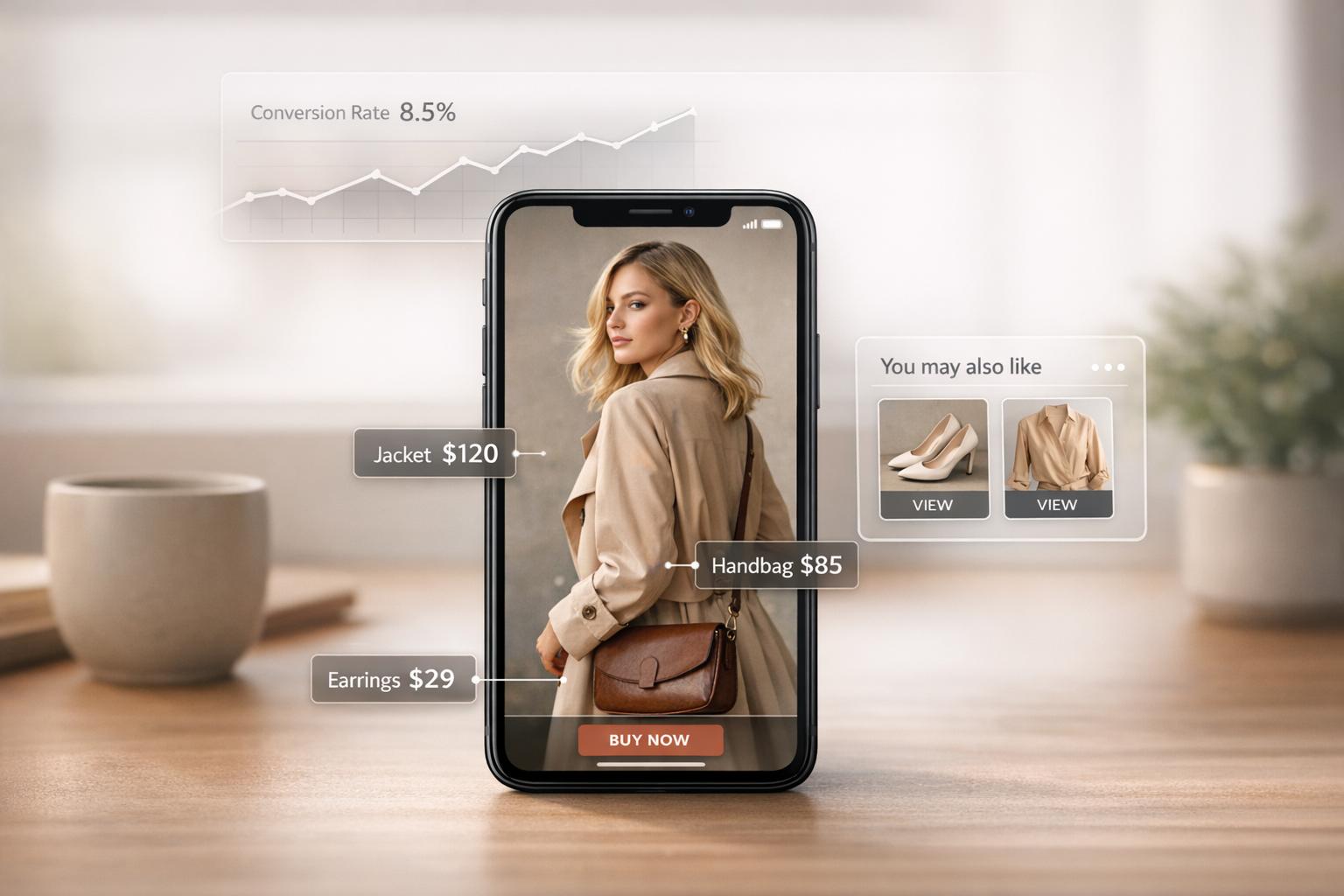
Interactive videos are transforming Shopify stores by making online shopping more engaging and effective. Static product pages often lead to low engagement, short visit times, and missed conversions. Interactive videos solve these issues by allowing customers to explore products directly within the video, boosting engagement by 66% and increasing conversion rates to nearly 30% compared to the usual 3%.
Key benefits include:
- Clickable hotspots: Let customers view product details or add items to their cart without leaving the video.
- Shoppable video carousels: Showcase multiple products in a swipeable format, ideal for mobile users.
- User-generated content: Build trust and drive sales by featuring real customers using your products.
Tools like UWidget make it simple to embed YouTube videos with shopping features directly into your Shopify store. These tools improve page load speed, track performance metrics, and help you optimize video placement for better results.
Quick Stats:
- 44% longer viewing time with interactive videos.
- 89% of consumers say videos influence their buying decisions.
- Ava Estell saw a 300% conversion rate increase with shoppable videos.
Interactive videos are a powerful way to keep customers engaged, answer their questions, and guide them to purchase - all within a single, seamless experience.
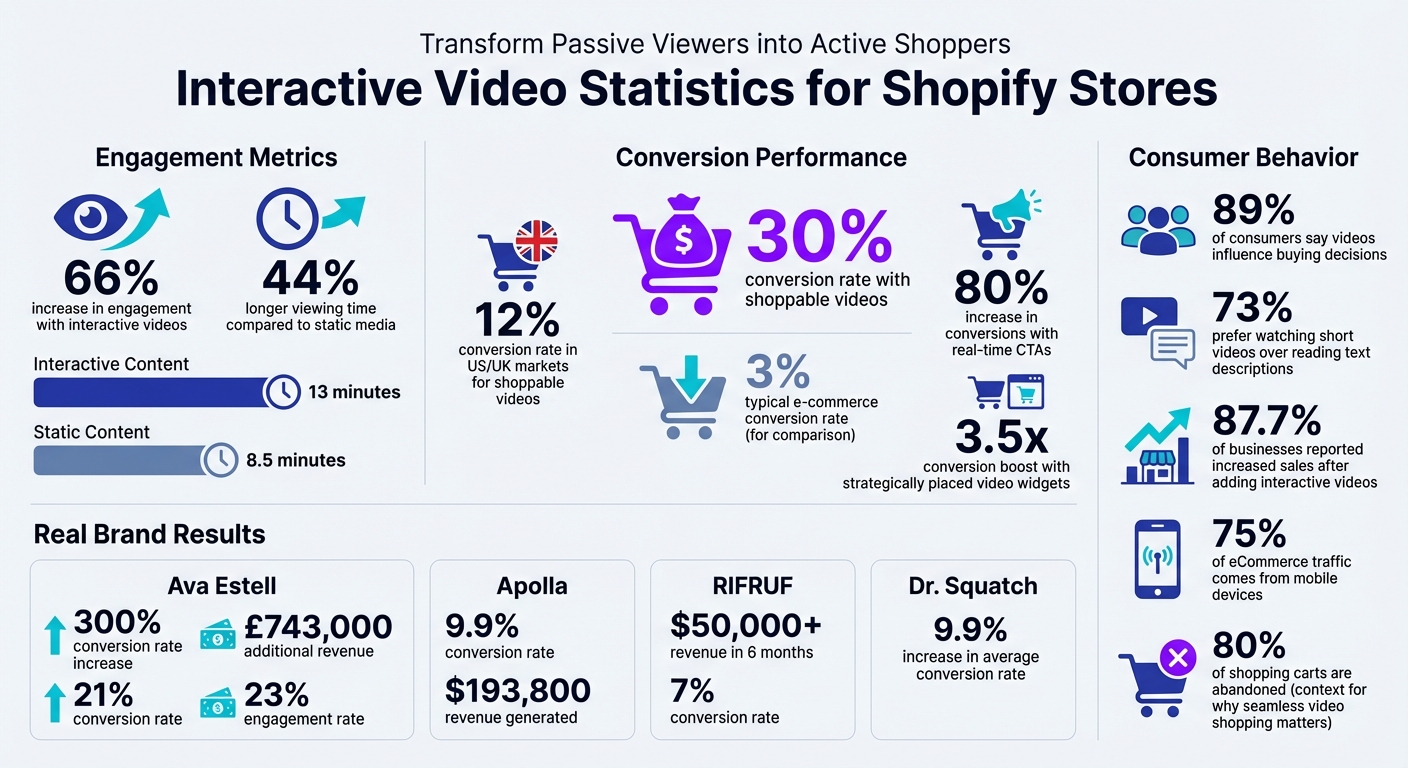
Interactive Video Impact on Shopify Store Performance: Key Statistics and Conversion Metrics
Common Engagement Problems in Shopify Stores

High Bounce Rates and Short Visit Times
Static product pages often fail to capture a shopper's attention, offering little to keep visitors engaged. This issue is worsened by slow page speeds. Many store owners make the mistake of uploading large video files directly to Shopify's servers instead of using platforms like YouTube or Vimeo. This not only slows down loading times but also leads to higher bounce rates. For mobile users - who now account for over 50% of online traffic - the frustration increases when videos don’t scale properly to fit smaller screens. The combination of slow load times and uninspiring visuals not only drives visitors away but also lowers the chances of converting them into customers.
Low Conversion Rates on Product Pages
Static product pages leave too many unanswered questions: How does the fabric move? Does the color match expectations? What does the product look like on a real person? These uncertainties often lead to hesitation, which hurts conversion rates. The solution? Interactive videos. In fact, 89% of consumers say a video convinced them to make a purchase.
"Interactive videos drive 66% more engagement and 44% longer viewing time than static media." - Shreelekha Singh, Content Writer, Videowise
Consider skincare brand Ava Estell, which adopted shoppable videos through the Videowise platform in 2024. The result? A 300% increase in conversion rates. Without interactive tools like these, many Shopify stores struggle to keep customers engaged and confident enough to complete their purchases.
Lack of Customer Interaction
Traditional media formats often create a one-sided experience, limiting how customers can explore products. This results in 52.6% less user interaction compared to websites with dynamic, interactive features. Meanwhile, 73% of consumers say they’d rather watch a short video to learn about a product than read a text description.
Brands that embrace this preference see real results. For example, organic soap company Dr. Squatch used user-generated content and shoppable videos on their Shopify store and TikTok in 2024. This approach led to a 9.9% increase in their average conversion rate. These examples underline the growing need for video shopping experiences that actively engage and involve customers in the buying process.
Create Interactive Shoppable Videos With Shopify + Mindstamp
How Interactive Videos Boost Engagement
Interactive videos transform passive viewers into active shoppers by allowing them to interact directly with products. For example, customers can click on items in a video to learn more or even add them to their cart instantly. This streamlined experience helps combat high bounce rates and encourages deeper engagement with products.
Shoppable videos are a game-changer, with conversion rates reaching nearly 30%, compared to the usual 3% average. They also hold viewers' attention longer - up to 44% more time than static media. This extended engagement builds trust and gives customers the confidence to make a purchase.
Shoppable Videos with Clickable Hotspots
Clickable hotspots in videos make it easy for shoppers to explore products. These hotspots can either stay fixed on the screen or move along with the product. When clicked, they reveal essential details like pricing, product descriptions, and an "Add to Cart" button - all without interrupting the video experience.
"Shoppable video technology lets ecommerce businesses turn video content into a vehicle for direct conversions." - Shopify Staff
For mobile users, who now make up the majority of online traffic, hotspots need to be large and easy to tap. Position them near key product features and use clear visual cues to guide users.
Beyond individual hotspots, you can enhance interaction by incorporating broader layouts like video carousels or galleries.
Video Carousels and Galleries
Video carousels and galleries allow you to showcase multiple interactive videos in a compact format, perfect for mobile users who are accustomed to swiping. This layout saves space while encouraging customers to explore a variety of content.
Carousels are especially effective for displaying curated video collections, such as product demos, customer reviews, styling tips, or how-to guides. On average, interactive content like this is watched for 13 minutes, compared to just 8.5 minutes for static content.
A great example comes from compression sock brand Apolla, which used video galleries to feature YouTube reviews after appearing on Shark Tank in April 2022. By embedding these videos as shoppable content, they achieved a 9.9% conversion rate and generated over $193,800 in revenue. Carousels also make it easy to run A/B tests to optimize user actions, such as increasing "add-to-cart" clicks.
User-Generated Content in Videos
User-generated videos bring an authentic, relatable touch to your marketing. Seeing real people using your products in everyday settings helps potential buyers trust your brand and imagine themselves as customers. In fact, 87.7% of businesses reported increased sales after incorporating interactive videos. Much of this success stems from repurposing social media content from platforms like TikTok, Instagram, and YouTube into shoppable on-site videos.
For instance, dog footwear brand RIFRUF used interactive videos to educate customers about the benefits of paw protection. By featuring real dog owners in natural settings, they addressed skepticism about their niche product. Within six months of launching these shoppable videos in 2021, the company generated over $50,000 in revenue with a 7% conversion rate.
"Interactive videos are the new marketing techniques that put users in control." - Liana Turbureanu, Videowise
Skincare brand Ava Estell also saw impressive results between 2020 and 2023. They used clickable hotspots in shoppable videos to showcase "before and after" transformations, generating £743,000 in additional revenue with a 21% conversion rate and 23% engagement rate. This approach eliminated the need for customers to search through product pages, making the shopping experience seamless.
For Shopify stores, tools like UWidget make it easy to embed video carousels, galleries, and playlists directly on product pages. This allows businesses to leverage existing YouTube content, such as reviews and demonstrations, while maintaining a smooth shopping experience.
Key Features of Interactive Video Tools for Shopify
When choosing interactive video tools for your Shopify store, it's essential to focus on features that simplify shopping and provide actionable insights. These tools take the interactive experience to the next level, helping you turn engagement into conversions.
Shoppable Hotspots and Product Tags
Shoppable hotspots make the buying process smoother and more intuitive. Imagine a customer watching your video, clicking on a product they like, and adding it straight to their cart - all without leaving the video. This approach captures their attention at the perfect moment. Considering that nearly 80% of online shopping carts are abandoned, often due to complicated checkout processes, this feature is a game-changer.
"The fewer steps a customer has to take to complete a purchase, the more likely they are to follow through." - Sam Horton, Sr. Director, Strategic Ecosystem/Alliance Partnerships, Firework
Look for tools that integrate seamlessly with your Shopify catalog. This ensures automatic updates for pricing and stock availability, reducing the frustration of customers encountering out-of-stock items. In markets like the US and UK, shoppable videos are achieving conversion rates of around 12%, far exceeding traditional e-commerce benchmarks.
Analytics and Performance Tracking
Analytics are the backbone of any successful interactive video strategy. The right tools will track key metrics like direct sales, conversion rates, watch time, and hotspot click-throughs. This data can help you determine whether user-generated content or studio-produced videos resonate more with your audience. It also highlights which product pages benefit most from video placement.
Advanced analytics tools can even identify your top-performing videos and highest-converting pages. Armed with this information, you can strategically position your best content to maximize its impact.
Fast Loading and Easy Integration
Nobody likes waiting for a video to load - especially not your customers. Slow-loading videos can hurt conversions before they even begin. That’s why it’s critical to use tools that support independent video loading. This ensures the video player loads separately, keeping your page speed intact and protecting your SEO rankings. It’s a win-win: better Core Web Vitals and a rich, interactive experience.
For example, tools like UWidget allow you to embed YouTube galleries, carousels, and playlists directly onto your product pages - no coding required. The quicker you can get your interactive videos up and running, the sooner you can start seeing results. Some platforms even enhance shoppable videos with star ratings, instantly building trust with your audience.
sbb-itb-d9e5b3a
Using UWidget for Interactive Video Experiences
Interactive video tools have become a game-changer for Shopify stores looking to enhance customer engagement, and UWidget makes integrating these videos seamless. UWidget allows you to embed YouTube videos directly into your Shopify store, turning casual viewers into active shoppers. By tagging products within videos, customers can watch and shop on the same page - eliminating unnecessary steps that often disrupt the buying journey.
UWidget Features for Shopify Stores
UWidget offers a variety of display options to fit your store’s needs, including video galleries, carousel sliders, grids, sticky video players, and video banner backgrounds. The sticky video feature ensures your content stays visible even as users scroll, keeping them engaged. Plus, you can add YouTube subscribe buttons to your widgets, encouraging visitors to follow your channel.
One of UWidget’s standout features is its thumbnail-first approach paired with lazy loading. Videos only load when they’re about to be viewed, helping maintain your site’s speed and performance. With these tools at your disposal, integrating UWidget into your store is straightforward and efficient.
How to Install UWidget on Your Shopify Store
Getting started with UWidget is easy. Search for "UWidget: Youtube Widgets" in the Shopify App Store, click "Add app", and enter your store URL to confirm installation. Once it’s set up, simply paste a YouTube video or playlist URL into the app, customize the widget settings to match your store’s branding, and publish it to your storefront.
UWidget offers a 7-day free trial for all plans, with pricing options starting at $5.99/month for the Starter plan (1 widget, 25 videos), $13.99/month for the Pro plan (3 widgets, 50 videos), and $19.99/month for the Premium plan (unlimited widgets and videos). This quick setup can help you create a more engaging shopping experience in no time.
Using Interactive Videos to Increase Conversions
Once UWidget is installed and customized, you can use interactive videos to drive sales. Add video banners to your homepage or demo videos on product pages to strengthen your brand and encourage purchases. Embedding videos with real-time calls-to-action can increase conversion rates by up to 80%, while strategically placed video widgets have been shown to boost conversions by as much as 3.5x.
Since 75% of eCommerce traffic comes from mobile devices, make sure your videos are responsive and touch-friendly to cater to mobile shoppers. By strategically placing interactive videos throughout your site, you can create a shopping experience that’s not only engaging but also highly effective at converting visitors into customers.
Measuring and Improving Interactive Video Performance
Once your interactive video is live, it’s time to track its performance. Start with key metrics like view count, which shows how many people have seen your video, and play rate, which measures how enticing your thumbnail and title are to viewers. Another critical metric is average view duration, which reveals whether your content is holding attention or falling flat.
For conversion tracking, focus on click-through rate (CTR) for interactive hotspots and product tags. Also, monitor the conversion rate, which tells you how many viewers make a purchase after watching. If you’re using Shopify, distinguish between direct sales (purchases made directly through the video player) and influenced sales (when someone watches at least 5 seconds of a video and completes a purchase later in the same session).
Important Metrics to Track
Your metrics should tie directly to revenue. For example, revenue per click (RPC) shows the value of each interaction, while view-through rate (VTR) tracks the percentage of viewers who watch at least 75% of your video. Another useful metric is session time added, which measures how much extra time shoppers spend on your store due to video engagement. Dive into audience retention graphs to see where viewers drop off - if there’s a sharp decline around the 30-second mark, that section may need reworking.
| Metric Category | Key KPI | What It Tells You |
|---|---|---|
| Visibility | Play Rate | Ratio of plays to video loads |
| Engagement | View-Through Rate (VTR) | Percentage watching 75% or more of the video |
| Action | Click-Through Rate (CTR) | Percentage clicking product tags or CTAs |
| Success | Conversion Rate | Percentage completing a purchase after watching |
Use these metrics to guide improvements. Systematic testing can help you refine your video’s placement and performance.
A/B Testing Video Placement
Experimenting with where your video appears on your site can reveal which placement drives the best results. For example, test the same video on your homepage, product pages, and blog posts to see which location generates the most clicks and sales. When testing, isolate one variable at a time. For instance, compare the performance of a call-to-action (CTA) in the bottom-right corner versus the center. One beauty brand discovered that bottom-right CTAs outperformed center placements by 15% in CTR.
Timing also plays a crucial role. Place product tags within the first 15 seconds of the video, when viewer attention is at its peak. If your video gets lots of views but few clicks, consider moving the CTA earlier or making it more prominent. Keep product demos short - under 60 seconds - to maintain interest and avoid viewer drop-offs.
Once you’ve identified the best placements, implement those changes to optimize performance.
Making Data-Driven Improvements
Every tweak you make should aim to boost engagement and conversions. For instance, if your video has high views but a low CTR, it’s likely time to adjust your CTA placement. On the other hand, a high CTR but low conversion rate might indicate a mismatch between your video content and the product landing page. Similarly, a low view-through rate could mean your video is too long or lacks a compelling hook at the start.
To keep viewers engaged, include visual or audio pattern interrupts every 30–60 seconds. Regularly check your retention graphs and trim sections where viewers consistently drop off. Update your video content periodically - monthly or quarterly - to align with seasonal trends and keep it fresh. Since mobile traffic is a major driver on Shopify, analyze video performance separately for mobile and desktop to ensure it looks and functions great across all devices.
Conclusion
Interactive videos are becoming a game-changer for Shopify store owners looking to stand out. Why? They deliver 66% more engagement and extend viewing time by 44% compared to static media. Even better, shoppable formats boast conversion rates nearing 30% - a staggering leap from the 3% industry average.
The secret lies in turning passive viewers into active participants. Features like clickable hotspots, product tags, and branching narratives create tailored shopping experiences that lead customers straight to checkout. For instance, Ava Estell saw impressive results: £743,000 in additional revenue and a 21% conversion rate by using shoppable product videos on their Shopify store.
To tap into this potential, choose tools that make implementation seamless. Platforms like UWidget let you embed interactive YouTube videos with features like galleries, carousels, and sticky videos - all designed to boost engagement. Highlight your best-selling products, include clear "Add to Cart" buttons, and ensure mobile compatibility since most traffic comes from mobile users.
Don’t forget to measure your success. Keep an eye on metrics like play rate, click-through rate, conversion rate, and revenue per click. Experiment with A/B testing to find the best video placements, whether on product pages, your homepage, or blog posts. With 89% of consumers reporting that video has influenced their purchase decisions, even small tweaks can lead to big results.
FAQs
How can interactive videos help boost sales on Shopify stores?
Interactive videos can play a big role in increasing sales for Shopify stores by offering a more engaging and immersive shopping experience. With features like clickable hotspots, personalized content, and branching options, customers can explore products directly within the video itself. This not only keeps viewers interested for longer but also strengthens their connection with your brand, making them more likely to buy.
By turning a passive viewing experience into an interactive one, these videos create a dynamic and tailored journey for shoppers. This approach helps turn casual viewers into paying customers, boosting conversion rates and driving revenue growth.
What features should you look for in interactive video tools for your Shopify store?
When selecting interactive video tools for your Shopify store, prioritize features that boost customer interaction and simplify the shopping process. Tools that enable clickable hotspots, quizzes, or story branching can make your videos more engaging and keep viewers interested. Integration with shoppable video elements - like clickable product links - is essential for turning viewers into customers.
It’s also important to choose tools that support mobile optimization and video formats like vertical (9:16) to match current viewing trends. Features such as analytics to track video performance and options to tailor content based on viewer behavior can enhance the shopping experience and help drive more conversions.
How can I track the impact of interactive videos on my Shopify store?
To understand how interactive videos affect your Shopify store, keep an eye on important metrics like video-driven sales, customer engagement rates, and conversion rates. Additionally, look at how these videos impact session duration and your store's overall performance.
Leverage analytics tools to dig deeper. Track how many viewers engage with your videos, complete purchases, or spend extra time browsing your store. By consistently reviewing these numbers, you'll uncover what resonates with your audience and can fine-tune your approach for improved outcomes.