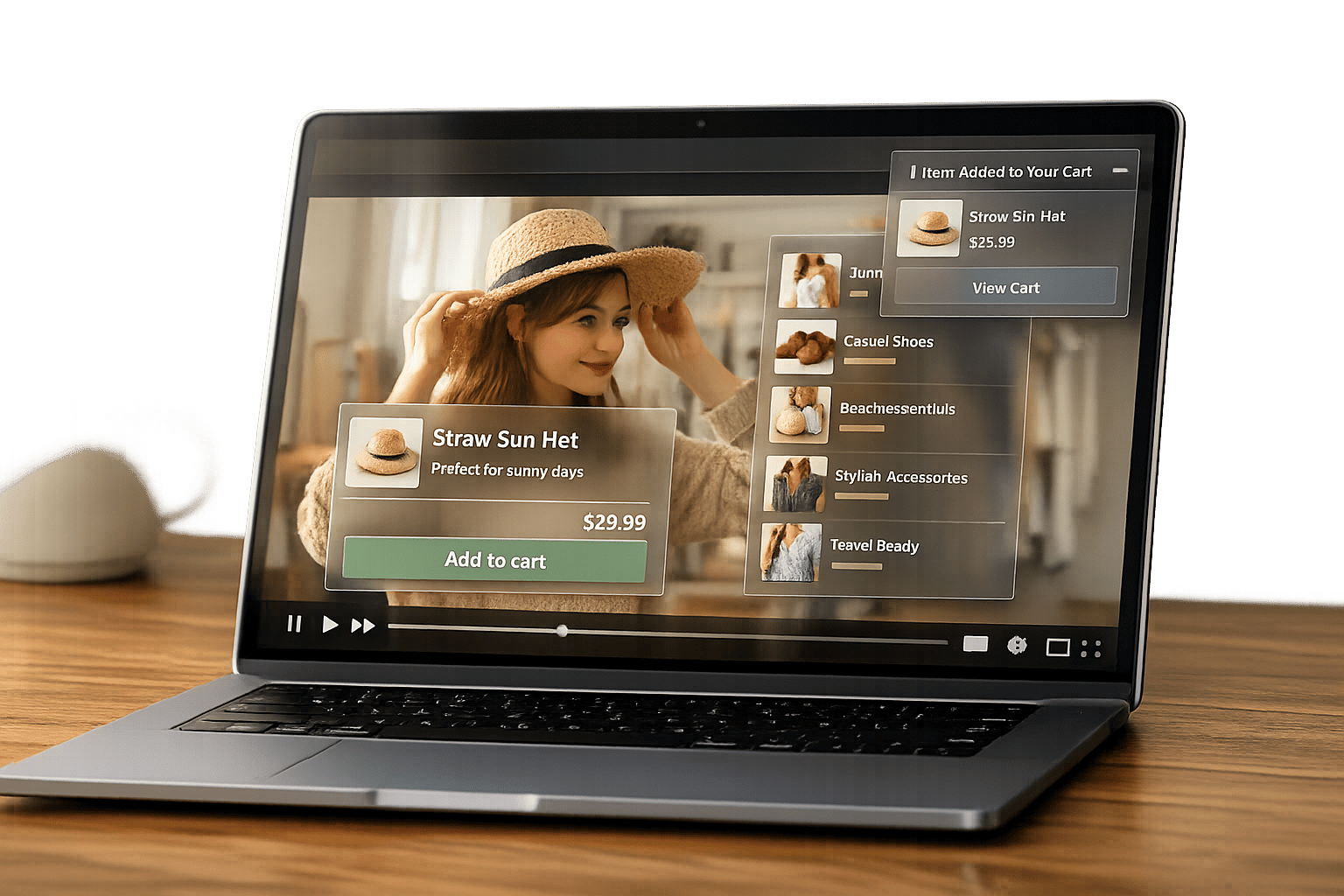
Shoppable videos are transforming online shopping by letting viewers purchase products directly from videos. Placing these videos in the right spots can boost engagement and sales. Here's what you need to know:
- Product Pages: Place videos above the fold, in image carousels, or between descriptions and reviews to grab attention immediately.
- Homepage: Use the header or banner area to showcase key products or stories.
- Collection Pages: Add videos at the top of product grids to highlight new arrivals or best-sellers.
- Tag Placement: Use heatmaps to find where viewers focus and limit tags to avoid clutter.
- Testing: Use A/B testing to optimize placement and track metrics like conversion rates and click-throughs.
The key is to position videos where shoppers naturally look and ensure they’re mobile-friendly, quick-loading, and engaging.
Shoppable Video Placement Statistics and Best Practices
Product Page Video Placement
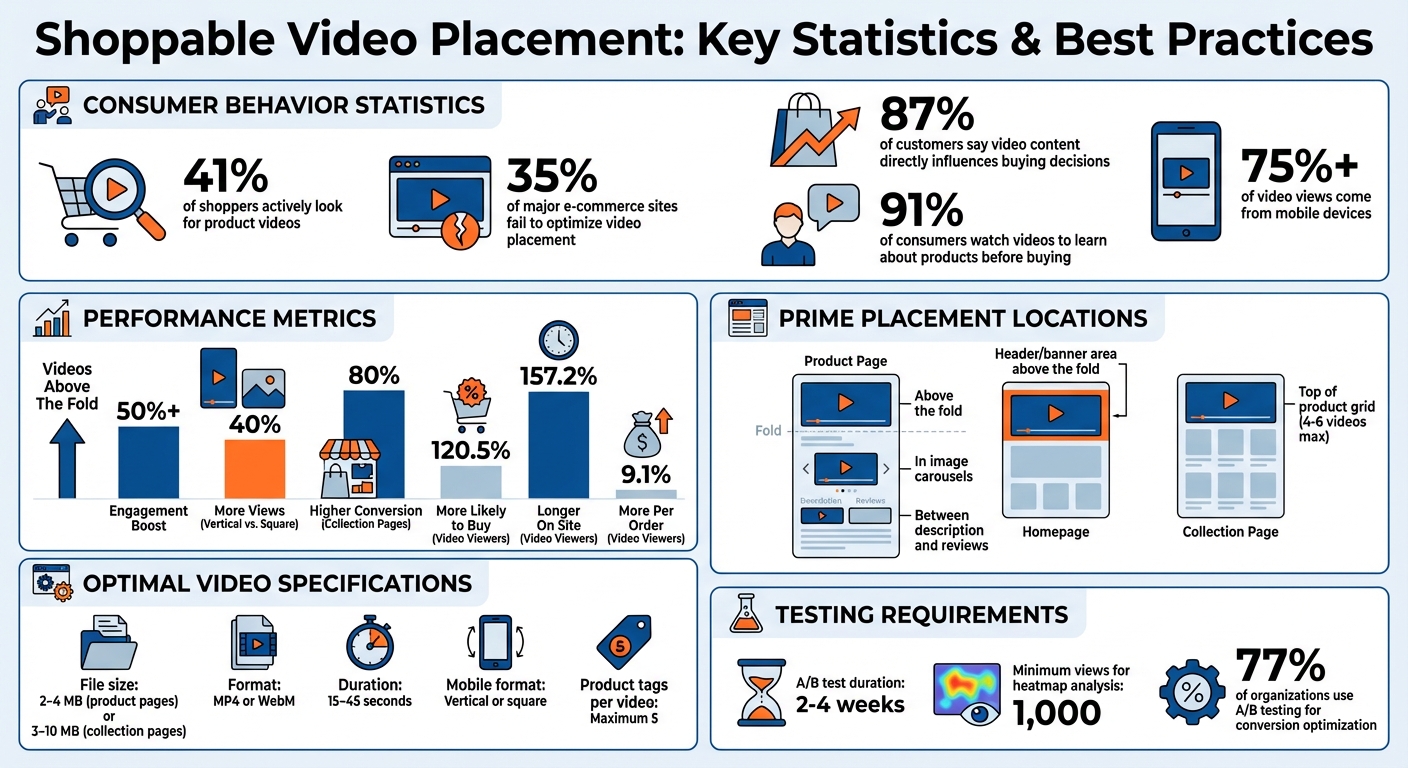
Product pages play a crucial role in influencing buying decisions. In fact, research reveals that 41% of shoppers actively look for product videos during their journey. Despite this, 35% of major e-commerce sites fail to optimize video placement, often making these videos difficult to find. The fix? Place shoppable videos exactly where customers expect them - right in their line of sight when they land on the page.
Place Videos Above the Fold
Positioning videos above the fold - directly under the product title or price - grabs attention immediately. This strategic placement ensures videos become part of the shopper’s first impression.
"So there it is. Excessive scrolling. That's not what I would have expected at all… I would think the video would be right in the overview." - Baymard Institute Test User
Don’t make customers hunt for videos. Keep them front and center to encourage engagement. Another effective tactic? Incorporate videos into image carousels for even better visibility.
Add Videos to Product Image Carousels
Instead of tucking videos away in separate tabs, embed them directly into the product image gallery. Videos hidden in tabs are less likely to be discovered. By integrating them into the top carousel alongside product photos, you make them impossible to miss.
Make sure video thumbnails stand out by adding a clear "play" icon. To ensure fast loading, compress videos to sizes between 2–4 MB in MP4 or WebM formats. For mobile shoppers - who now account for over 75% of video views - opt for vertical or square video formats so they display properly on smaller screens.
Position Videos Between Description and Reviews
Placing videos between the product description and customer reviews creates a natural bridge between product details and user validation. This spot is ideal for addressing practical questions like size, texture, or real-world functionality - right when shoppers are looking for reassurance.
The results speak for themselves:
"When someone watches our video reviews they're 120.5% more likely to buy, spend 157.2% longer on the site and spend 9.1% more per order." - Winterson
Stick to authentic content for these videos. Real customer demonstrations or "how-to" clips often resonate more than overly polished, studio-produced footage. Keep videos short - 15 to 45 seconds is the sweet spot for maintaining viewer attention.
sbb-itb-d9e5b3a
Homepage and Collection Page Video Placement
Your homepage and collection pages are prime spots for shoppable videos. These high-traffic areas shape the first impression of your store and guide shoppers toward products. Videos placed above the fold can boost user engagement by over 50%, making thoughtful placement essential for driving conversions. Here's how to position videos effectively on both the homepage and collection pages for maximum impact.
Feature Videos Above the Fold on the Homepage
The header or banner area on your homepage is ideal for shoppable videos. This is where visitors' attention is naturally drawn, making it the perfect place to showcase brand stories or product highlights that build trust. This setup not only grabs attention but also nudges viewers to interact with your products.
With most people browsing on their phones, optimizing videos for mobile is non-negotiable. Vertical formats work best, as they use screen space efficiently and attract 40% more views compared to square or landscape videos. Keep videos short and engaging to hold viewers' attention.
Authenticity matters here. Videos created by customers often outperform slick, studio-produced ones because they feel more like genuine recommendations than sales pitches. Using "Stories"-style widgets - similar to those on social media - can also create a sense of familiarity and encourage interaction. Don’t forget to include a clear call-to-action like "Shop the Look" or "Learn More" to turn interest into action.
"Video is a great way to spark discovery and engagement on your site - but it's also pretty passive. That is, unless you're incorporating shoppable video." - ReelTok Team
Place Videos at the Top of Collection Pages
On collection pages, position shoppable videos at the very top of the product grid. This is an excellent way to highlight new arrivals, best-sellers, or curated product sets, while also showing how items can be used in everyday life. For example, a fashion collection could feature styling tips, while skincare or electronics collections might include practical demonstrations.
Consider using TikTok-style vertical video carousels to showcase multiple products quickly. Tag products within the first few seconds to capture viewers' interest right away. To maintain fast page loading speeds and avoid overwhelming shoppers, limit the number of videos to 4–6 per collection page. Stick to file sizes between 3–10 MB, using MP4 or WebM formats for compatibility.
E-commerce stores that incorporate videos on collection pages report up to an 80% higher conversion rate compared to those relying solely on static images. Why? Videos let shoppers see products in action and make a purchase directly from the video player. By placing videos strategically, you create a smoother, more engaging shopping experience.
Product Tag Placement Within Videos
Strategic tag placement can significantly enhance the effectiveness of shoppable videos. By positioning clickable tags where viewers are most engaged, you can seamlessly guide them from watching to shopping without interrupting their experience.
Use Heatmaps for Tag Placement
Heatmaps are an invaluable tool for identifying where viewers focus their attention during a video. These visual tools use color coding to highlight high-engagement "hot spots" where tags are most likely to grab attention [24, 26]. For a more budget-friendly option, mouse-tracking heatmaps can be used instead of costly eye-tracking studies. Research indicates a strong link between where viewers move their cursors and where their attention is focused [25, 26].
Pay close attention to "dead click" heatmaps, which pinpoint areas where viewers attempt to click on untagged products. These missed clicks can reveal untapped opportunities to boost conversions [24, 26]. Before making adjustments to tag placement, aim for at least 1,000 views to gather sufficient data. Additionally, separate your analysis for mobile and desktop viewers, as tap behavior on mobile devices differs significantly from cursor activity on desktops [25, 27].
"Research shows that people place their mouse where they hold their attention." - Mouseflow
For the best results, focus on using fewer, well-placed tags to maintain clarity.
Limit the Number of Tags Per Video
When it comes to product tags, simplicity is key. Platforms like Instagram Shopping limit shoppable videos to five product tags [1, 2, 5, 28]. Overloading a video with tags can confuse viewers and dilute their focus. Instead, introduce products one at a time as they appear or are mentioned in the video.
Keep tag descriptions short and easy to understand, ensuring viewers can quickly identify the featured items. For mobile users - who make up the bulk of online shoppers - ensure tags are large enough for easy tapping and spaced to avoid accidental clicks. To signal interactivity early on, tag the first product near the beginning of the video, then add additional tags only as products are shown or discussed.
Testing and Improving Video Placement
Shoppable video placement isn’t a one-and-done deal - it requires constant tweaking and testing. The most successful Shopify stores rely on real performance data to fine-tune their video strategies. In fact, in 2023, 77% of organizations used A/B testing to boost website conversion rates. Video placement should follow suit.
A/B Test Different Video Placements
Experimenting with video placement is key to figuring out what drives sales. Focus on isolating one variable at a time. For example, test moving a video from a product carousel to a sticky embed. This way, you can clearly link any performance changes to that specific adjustment.
Target high-traffic areas like best-sellers or homepage hero sections for the most actionable insights. Run each test for 2–4 weeks to account for traffic variations, and segment the results by device type and visitor demographics.
Track essential metrics such as conversion rate changes, click-through rates on product tags, add-to-cart rates, and revenue tied to video interactions. For instance, in 2022, Headphonezone.in saw impressive results - $570,000 in revenue from video shoppers with an average conversion rate of 20.2% - by leveraging automated shoppable video features.
"Testing once improves a campaign, but testing everywhere, like sites, email, and SMS, creates momentum. That's how leading brands stay ahead and build trust in a highly competitive market." – Evaldas Mockus, VP of Marketing, Omnisend
These tests lay the groundwork for further optimization using adaptable tools.
Use Apps for Flexible Video Placement
Apps like UWidget make video placement testing easier with customizable widgets, including sliders, sticky sections, and carousels that work seamlessly across devices.
When selecting a video placement tool, look for one with a robust analytics dashboard. Track engagement metrics such as play rate, average watch time, and completion rate alongside conversion metrics like direct and influenced revenue. Direct revenue comes from purchases made immediately after interacting with a video, while influenced revenue captures sales made after viewers spend at least five seconds watching.
Don’t overlook technical performance. For example, one store managed to cut Total Blocking Time from 3.8 seconds to just 552 milliseconds and reduced page weight by over 2MB by optimizing mobile video display. With 91% of consumers watching videos to learn about products before buying, fast-loading pages are a must to keep shoppers engaged.
Conclusion
Timing is everything when it comes to shoppable videos. Placing these videos strategically - above the fold, in image carousels, or near add-to-cart buttons - ensures they appear right when buyers are looking for that extra push to make a decision. And it works: 87% of customers say video content directly influences their buying choices.
Leading retailers treat shoppable videos as more than just a fancy add-on; they see them as a core revenue driver. They focus on mobile-friendly video marketing strategies, authentic videos that run 15–45 seconds and measure what truly matters - metrics like conversion rate lift, click-through rates on product tags, and revenue influenced by these videos. This approach lays the groundwork for the technical elements that ultimately drive conversions.
The philosophy is simple yet powerful:
"Shoppable video is a revenue system, not a feature." - The Moast Team
And don’t overlook the technical side. Speed and optimization are non-negotiable - well-performing videos keep customers engaged and prevent missed sales opportunities.
FAQs
What are the best practices for placing shoppable videos on mobile-friendly Shopify stores?
To make shoppable videos work well for mobile users, focus on creating short, vertical videos that grab attention and are easy to interact with. Place these videos in prominent spots, like just below the homepage fold or directly on product pages, so they’re immediately visible without requiring users to scroll.
Use a responsive tool like UWidget from Fractal Apps to embed the videos. This ensures they automatically adjust to fit any screen size. Add clear, easy-to-tap product tags or "Buy Now" buttons within the first 5–15 seconds to encourage quick interactions. Prioritizing a mobile-first design will make it easier for users to engage and boost your chances of driving conversions.
What are the best practices for adding product tags to shoppable videos?
When adding product tags to shoppable videos, prioritize clarity and relevance to make the viewer's experience smooth and engaging. Place tags thoughtfully - ensure they don’t block important parts of the video but remain easy to spot. Use short, descriptive labels that clearly identify the product or its purpose.
It's also important to test tag placement and functionality on various devices. This ensures the experience works well whether someone is watching on a phone, tablet, or computer. Well-tagged videos can direct viewers straight to product pages, simplifying the shopping process and increasing your store's engagement.
How can A/B testing help optimize the performance of shoppable videos?
A/B testing is a powerful way to compare different versions of your shoppable videos to see which one drives better engagement and conversions. By experimenting with elements like where the video is placed, the design of call-to-action buttons, or the way products are highlighted, you can figure out what truly connects with your audience.
This method relies on real data, helping you make smarter decisions to improve the shopping experience and boost sales. Plus, keeping up with regular testing ensures your videos stay effective and in tune with what your customers want.