If you're running a Shopify store, YouTube playlists can help drive sales by guiding potential customers through their buying journey. Why? 84% of consumers say watching a video convinced them to purchase, and playlists boost visibility through YouTube’s recommendations. By organizing videos into playlists that align with customer stages - like tutorials for awareness or testimonials for decision-making - you can increase engagement and conversions.
Here’s how to make your playlists work for your store:
- Pick videos that matter: Tutorials, product demos, testimonials, and behind-the-scenes clips.
- Organize playlists smartly: Match videos to customer stages (e.g., "How-to" for consideration).
- Use metadata effectively: Add keyword-rich titles, descriptions, and tags for better SEO.
- Design clickable thumbnails: Use bold text, faces, and colors to grab attention.
- Embed playlists on Shopify: Use tools like UWidget to showcase videos on product or landing pages.
Measure success by tracking YouTube watch time, click-through rates, and Shopify referral traffic. Update playlists regularly by adding new videos and removing underperformers. When done right, YouTube playlists can become a powerful sales tool for your Shopify store.
How to Use Playlists to Grow Your YouTube Channel (STEP-BY-STEP GUIDE)
Creating YouTube Playlists That Work
YouTube Video Types by Customer Journey Stage for Shopify Stores
Selecting the Right Videos
When building YouTube playlists, focus on videos that address your audience's needs - think tutorials, product demos, customer testimonials, and behind-the-scenes clips. These types of videos resonate deeply because 91% of consumers want to see more genuine brand content.
Consistency matters. Every video should reflect your brand’s identity. Use the same fonts, colors, graphics, and on-camera personalities to make your content instantly recognizable. Authenticity also plays a huge role in influencing buying decisions, with 85% of viewers saying good content creates an emotional bond. Videos featuring real people, like vlogs from founders or customer reviews, foster trust in ways that polished product shots simply can’t.
As YouTuber Amanda Rach Lee wisely points out:
"Done is better than perfect because nothing's ever going to be perfect, and if you keep telling yourself and waiting for something to be completely perfectly packaged, then you'll just hold yourself back and you'll never do it."
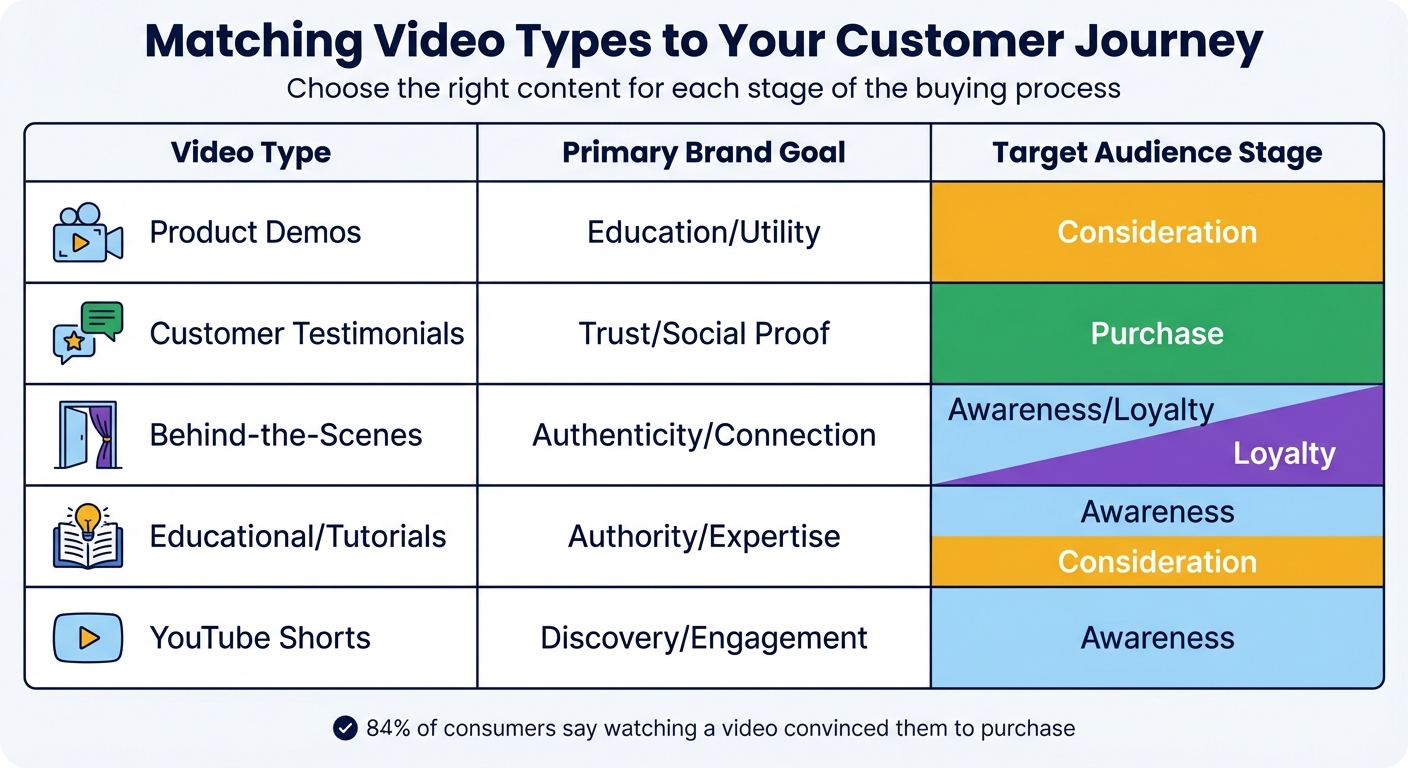
Here’s a quick guide to match video types with brand goals and audience stages:
| Video Type | Primary Brand Goal | Target Audience Stage |
|---|---|---|
| Product Demos | Education/Utility | Consideration |
| Customer Testimonials | Trust/Social Proof | Purchase |
| Behind-the-Scenes | Authenticity/Connection | Awareness/Loyalty |
| Educational/Tutorials | Authority/Expertise | Awareness/Consideration |
| YouTube Shorts | Discovery/Engagement | Awareness |
Once you’ve chosen the right videos, organize your playlists to align with your customers’ buying journey.
Organizing Playlists by Customer Journey Stages
Think of playlists as a roadmap, guiding viewers through their journey with your brand.
For the awareness stage, create a playlist like "Introduction" or "New Visitor" with your most universally appealing videos. For instance, Mr. Kate, a popular DIY creator, uses a "Room Makeovers" playlist to group project videos, encouraging viewers to binge-watch using YouTube's auto-play feature.
In the consideration stage, group educational content and how-to videos. Amanda Rach Lee, for example, organizes her playlists into interest-specific categories like "bullet journaling", "drawing", and "interior decorating", making it easy for viewers to find content that matches their needs.
The decision stage is where social proof shines. Fresh Beauty, in 2024, curated customer video testimonials into a dedicated playlist featured on their YouTube homepage, helping viewers trust their brand at the critical moment of decision-making.
Finally, for retention and loyalty, behind-the-scenes vlogs and founder stories work wonders to keep your existing audience connected with the personal side of your brand.
Keep your playlists short - between 3 to 10 videos - to hold your audience's attention without overwhelming them. Place your best-performing videos, or "subscriber magnets", at the start of each playlist to hook viewers right away. For example, Colorado State University revamped their playlists to highlight themes like student experiences and campus tours, giving prospective students an easy entry point.
Optimizing Video Metadata
Writing Keyword-Rich Titles and Descriptions
To improve YouTube indexing, start your video title with the primary keyword and keep it under 60 characters. For example, if you're running a Shopify store that sells home décor, a title like "Shopify Product Tutorial: Installing Floating Shelves" will perform better than something vague like "How We Install Shelves (Tutorial)."
In your video description, place the primary keyword within the first 25 words and include direct links to your Shopify product pages near the top. Aim for descriptions that are at least 250 words long, naturally incorporating your target keyword two to three times. Use clear calls to action and include links to relevant Shopify collections. For instance: "Shop this collection: [yourstore.com/kitchen-essentials]."
Here’s a quick guide to metadata best practices:
| Metadata Element | Best Practice |
|---|---|
| Video Title | Start with the primary keyword; clearly state the value (<60 characters) |
| Description | Include the keyword in the first 25 words; add product links (>250 words) |
| Video File Name | Rename to include the target keyword using underscores or dashes |
| Tags | Use 6–12 specific keywords, including variations and common misspellings |
| Hashtags | Add 2–3 niche-relevant hashtags |
Also, mention your target keywords during the video itself. YouTube’s automated transcription will pick them up, further boosting your SEO.
Pair these optimized titles and descriptions with well-chosen tags and hashtags for even better results.
Adding Tags and SEO Metadata
Tags play a crucial role in clarifying your video's content for YouTube. Use 6–12 specific tags that include keyword variations and even common misspellings. Combine broad terms like "Shopify store" with more specific phrases such as "Shopify kitchen product demo" to strike the right balance. Avoid overly generic tags, as they can dilute your video's focus.
Hashtags are another useful tool. Add 2–3 relevant hashtags to your description. If your Shopify store targets a specific region, include location tags in your metadata to attract local search traffic. Finally, categorize your video accurately - options like "How-to & Style" or "Education" can help YouTube group your content with similar videos.
Improving Visual Consistency
Creating Custom Thumbnails
Thumbnails are the gateway to your content - they're what potential viewers see first, and they play a major role in whether someone clicks or scrolls away. As Rebecca Vilsan puts it:
Your thumbnail gets the click, not your video content.
For best results, design thumbnails at 1280×720 (16:9) with a file size under 2MB. Use the "one-second rule" - your thumbnail should immediately communicate value at a glance. Keep the text short and impactful, ideally 3–5 words, with bold, easy-to-read fonts in high-contrast colors. A great example of this is Ruggable, which in September 2024 revamped their tutorial playlists by using clean, minimalist backgrounds paired with professional text overlays that highlighted product features.
Whenever possible, include faces with clear expressions - this simple addition can boost click-through rates by as much as 25%. Pastry chef Claire Saffitz leveraged this in 2024 by using crisp, high-resolution images of herself with expressive emotions to engage her audience. To further reinforce branding, place your logo in a consistent spot, such as the top-left or bottom-right corner, ensuring it doesn’t take attention away from the main content. Use complementary colors like blue and orange or red and white to make your thumbnails pop in crowded feeds. And don’t forget: always preview your thumbnails on a mobile device, as over 60% of YouTube views come from smartphones.
Stick to one clear, focused message in your thumbnails to avoid visual clutter. Once you’ve nailed your design, maintain that style across your channel to strengthen your brand identity.
Keeping a Consistent Visual Style
Your channel’s visual style should reflect your Shopify store’s branding. This means aligning colors, fonts, and graphics to create a cohesive look that’s instantly recognizable. Ensure your profile picture (98×98), banner (2048×1152), and watermark (150×150) all match your Shopify branding.
Thumbnail templates can be a game-changer for keeping your designs consistent and speeding up the creation process. For playlists, consider series-specific templates that balance your core branding with unique visual cues for each series. This approach not only strengthens your overall channel identity but also makes it easy for viewers to navigate your content. Ryan Trahan’s channel is a prime example: in his video "I Tried Every Seat on the Most Expensive Airline", he used a simple side-by-side comparison thumbnail featuring "Economy" versus "First Class." The design was clean, with minimal text and clear visual elements like a paper cup versus a gold neck pillow. This straightforward and consistent style has helped him grow to over 21.5 million subscribers.
Whether your aesthetic is minimalist, vibrant, or professional, keep your designs clean and aligned with your Shopify store’s vibe. A consistent visual style not only looks polished but also builds trust and keeps viewers coming back for more.
sbb-itb-d9e5b3a
Embedding Playlists on Shopify with UWidget
Setting Up UWidget
If you want to embed YouTube playlists on your Shopify store without touching a single line of code, UWidget: YouTube Widgets from Fractal Apps makes it incredibly straightforward with its paste-and-publish approach.
Start by visiting the Shopify App Store and searching for "UWidget: YouTube Widgets." Click "Add app" and enter your store URL to begin the installation process. Once the app is installed, open UWidget from your Shopify dashboard. From there, paste the full URL of your YouTube playlist into the provided field (make sure it’s a playlist link, not an individual video). This ensures the entire collection is loaded.
Next, choose how you want the playlist to appear on your site. Options include:
- Customizable gallery: Great for tutorial pages or showcasing a full collection of videos.
- Carousel slider: Ideal for saving vertical space on product pages.
- Sticky video: Keeps the video visible as customers scroll, perfect for grabbing attention.
- Video banner background: Adds a bold, eye-catching element to your homepage.
The app works seamlessly with both standard YouTube videos and YouTube Shorts, so you can mix and match content formats. Customize the widget’s colors, spacing, and layout to align with your store’s branding. Once everything looks good, save and publish your changes.
With a 5/5 rating on the Shopify App Store, UWidget is loved for its effortless setup and ability to display unlimited videos, helping merchants build trust and encourage purchases. Once your widget is live, you can shift your focus to strategically placing playlists for maximum impact.
Placing Embedded Playlists for Maximum Engagement
After setting up UWidget, the real magic happens when you strategically embed your playlists to drive customer interaction and boost conversions. The right placement can make all the difference in how shoppers engage with your content.
Product pages are a top choice for embedding playlists. Use shoppable videos to connect products directly with tutorials or demos. This approach works wonders - 89% of consumers say watching a video has convinced them to buy a product or service.
For landing pages, place playlists above the fold to grab attention immediately. Sticky videos work particularly well here, keeping important content like product demos or time-sensitive offers visible as visitors scroll. On blog posts, galleries or carousels can act as supporting visuals, keeping readers engaged longer - which is great for SEO.
Carousel sliders are especially useful on product pages, where they allow you to showcase multiple demos without taking up too much space. Meanwhile, full galleries are perfect for pages dedicated to testimonials or "Shop the Look" collections, where customers can explore several videos at their own pace.
One of UWidget’s best features is its automatic syncing with your YouTube playlist. Whenever you add a new video to your playlist, it updates on your Shopify store automatically - no manual work required. This keeps your content fresh and relevant without extra effort on your part.
Measuring Performance and Adjusting Your Strategy
Tracking Engagement Metrics
Once your playlists are live on your Shopify store, it’s time to dive into the data. YouTube Studio becomes your go-to tool for tracking performance, offering insights like "views from playlist", "playlist watch time", and "playlist average duration". These metrics shed light on how viewers are interacting with your playlists and where adjustments might be needed.
But here’s the kicker: watch time trumps view counts. YouTube’s algorithm prioritizes total minutes watched over sheer view numbers. For example, a playlist with 1,000 views but low watch times signals weaker engagement compared to one with fewer views but higher retention. The audience retention graph is particularly helpful - it shows exactly where viewers drop off. If you notice a consistent dip, it might be time to tighten up your product demo or craft a stronger hook for your tutorial. To keep viewers engaged and drive action, consider inserting YouTube cards with Shopify links right before those drop-off points.
Pay attention to "Impressions CTR" (click-through rate for your thumbnails) and "Card CTR" (click-through rate for interactive video links). If these numbers are low, it could mean your visual branding needs a refresh or your calls-to-action aren’t hitting the mark. Additionally, the traffic sources report reveals how viewers are finding your playlists - whether through YouTube search, suggested videos, or external embeds on your store. This data is invaluable for fine-tuning your SEO efforts and ensuring your embedded widgets are pulling their weight.
These engagement metrics are just the beginning. They lay the groundwork for connecting YouTube activity to Shopify’s business outcomes.
Monitoring Shopify Referral Traffic
Once you understand how viewers engage with your content on YouTube, it’s time to assess the impact on your Shopify store. YouTube metrics alone only tell part of the story. To see the bigger picture, use Shopify Analytics and Google Analytics 4 (GA4) to track how embedded playlists drive traffic, leads, and sales.
Start by segmenting your traffic sources in Shopify’s dashboard. Filter the data specifically for YouTube referrals to analyze how well your playlists are converting viewers into customers. It’s not just about how many visitors you get - it’s about the quality of that traffic. For instance, a playlist that brings in 100 visitors with a 5% conversion rate is far more effective than one that drives 500 visitors with only a 1% conversion rate.
Dive deeper into conversion events like "begin_checkout", "add_shipping_info", and "purchase" to pinpoint where YouTube traffic is dropping off. If you notice a significant drop between adding items to the cart and completing the purchase, it’s a signal to address checkout issues ASAP.
"If you're not tagging and tracking these events in Shopify Analytics and GA4, you're tuning a race car with earplugs in." – Tailored Edge Marketing
When promoting a new playlist on social media or email, use YouTube’s real-time reports (covering the past 48 hours and 60 minutes) alongside Shopify analytics. This lets you see which marketing channels are driving immediate engagement and adjust your efforts accordingly.
For even more precision, sync your Shopify product catalog with YouTube and tag products directly in your videos. This integration allows you to tie revenue back to specific playlists, giving you a clear picture of what’s driving sales.
Keeping Playlists Updated
Adding New Videos on a Regular Schedule
To keep your playlists engaging and relevant, make it a habit to update them regularly. This not only keeps your audience interested but also signals to YouTube's algorithm that your content is active, which can help improve search visibility.
A great approach is to mix evergreen content with newer additions. For example, pair your most-viewed videos with fresh uploads, like product launches, seasonal campaigns, or trending topics. Let’s say you release a video about your summer collection in June 2024 - link it with a top-performing product demo from earlier in the year. This pairing can maximize visibility for your new content while leveraging the popularity of older videos, creating a playlist that encourages both discovery and action.
Also, don’t forget to tidy up your playlists by phasing out videos that no longer provide value.
Removing Videos That Don't Perform
Adding fresh content is just one side of the coin - removing underperforming videos is just as important. Dive into YouTube Analytics to identify videos that aren’t holding your audience’s attention. The Audience Retention tool, for instance, can reveal where viewers tend to drop off. If a video consistently loses viewers early on, it might be time to replace or remove it.
"From YouTube's perspective, watch time, or the estimated total minutes spent viewing your content, is more important than a raw view." – Michael Keenan, Shopify
Focus on videos that contribute to longer watch times and higher subscriber growth. Compare each video’s views to its impact on subscriber gains - those that drive subscriptions should stay, while others with high drop-off rates may need to go.
When removing videos, make sure your playlist’s flow remains intact. For example, if you’re curating a "Getting Started" series and decide to pull one video, ensure the remaining sequence still makes sense for viewers watching in order. If a topic requires more depth, consider splitting it into a separate, focused playlist. This ensures your content stays organized and continues to provide a seamless experience for your audience.
Conclusion
Fine-tune your YouTube playlists to seamlessly guide customers from discovery to purchase. By aligning playlists with the customer journey, refining metadata, maintaining a consistent visual style, and keeping content fresh, you can transform them into a round-the-clock sales tool.
Want to take it a step further? Embed these optimized playlists on your Shopify store using UWidget. Why? Because video is a powerful driver of conversions - 84% of consumers are more likely to make a purchase after watching a video, and landing pages with videos can increase conversions by up to 80%. Even better, well-crafted playlists encourage longer viewing sessions, amplifying this impact.
Using auto-play can further boost watch time and signal strong engagement to YouTube’s algorithm, helping your playlists gain organic traction. This matters when over 90% of people find new brands on YouTube. Plus, with UWidget’s automatic syncing, your embedded playlists will always reflect your latest YouTube updates, saving you time and effort.
To make the most of these benefits, treat your playlists as living assets. Regularly dive into analytics, remove videos that aren’t performing, add trending content, and ensure every detail - thumbnails, titles, descriptions - aligns with your brand and your customer’s journey. By keeping them updated and relevant, your playlists can become a powerful tool for driving engagement and revenue.
FAQs
How can I track the success of my YouTube playlists on my Shopify store?
To gauge how well your YouTube playlists are performing, dive into YouTube Analytics and focus on metrics like views, watch time, audience retention, traffic sources, and device usage. Next, link these findings to your Shopify store's data by examining referral traffic, add-to-cart rates, and completed purchases. This approach gives you a clearer picture of how your playlists are contributing to both engagement and sales.
By blending insights from YouTube and Shopify, you can spot patterns, fine-tune your playlists, and adjust your content strategy to better support your business objectives.
What are the best ways to select and organize YouTube playlists to boost sales for your Shopify store?
To make YouTube playlists work effectively for your Shopify store, focus on curating videos that complement your customers' shopping experience. Group your content based on product categories, how-to guides, or stages in the decision-making process. For instance, you might include tutorials, product demonstrations, customer testimonials, or even tips for product care. The key is to select engaging, high-quality videos that align with the keywords and search terms your audience is likely using.
For better organization and improved SEO, keep your playlists concise - ideally between 5 and 10 videos. Start with an introductory video that includes a clear call-to-action, transition into more detailed content, and wrap up with a video that encourages a purchase. Use keyword-rich titles, captivating descriptions, and visually appealing thumbnails to make your playlists more discoverable and inviting.
To maximize their impact, embed these playlists on your product pages or blogs to keep visitors engaged and drive conversions. Tools like Fractal Apps’ UWidget can make this process easier by seamlessly integrating YouTube playlists into your Shopify store.
How can embedding YouTube playlists on my Shopify store improve customer engagement and sales?
Embedding YouTube playlists into your Shopify store is a smart way to boost customer engagement and keep visitors on your site longer. Videos offer a dynamic, eye-catching way to highlight your products, share how-to guides, or tell your brand's story - helping to spark interest and build trust with potential buyers.
When visitors interact with your content for longer periods, it can translate into increased traffic, stronger brand recognition, and higher conversion rates. Plus, a thoughtfully curated playlist can encourage repeat visits and deepen the relationship with your audience.