Shoppable videos can significantly boost sales by allowing customers to buy products directly while watching. The right video placement on your Shopify store can make all the difference in turning viewers into buyers. Here’s a quick overview of the best-performing placements:
- Above the Fold on Product Pages: Grabs attention immediately, increasing engagement and reducing bounce rates.
- Below Product Title or Price: Keeps the video near the decision-making point, boosting purchase intent.
- Inside Product Image Carousel: Provides dynamic visuals in a familiar browsing area, improving interaction and conversions.
- Sticky Video That Follows Scroll: Keeps the product visible as users scroll, increasing engagement by 66%.
- Homepage Hero Section: Captures attention on arrival and encourages exploration.
- Collection or Category Pages: Enhances discovery with engaging content, driving impulse purchases.
- Checkout Progress Area: Eases hesitation with short, targeted videos, reducing cart abandonment.
Why Placement Matters
Statistics show that 89% of consumers say videos influence their buying decisions, and placing shoppable videos in high-visibility areas can increase conversions by up to 70%. Prioritize mobile optimization, short load times, and interactive tags to maximize impact.
For best results, test different placements and track metrics like click-through rates and add-to-cart actions.
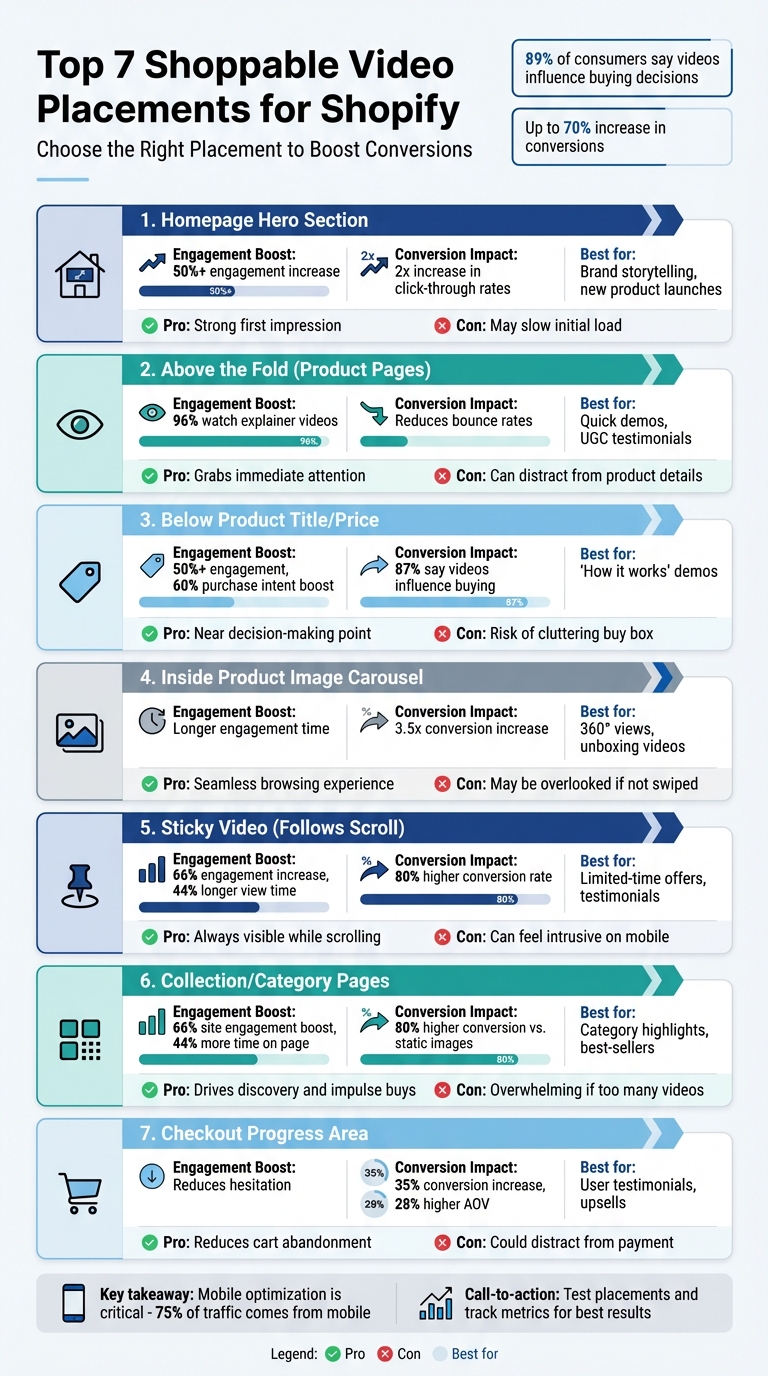
Shoppable Video Placement Comparison: Pros, Cons, and Best Use Cases for Shopify Stores
1. Above the Fold on Product Pages
Visibility and Engagement Potential
Positioning a shoppable video above the fold ensures it’s the first thing shoppers see, grabbing attention far more effectively than static images. With 96% of consumers watching explainer videos to learn about products, this approach meets them right at their peak interest.
Not only does this boost engagement, but it also helps lower bounce rates by keeping users on the page longer. Plus, video content is 51% more likely to be shared than static images, giving your brand a chance to expand its reach organically - without spending extra on ads.
This increased engagement creates a direct path to purchase, encouraging shoppers to act quickly.
Impact on Conversions
When videos above the fold include interactive product tags, customers can add items to their cart directly from the video. This seamless experience reduces friction and encourages impulse buying, as shoppers can act on their interest instantly.
Additionally, video simplifies complex product details, helping customers make quicker decisions without second-guessing.
User Experience Considerations
To maintain fast page speeds, use thumbnail-first and lazy loading techniques. Tools like UWidget offer features like shoppable YouTube carousels and video backgrounds, starting at $5.99/month.
Make sure your video begins with a compelling hook that addresses the customer’s primary needs. Include clear calls-to-action, such as "Buy Now", and ensure the video player is mobile-friendly. Aligning the video’s tone and pacing with your brand’s personality will make it even more effective.
This prime placement lays a solid foundation for integrating video content throughout your store.
2. Below the Product Title or Price
Visibility and Engagement Potential
Placing a video right below the product title or price is a smart move. Why? It grabs attention at a key decision-making moment. This prime spot ensures the video stays visible on most devices - usually "above the fold" - which can increase engagement by over 50%. Plus, delivering important details right when customers are considering a purchase can lead to a 60% boost in purchase intent.
Impact on Conversions
This placement is all about turning interest into action. Seeing a product demo or user testimonial near the price provides social proof where it matters most. In fact, 87% of shoppers say videos directly influence their buying choices. By positioning the video here, you not only build trust but also make it easy for customers to add the item to their cart without breaking their flow.
User Experience Considerations
To make the most of this placement, keep videos short - about 10 seconds - and ensure file sizes stay between 3–10 MB for quick loading. With mobile devices accounting for 38.5% of sales, fast load times are critical. Use techniques like lazy loading, compress your files, and stick to dimensions like 640×320 pixels or a 4:3 ratio. Closed captions are a must for accessibility, and avoid auto-playing audio to keep the shopping experience smooth. Up next, we’ll look at another effective spot for videos that can also drive conversions.
3. Inside the Product Image Carousel
Visibility and Engagement Potential
Adding shoppable videos to the product image carousel can connect with shoppers right when they're making decisions. Since customers already explore products through the media gallery, this placement taps into their buying intent. Videos bring movement, scale, and texture to the forefront, showcasing how a product fits or moves - something static images just can't do.
Interactive videos also keep viewers engaged longer, which often leads to increased purchase intent. By embedding videos directly into the carousel, you can tag products so users can interact without leaving the gallery. This approach not only enhances engagement but also creates a smooth path to conversions.
Impact on Conversions
Including shoppable videos in the carousel can increase conversion rates by up to 3.5×, bridging the gap between interest and purchase. These videos simplify the journey from curiosity to clicking "Add to Cart", reducing friction at a critical moment. When customers can watch a product demo and make a purchase directly from the carousel, the process becomes seamless.
Keep videos short and focused - 15 to 45 seconds is ideal. Highlight a single product or use case per clip, and tag products early to encourage quick actions. For Shopify users, tools like UWidget offer shoppable video carousels starting at $5.99/month. With a 5.0-star rating on the Shopify App Store, it’s a solid option for enhancing your store. Fine-tuning these elements ensures a smooth experience for users across all devices.
User Experience Considerations
To optimize for mobile, use vertical or square video formats (9:16 or 1:1) with large, easy-to-tap tags. Implement lazy loading to maintain fast page speeds - one store cut its Total Blocking Time from 3.8 seconds to just 552ms by optimizing mobile video displays. Add closed captions to make videos accessible, and avoid auto-playing audio to keep the experience user-friendly. Using videos from real customers instead of polished studio ads can also help build trust and authenticity within the carousel.
4. Sticky Video That Follows Scroll
Visibility and Engagement Potential
A sticky video stays within view as you scroll, keeping the content consistently visible. This setup ensures your product remains front and center, increasing engagement by 66% and extending view time by 44%.
By maintaining focus on the product, sticky videos create a seamless connection between engagement and purchase intent. For example, as a customer browses product details or sizing info, the video continues playing in the corner of their screen. This transforms casual browsing into a more interactive experience. In fact, 87% of customers say video content directly impacts their buying decisions. Embedding product links within the sticky player further simplifies the shopping process, removing the need to scroll back up for the "Add to Cart" button. This constant visibility not only enriches brand storytelling but also enhances conversion rates.
Impact on Conversions
Sticky video placements can drive conversion rates up by 80%. They create "micro-choice moments" that encourage impulse buys. Additionally, 64% of online shoppers are more likely to purchase a product after watching a video about it.
"ReelTok's floating widget placement ensures smooth transitions between product videos, keeping users in the shopping mindset." - ReelTok
To maximize effectiveness, place your key "Shop Now" or "Add to Cart" buttons between 21 and 34 seconds into the video - this is when viewers are most engaged and ready to act. Position the sticky widget in a corner, typically the bottom right, to avoid covering essential product details on the main page.
User Experience Considerations
To fully capitalize on the benefits of sticky videos, user experience should be a top priority. Since 38.5% of sales come from mobile devices, optimizing for mobile is essential. Use vertical or square video formats (9:16 or 1:1) with dimensions around 640x320 pixels. Incorporate large, tappable product tags and enable lazy loading to ensure smooth performance on mobile devices.
Avoid auto-playing audio in sticky videos, as it can disrupt the browsing experience. Instead, include captions to maintain accessibility. For Shopify stores, tools like UWidget provide sticky video functionality starting at $5.99/month, with unlimited widget plans available for $19.99/month. Always test on real mobile devices to ensure the floating video behaves as intended.
5. Homepage Hero Section
Visibility and Engagement Potential
Your homepage hero section is prime real estate for grabbing attention and driving action. By featuring a shoppable video in this space, you can immediately engage visitors and guide them toward making a purchase. Placing this video above the fold - where it's the first thing visitors see - can boost engagement by over 50% compared to content further down the page.
A shoppable video transforms your homepage from a simple display to an interactive shopping experience. Visitors can click on product tags within the video and add items directly to their cart. Considering that 91% of consumers watch videos to learn about products before buying, and 89% say videos have convinced them to make a purchase, this approach aligns perfectly with how people shop today.
"Video is a great way to spark discovery and engagement on your site - but it's also pretty passive. That is, unless you're incorporating shoppable video." - ReelTok Team
This strategy not only enhances visibility but also sets the stage for better conversions.
Impact on Conversions
Hero videos offer a dynamic alternative to static banners, capturing attention and encouraging action more effectively. Products shown in motion naturally draw the eye, while features like tap-to-shop streamline the path from discovery to checkout, removing barriers in the buying process.
Brands that integrate mobile-optimized video carousels in their hero sections often report up to a 2x increase in homepage click-through rates. Vertical videos, in particular, perform well - garnering 40% more attention than horizontal formats. This is especially relevant since 75% of eCommerce traffic comes from mobile devices. To maximize engagement, keep hero videos concise, ideally between 21 and 34 seconds.
User Experience Considerations
To ensure a smooth experience, focus on optimizing page speed. Use techniques like lazy-loading and thumbnail-first widgets to prevent slow load times. Compress video files in formats like WebP or MP4 to maintain quality while reducing file size.
Since many shoppers browse on mobile devices or in public spaces, include captions so your message is clear even without sound. Make sure interactive elements, like product tags, are mobile-friendly. Start your video with a compelling hook and finish with a strong call-to-action, such as "Shop Now" or "Add to Cart", either as an overlay or at the end of the video.
If you're using Shopify, tools like UWidget can help you add video widgets seamlessly. Plans start at $5.99/month, with unlimited widgets available for $19.99/month.
sbb-itb-d9e5b3a
6. Collection or Category Pages
Visibility and Engagement Potential
Collection pages are where discovery meets action. These pages naturally attract shoppers who are ready to buy, and adding shoppable videos takes the experience to the next level. Instead of scrolling through static thumbnails, visitors can watch engaging content like category overviews, product comparisons, and styling demos that show items in real-world scenarios. This turns what could be a passive browsing session into an interactive experience that nudges them closer to a purchase decision.
The numbers back this up: videos on collection pages boost site engagement by 66%, and viewers spend 44% more time on these pages when video content is available. This extended interaction is especially valuable during the discovery phase when customers are weighing their options. Shoppable videos simplify the buying process by letting users add items directly to their cart from the video, skipping the need to visit individual product pages. This streamlined approach can lead to noticeable improvements in conversion rates.
"By combining product discovery and checkout in one experience, Shoppable Video Playlists turn traditional Shopify collection pages into engaging, video-first shopping destinations." - Navneet Bali, Channelize.io
Impact on Conversions
This increased engagement directly impacts conversions. eCommerce stores that feature video content on collection pages report up to an 80% higher conversion rate compared to those relying solely on static images. On average, websites with video content see a 4.8% conversion rate, while those without video lag behind at just 2.9%.
Shoppable videos also help cut down on cart abandonment by encouraging impulse purchases. When users can add items to their cart without leaving the video feed, they’re less likely to hesitate or get sidetracked. Beyond this, videos offer an SEO advantage, as search engines like Google tend to favor sites with video content. Plus, 89% of consumers say watching a video has convinced them to make a purchase.
User Experience Considerations
To maximize the benefits of shoppable videos, it’s crucial to fine-tune the user experience on collection pages. Videos should be short and lightweight - ideally between 3–10 MB and around 10 seconds long. Limit the number of videos to 4–6 per page to maintain fast load times, and use techniques like lazy loading and file compression to keep page speeds optimal.
Since 75% of video consumption happens on mobile devices, prioritize mobile-friendly formats like vertical or square videos (640x320 pixels or a 4:3 aspect ratio). Make sure interactive elements, like product tags, are large and easy to tap, and place them early in the video to capture impulse buyers. No one wants to wait until the end of a video to take action.
Don’t forget accessibility - include closed captions and transcripts. If you’re using YouTube videos, tools like UWidget can help create optimized galleries, carousels, and sliders for collection pages, starting at $5.99/month. Lastly, make sure your video content reflects real-time stock levels. Few things frustrate customers more than discovering that a featured product is sold out.
7. Checkout Progress Area
Visibility and Engagement Potential
The checkout area is your last chance to turn hesitant shoppers into buyers. This is where shoppable videos can make a real difference. At this stage, customers might still be second-guessing their decision. A short, focused video - whether it’s a user testimonial, an unboxing clip, or a quick demo - can provide that final nudge of reassurance without pulling them away from the checkout process.
Keep these videos short and to the point, ideally between 15 to 45 seconds. Instead of showcasing multiple products, zero in on one product or a specific use case. For instance, a quick “how it works” video or a testimonial answering common doubts like “Is it worth it?” or “How does it fit into my daily life?” can seal the deal.
"When uncertainty drops, conversion rises." - Moast Team
Impact on Conversions
Shoppable videos in the checkout area can increase conversion rates by 35% and boost average order value by 28%. These videos are particularly effective at reducing cart abandonment. When customers see content that validates their choice - without leaving the checkout flow - they’re less likely to second-guess and abandon their purchase.
Interactive product tags within these videos are a game-changer. They allow customers to add complementary items directly to their cart, creating natural upsell opportunities. Brands using video commerce platforms have reported up to a 20% increase in revenue per session. This placement not only helps close the sale but also maximizes the value of each transaction. The key is to ensure that these videos integrate smoothly with the overall shopping experience on your Shopify store.
User Experience Considerations
Speed is critical in the checkout area. Videos should load quickly and be paired with responsive, lightweight widgets. Tools like UWidget, starting at $5.99/month, can help optimize video performance for Shopify stores. Similarly, CheckIt offers a progress bar to keep customers engaged throughout the checkout process.
For mobile users, ensure product tags are easy to tap and placed early in the video. Avoid overcrowding the frame with too many options - decision fatigue is a real risk at this stage. Videos featuring real people and authentic testimonials work best, giving customers that last layer of social proof. To maintain a seamless experience, make sure checkout videos reflect the clarity and simplicity of the rest of your store’s design.
How To Add Shoppable Videos to your Shopify Store | Videeo
Comparison Table: Placement Pros, Cons, and Best Uses
When it comes to video placement, aligning the location with your product type, customer journey stage, and conversion goals is critical. Some placements are perfect for building awareness, others for driving immediate purchases, and a few for reducing cart abandonment. Here’s a breakdown of the advantages, potential challenges, and ideal scenarios for seven key placements:
| Placement | Advantage | Potential Disadvantage | Best Use Case |
|---|---|---|---|
| Homepage Hero Section | Creates a strong first impression and reinforces brand identity | May slow down the site’s initial load if not optimized | Perfect for brand storytelling, launching new products, or showcasing mission-driven content |
| Above the Fold (Product Pages) | Grabs attention instantly and influences "Add to Cart" decisions | Can distract from product details or pricing if the video is too lengthy | Ideal for quick product demos, high-impact hooks, or UGC testimonials |
| Below Product Title/Price | Keeps the video near the conversion point, simplifying the buying process | Risk of cluttering the "Buy Box" area if not well-designed | Great for "How it works" demos or highlighting key features |
| Inside Product Image Carousel | Blends seamlessly into the browsing experience; non-intrusive | Could be overlooked if users don’t swipe through the carousel | Best for 360° views, unboxing videos, or action shots of the product |
| Collection/Category Pages | Encourages discovery across multiple products; drives impulse purchases | Can feel overwhelming if too many videos load simultaneously | Works well for category highlights, best-sellers, or UGC showcasing multiple items |
| Sticky Video (Follows Scroll) | Keeps the video visible throughout scrolling, ensuring it stays top-of-mind | May come across as intrusive, especially on mobile devices | Best for limited-time offers, key testimonials, or explaining technical products |
| Checkout Progress Area | Eases last-minute hesitation and reduces cart abandonment | Could distract from completing the payment process if not concise | Effective for user testimonials, quick "How to use" clips, or upsell opportunities |
Interactive videos can increase conversions by up to 70%, emphasizing just how impactful a well-thought-out placement strategy can be.
To make the most of these placements, tools like UWidget can help optimize video performance on platforms like Shopify. The right tools ensure your videos not only look great but also deliver measurable results.
Conclusion
Shoppable video placement goes beyond simply adding videos to your Shopify store - it’s about positioning them where they’ll have the most impact on customer decisions. As the Moast Team aptly states:
"Shoppable video is a revenue system, not a feature".
The success of a video often hinges on where it’s placed, not necessarily how polished it looks. This echoes the earlier point about inserting videos at crucial decision-making moments to guide customers toward action.
Strategic placement can turn casual interest into measurable results. But it’s not a one-size-fits-all approach. Testing is key. With around 75% of eCommerce traffic now coming from mobile devices, testing different placements through A/B tests is essential. Focus on metrics that directly affect your sales, like add-to-cart rates, product tag click-through rates, and revenue influenced by the videos.
To streamline the process, tools like UWidget make it easy to integrate shoppable YouTube videos and Shorts. With plans starting at $5.99/month and a 7-day free trial, you can quickly experiment with features like video galleries, carousel sliders, sticky players, and product tagging - all without a hefty upfront cost.
Start small. Test one or two high-traffic areas, such as your homepage hero section or a product page carousel. Track the results and refresh your content monthly to maintain engagement. Prioritize mobile-friendly formats and incorporate genuine customer videos to build trust and drive conversions. The ultimate goal? Create a seamless path from curiosity to purchase, transforming browsers into buyers. Thoughtful video placement is the bridge between compelling content and tangible sales.
FAQs
How do shoppable videos help increase sales on Shopify?
Shoppable videos are a game-changer for boosting sales on Shopify. They make the shopping experience more engaging by letting customers see products in action, which helps build trust and confidence in what they're buying.
What makes them so effective is how they simplify the buying process. Instead of navigating through multiple steps, customers can add items to their cart directly from the video. This streamlined experience not only keeps shoppers engaged but also transforms videos into powerful tools for increasing conversions and driving more revenue.
How can I optimize video load times on my Shopify store?
Making sure your videos load quickly is crucial for creating a seamless shopping experience and boosting conversions. To start, compress your video files to keep their size manageable - ideally between 5–10 MB per video. Stick to the MP4 format with the H.264 codec, as it offers great compatibility and faster loading speeds.
Another smart technique is lazy loading, which delays video downloads until they're actually needed. This is particularly useful for mobile users, where bandwidth can be limited.
For even better performance, consider hosting your videos on platforms with strong CDNs (Content Delivery Networks), like YouTube. These platforms ensure faster delivery by distributing content across multiple servers. Also, use optimized thumbnails in modern formats like WebP or AVIF to reduce the load time further.
Finally, avoid autoplaying videos and only load the video player when users interact with it. This keeps your pages lightweight, responsive, and user-friendly. By implementing these steps, you’ll not only improve video load times but also enhance user engagement and lower bounce rates.
What’s the best place to add shoppable videos to reduce cart abandonment?
The most effective spot for placing shoppable videos to tackle cart abandonment is during the checkout process. By featuring engaging videos at this stage, you can address any lingering doubts, emphasize the benefits of the product, or even showcase quick tutorials. These videos provide that extra reassurance customers might need to finalize their purchase.
This approach simplifies decision-making and keeps buyers focused on completing their orders, which can lead to higher conversion rates.