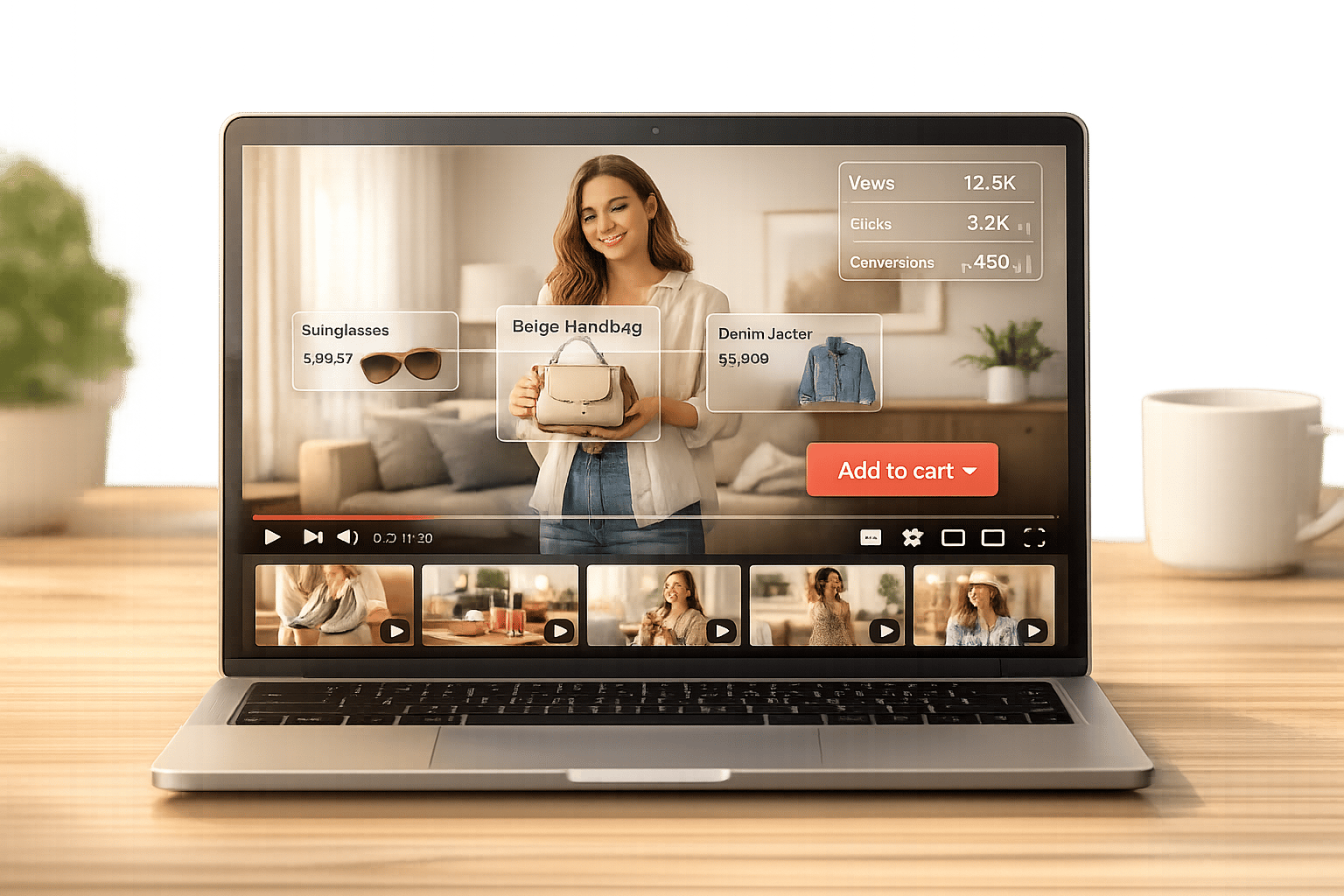
Sticky video widgets are transforming Shopify stores by keeping videos visible as users scroll, ensuring key content like product demos and testimonials stay in view. These floating video players integrate YouTube videos, Shorts, or playlists into a fixed corner of the screen, enabling customers to watch and shop simultaneously. With features like product tagging and lazy loading, they enhance the shopping experience without slowing down your site.
Key Benefits:
- Boost Engagement: Videos remain visible, turning passive browsing into active interaction.
- Increase Sales: Shoppable videos let customers add products to their cart instantly, driving conversions by up to 80%.
- Improve Visual Merchandising Strategies: Dynamic video showcases products better than static images, especially on mobile.
How It Works:
- Videos stay fixed on the screen using a "Sticky Video Mode."
- Supports YouTube videos, Shorts, playlists, and channels.
- Fully responsive design with customization options for branding.
Getting Started: Install UWidget from the Shopify App Store for as low as $5.99/month. Configure sticky video placement, tag products, and optimize performance with lazy loading. Pair it with other apps from Fractal Apps to further enhance your store.
Bottom Line: Sticky video widgets let Shopify merchants deliver engaging, mobile-friendly shopping experiences that convert browsers into buyers.
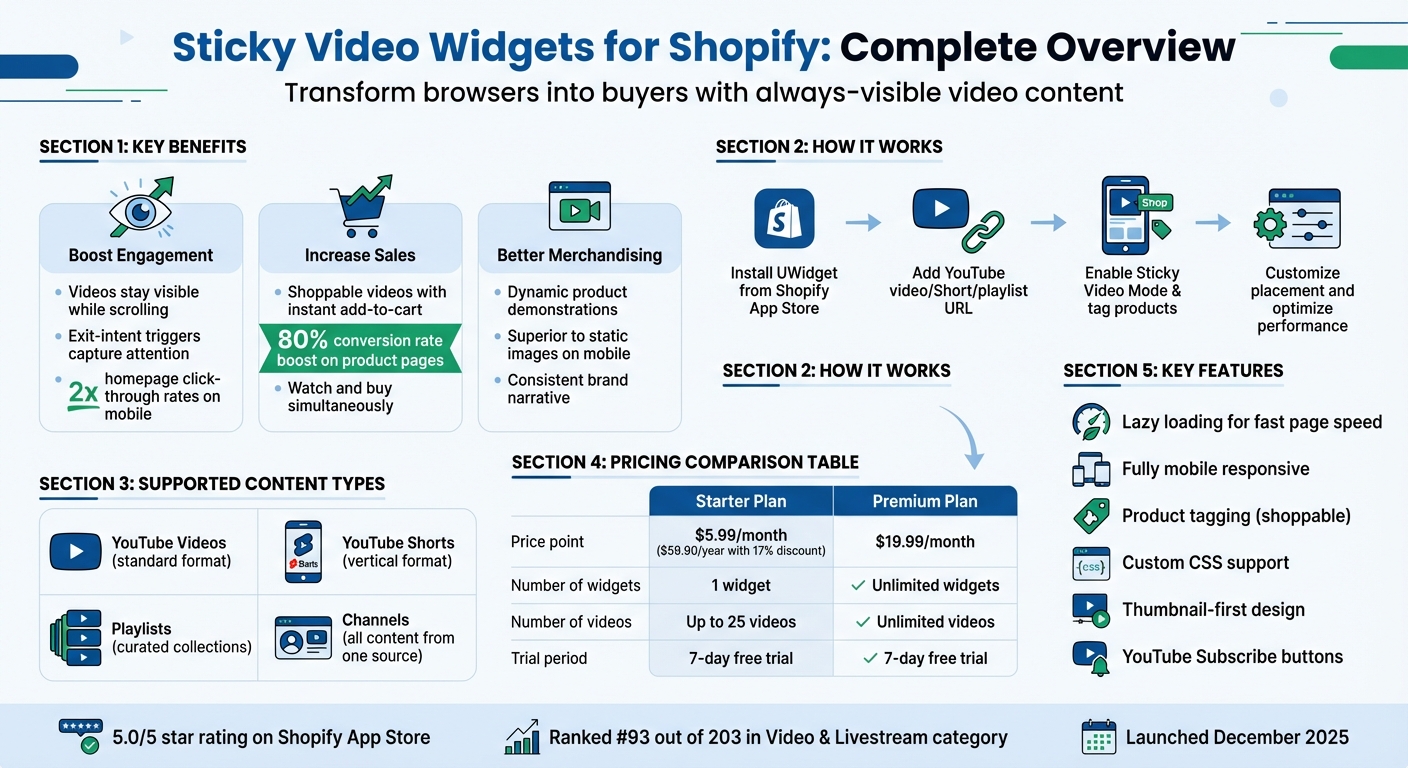
Sticky Video Widget Features and Benefits Comparison for Shopify Stores
Benefits of Sticky Video Widgets on Shopify

Increased User Engagement
Sticky video widgets ensure your content stays front and center as customers browse, turning passive scrolling into active engagement. Unlike traditional videos that disappear when users scroll past, these floating players stay visible, keeping product demos and brand stories in constant view during the shopping experience.
This "watch and buy" concept reshapes how customers shop. By integrating tagged products and add-to-cart buttons directly into the video, shoppers can make purchases without pausing or navigating away. For mobile users, video carousels optimized for smaller screens can double homepage click-through rates, a crucial boost given the dominance of smartphone shopping.
Exit-intent triggers further enhance engagement. When a shopper is about to leave, a scroll-triggered video can grab their attention with a discount or a compelling message. These features not only capture interest but also encourage decisive actions.
Higher Conversion Rates
Videos that stay visible throughout the shopping journey significantly impact buying decisions. On product pages, videos paired with real-time calls-to-action can boost conversion rates by 80%. Showing products in action - whether it’s fit, size, or practical use - helps customers make quicker, more confident decisions.
Shoppable video widgets streamline the buying process by replacing lengthy descriptions with engaging visuals. When customers see how a product works or looks in real life, they’re more likely to purchase. These widgets also leverage user-generated content, like YouTube Shorts or TikTok-style clips, offering genuine social proof that builds trust far more effectively than traditional ads.
By simplifying the path from viewing to purchasing, these widgets align perfectly with a modern, visually driven shopping experience.
Better Visual Merchandising
Static product grids often fall short of capturing attention, especially on mobile devices with limited screen space. Sticky video widgets solve this by showcasing dynamic product demonstrations that stay visible as users explore your store. Whether it’s a product being worn or used in real-life scenarios, these videos provide clarity that static images simply can’t match.
These widgets also maintain a consistent visual narrative, ensuring your brand story remains prominent throughout the browsing experience. Unlike standard embedded videos, which disappear as users scroll, sticky widgets keep your merchandising message alive. Features like thumbnail-first design and lazy loading further enhance performance, delivering high-quality visuals without slowing down your site.
sbb-itb-d9e5b3a
How Sticky Video Widgets Work
Floating Video Placement
Sticky video widgets are floating video players designed to stay visible even as users scroll through a page. Unlike regular embedded videos that vanish when you scroll past them, these widgets use a Sticky Video Mode layout, keeping the video in view without relying on conventional grid or gallery formats.
These widgets are responsive and thumbnail-focused, meaning they adjust seamlessly to different screen sizes without interfering with your store’s design. Whether viewed on a desktop or mobile device, the player adapts its positioning to ensure it’s always accessible. To maintain page speed, the widget uses lazy loading, ensuring the video loads only when needed while still remaining visible.
For merchants, placement can be fine-tuned through built-in settings or custom CSS, offering flexibility to align the widget with your brand’s look and feel.
Now, let’s dive into the types of video content these widgets support.
Supported Video Content Types
Sticky widgets are compatible with various YouTube video formats, making them a versatile tool for showcasing products. You can feature standard YouTube videos, vertical YouTube Shorts, curated playlists, or even all the content from a specific channel - just by adding the URL. This flexibility allows you to mix in-depth product demos with quick, attention-grabbing Shorts.
The integration of shoppable videos takes it a step further. You can tag specific products directly within the floating player, enabling customers to view and purchase items without leaving the page. This seamless "watch and buy" experience is especially effective for product demonstrations, how-to videos, and user-generated content that builds trust. A Shopify merchant from Wholesale Nursery Co shared their experience:
"I am pleased with this app. It allows shorts and videos to be displayed and easily integrated on my e-commerce store".
You can also personalize the widget’s design and functionality to align with your brand identity.
Customization Options
UWidget provides several ways to tweak the appearance and behavior of sticky video widgets - no coding skills required. For those with specific branding needs, custom CSS support allows for advanced styling options. You can adjust margins, borders, or even apply unique brand colors beyond the default settings.
Additionally, interactive features like YouTube Subscribe buttons can be added to grow your channel while customers browse. These customization options are fully responsive, ensuring the widget looks great and functions smoothly across all devices.
| Feature | Customization Capability |
|---|---|
| Styling | Built-in settings and Custom CSS |
| Layouts | Sticky player, carousels, grids, and banners |
| Interactivity | Product tagging (shoppable) and Subscribe buttons |
| Performance | Lazy loading and thumbnail-first rendering |
| Device Support | Fully mobile responsive |
Setting Up Sticky Video Widgets with UWidget
Installing UWidget
To get started, download UWidget from the Shopify App Store. Search for "UWidget: Youtube Widgets", click "Add app", enter your store URL, and complete the installation through your Shopify Admin. Every plan includes a 7-day free trial. The Starter plan costs $5.99/month (or $59.90/year with a 17% discount) and supports 1 widget with up to 25 videos. For more flexibility, the Premium plan is $19.99/month and offers unlimited widgets and videos. Once installed, you can access the app dashboard directly within your Shopify Admin panel.
Note: UWidget debuted on December 1, 2025, and has earned a 5.0-star rating based on early feedback from users.
Configuring Sticky Video Mode
To enable the sticky video feature, paste a YouTube video or playlist URL into the app interface and select the "Sticky video player" layout option. You can add shoppable tags to the video, turning it into an interactive tool for driving sales. This allows customers to watch product demos and add items to their cart without leaving the video. UWidget supports various formats, including standard YouTube videos, vertical YouTube Shorts, full playlists, and even entire channels. YouTube Shorts are particularly effective in this mode thanks to their vertical format and quick runtime.
Once activated, adjust the widget’s placement to ensure it complements your store’s overall design.
Optimizing Placement and User Experience
UWidget’s lazy-loaded, thumbnail-first design ensures fast page speeds and smooth mobile performance, with touch-friendly functionality. Test the sticky player on product pages where video demos can replace long text descriptions. Use the app’s built-in tools or custom CSS to tweak the widget’s position so it aligns with your store’s branding. For best results, place the widget in a corner where it remains visible but doesn’t distract from the shopping experience. As one satisfied user from Wholesale Nursery Co shared:
"I am pleased with this app. It allows shorts and videos to be displayed and easily integrated on my e-commerce store."
As of early 2026, UWidget ranks #93 out of 203 in the "Video and livestream" category on the Shopify App Store, reflecting its growing popularity among merchants. Proper placement and configuration ensure the sticky video widget enhances customer engagement across your store.
Fractal Apps Suite for Shopify Stores
Overview of Fractal Apps
Fractal Apps provides a collection of marketing and conversion tools specifically designed to enhance the functionality and design of Shopify stores. With a perfect 5.0-star rating on the Shopify App Store, the developer has built a reputation for delivering consistently high-quality tools. Since launching UWidget in December 2025, Fractal Apps has expanded its offerings to include six specialized tools that support Shopify merchants through every step of the customer journey - from discovery to checkout.
Each app in the suite is fine-tuned for performance and can function independently while contributing to a smooth and unified shopping experience. These tools not only integrate seamlessly but also amplify the effectiveness of sticky video widgets to keep users engaged and drive conversions at every stage.
Apps for Engagement and Conversions
In addition to sticky video widgets, Fractal Apps offers five other tools aimed at boosting engagement and conversions. Here's a quick look at what they bring to the table:
-
ILikeThat ($3.99/month): Adds like buttons to products, allowing customers to save their favorites while giving merchants valuable insights into customer preferences. As Lindquist Lane, a Shopify store owner, shared:
"Great way for me to track what my customers like and adds social proof. Easy to use, install, and adds a nice touch".
- CheckIt (Free): Features a visual progress bar during checkout, helping to reduce cart abandonment by giving customers a clear sense of where they are in the process.
- Time2Read ($1.99/month): Displays estimated reading times on blog posts, helping visitors manage their time and set expectations, especially useful for content-heavy stores.
- DivideItUp ($2.99/month): Offers customizable section dividers to improve page organization and create a cleaner, more polished look.
- Varco (Free plan available): Displays product variants as individual items on collection pages, making it easier for customers to browse and find exactly what they want.
Every app in the suite boasts a 5.0-star rating and includes a free trial, giving merchants the chance to explore their features before committing. Together, these tools provide Shopify store owners with practical, user-friendly solutions to enhance customer engagement and streamline the shopping experience.
Best Practices for Sticky Video Widgets
Getting the most out of sticky video widgets means following strategies that boost engagement and conversions.
Placement Strategy
Position sticky video widgets in the bottom-left or bottom-right corners of the screen. This ensures they stay visible while avoiding interference with navigation or crucial buttons. Use videos that align with the content being viewed - like showcasing a product demo on its product page. This approach makes the widget feel like a helpful feature rather than an annoyance. On product pages, aim for placements that encourage immediate actions, such as adding items to the cart.
Mobile Optimization
For mobile users, vertical video formats like YouTube Shorts work best. Use techniques like thumbnail-first previews and lazy loading to keep your site running smoothly. Also, ensure any call-to-action buttons are easy to tap. Some brands have seen up to a 2x boost in homepage click-through rates by adopting mobile-friendly video carousels.
Testing and Analytics
Once your widget is up and running, track the metrics that matter most to your business. Focus on direct video sales (purchases made right after watching), influenced video sales (purchases made by viewers who watched for more than 5 seconds), and average order value from video viewers. Dive deeper into engagement stats like total videos watched (plays lasting over 5 seconds), average watch time, and completion rates. Shopify analytics can help you compare how different placements perform. As video strategist Liana Turbureanu points out:
"Traditional tools used to host and manage the videos on a Shopify website cannot track essential video engagement and conversion metrics. Without this critical information, it can be challenging to determine the impact of your website videos".
Analyze performance over specific time periods - like sales events or holiday seasons - to see what resonates with your audience. Use this data to refine both your content and placement strategies, focusing on what delivers results rather than relying on assumptions.
Conclusion
Sticky video widgets have become a game-changer for Shopify stores, helping merchants stand out in an increasingly competitive market. Understanding the importance of video content and keeping it front and center is critical, especially in a mobile-first shopping world. When paired with shoppable features that allow customers to "watch and buy", these widgets deliver measurable benefits.
As Rhea Jotsinghani from ReelUp puts it:
"Shopify stores aren't just competing on product quality anymore - they're competing on experience. The right shoppable video widget can make the difference between a bounce and a buy".
This shift toward prioritizing customer experience makes tools like UWidget a smart choice for improving your Shopify conversion rate. UWidget offers a simple setup, a 7-day free trial, and affordable pricing starting at $5.99/month for the Starter plan. With a perfect 5.0/5 rating on the Shopify App Store, users have praised its ability to seamlessly integrate YouTube Shorts and standard videos into storefronts. One satisfied user from Wholesale Nursery Co shared:
"I am pleased with this app. It allows shorts and videos to be displayed and easily integrated on my e-commerce store".
For those looking to further enhance customer engagement, don’t forget to explore the curated Shopify Apps suite from Fractal Apps, mentioned earlier in this guide.
The evidence is clear: sticky video widgets can drive real results. Start using UWidget today, fine-tune the placement of your videos, and watch as your store’s engagement and conversions improve.
FAQs
Will a sticky video slow down my Shopify store?
A sticky video can impact the speed of your Shopify store if it's not properly optimized. To keep things running smoothly, consider strategies like lazy loading, compressing video files, and ensuring that only visible content loads. These methods help preserve your store's performance and responsiveness.
Where should I place the sticky video on my pages?
The ideal spot for a sticky video is one where it remains in view as users scroll, such as in a sticky sidebar, header, or footer. Prioritize placing it on high-traffic pages like the homepage or product pages to get the most interaction. Just make sure the video doesn’t block essential content - it should complement the user experience, encouraging engagement and driving conversions.
How do I track if the sticky video increases sales?
To see if the sticky video is actually driving sales, keep an eye on metrics like conversion rate, click-through rate (CTR), add-to-cart rate, and average order value (AOV). Use analytics tools to track how many orders are influenced by the video and whether it increases session duration. By regularly checking these numbers, you can gauge how well the sticky video is boosting engagement and turning visitors into customers on your Shopify store.