YouTube playlists can help e-commerce brands connect with online customers by organizing videos into logical, engaging sequences that tell a story. From showcasing product demos to sharing customer testimonials, playlists guide viewers through a structured journey, improving engagement and driving sales.
Key takeaways:
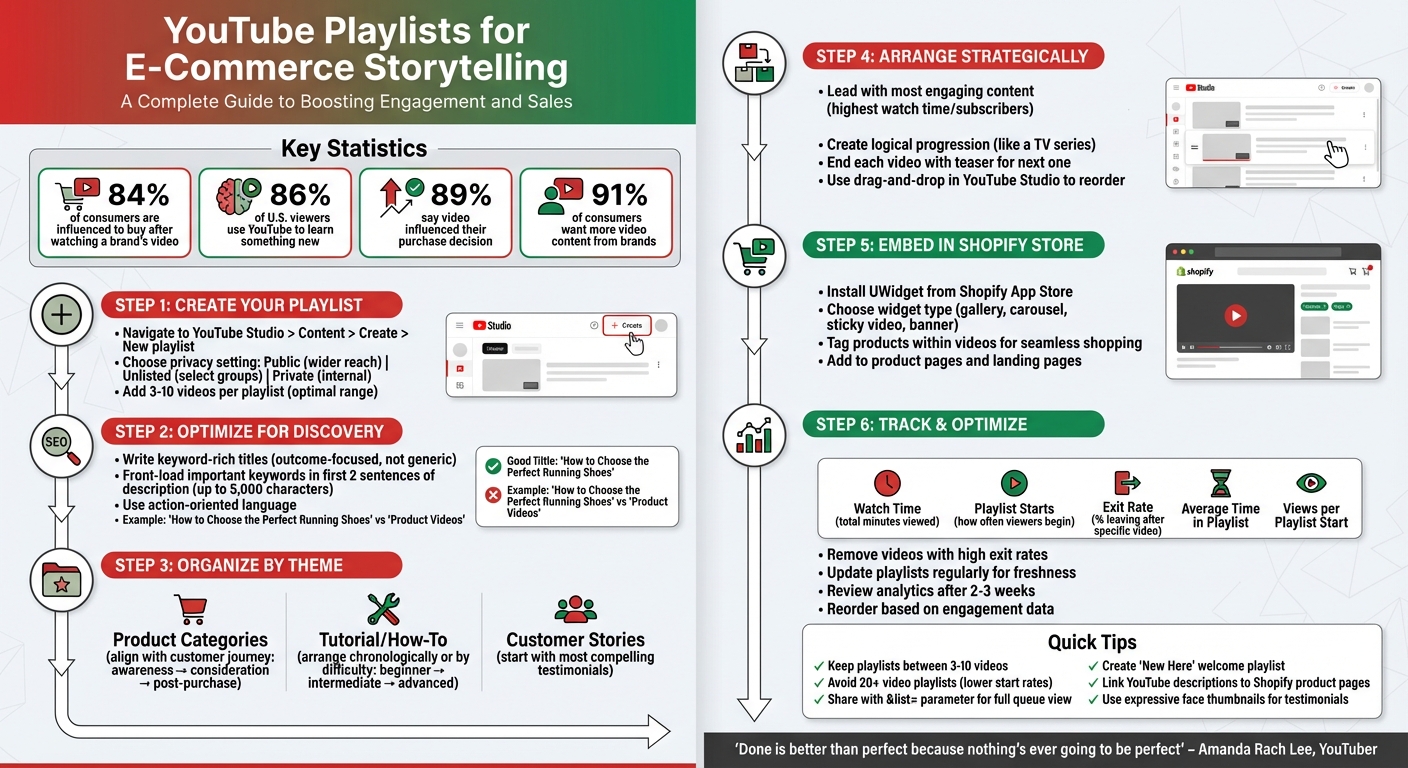
- Storytelling drives results: 84% of consumers are influenced to buy after watching a brand’s video.
- Playlists boost visibility: They rank on YouTube and Google, helping new customers discover your brand.
- Practical use cases: Create themed playlists for product categories, tutorials, or customer stories to build trust and loyalty.
- Optimize performance: Use analytics to track watch time, exit rates, and engagement, then update playlists regularly.
To maximize impact, embed playlists directly into your Shopify store using tools like UWidget, allowing customers to shop while watching. Focus on crafting logical sequences, strong titles, and descriptions to keep viewers engaged and improve conversions.
How to Create and Optimize YouTube Playlists for E-Commerce: A Step-by-Step Guide
How to Create YouTube Playlists
YouTube playlists can be a powerful tool to tell your e-commerce story. You can create them in YouTube Studio by navigating to "Content", then selecting "Create" > "New playlist." Alternatively, create one directly from a video's watch page by clicking the three-dot "More" menu, then choosing "Save" > "Create new playlist". Once you're ready, follow these steps to set up your first playlist.
Setting Up Your First Playlist
Start by choosing a privacy setting that aligns with your goals. Public playlists are ideal for reaching a wider audience, Unlisted playlists work well for sharing with select groups, and Private playlists are great for internal use. For most e-commerce purposes, public playlists are the way to go. To add videos, use the three-dot menu in the playlist editor to search YouTube or select from your uploads.
Consider creating a "New Here" playlist to welcome new viewers. For instance, Duolingo’s "All About Duolingo" playlist introduces their brand and key offerings in a neatly curated sequence.
Writing Titles, Descriptions, and Tags
Crafting the right titles and descriptions is crucial for discoverability. Use relevant keywords (up to 5,000 characters) that resonate with your audience. Make your titles engaging and outcome-driven. For example, instead of a generic name like "Product Videos", focus on what viewers will gain, such as "How to Choose the Perfect Running Shoes." Colorado State University adopted this approach by renaming their playlists with titles like "How to Be a Better Earthling", which emphasizes personal growth rather than just listing topics.
In descriptions, front-load the most important details and keywords into the first two sentences, as this is what viewers often see in search results. Use action-oriented language to highlight what viewers will learn or achieve, rather than just listing what’s included.
Arranging Videos in the Right Order
Once your playlist is set up, arranging the videos thoughtfully is key to keeping viewers engaged. Start with your most engaging content to grab attention right away. For tutorials, organize videos in chronological or difficulty-based order to ensure a smooth learning experience. Wix.com, for example, structures playlists on e-commerce lessons in a logical progression, making it easy for beginners to follow along.
Keep your playlists concise - somewhere between 3 to 10 videos - to avoid overwhelming your audience and to maintain focus. You can reorder videos manually in YouTube Studio by dragging them into the desired sequence. To keep viewers watching, end each video with a teaser for the next one in the playlist.
Organizing Playlists by Theme and Purpose
Think of each playlist as a chapter in your brand’s story. The idea is to align your playlists with your business goals and what your customers need, making it simple for viewers to find exactly what they’re after. Let’s dive into how organizing playlists by theme can help you connect better with your audience.
Product Category Playlists
Organizing videos by product lines or collections allows customers to explore your offerings naturally. For instance, if your business sells outdoor gear, you could create playlists like “Camping Equipment,” “Hiking Essentials,” or “Winter Sports Gear.” It’s similar to how a store arranges its aisles, making it intuitive for customers to navigate. This approach has been shown to improve conversion rates.
Another effective strategy is to align playlists with the customer journey - awareness, consideration, and post-purchase. For better focus, keep playlists between 3 to 10 videos. If a category has too much content, break it into sub-playlists based on themes or specific product types.
Tutorial and How-To Playlists
Educational content is a great way to build trust while showing your products in action. With 86% of U.S. viewers turning to YouTube to learn something new, tutorial playlists can be a powerful tool. Arrange these videos in a logical order to make them easy to follow. For example, Wix.com organizes its e-commerce tutorials chronologically to guide beginners step-by-step.
Use titles that focus on outcomes to grab attention. Instead of generic names like “Product Tips,” try something like “How to Choose the Perfect Running Shoes for Your Foot Type.” Companies like REI go a step further by creating playlists that teach practical skills, such as setting up camping equipment, offering value beyond just selling products. If your product requires skill development, group videos by difficulty level - beginner, intermediate, and advanced - similar to how guitar instructor Andey Crowley structures his lesson playlists. This approach naturally leads viewers through a journey that showcases real-life success stories.
Customer Story Playlists
Few things are as convincing as real customer experiences. In fact, 89% of people say watching a video has influenced their decision to buy a product or service. Collect these testimonials into dedicated playlists, starting with your most compelling stories to hook viewers right away.
To keep viewers engaged, arrange testimonials in a way that tells a story. Use thumbnails featuring expressive faces - showing excitement, surprise, or satisfaction - to create a personal connection. Maintain consistent production quality across these videos, using similar backgrounds or text overlays to reflect your brand’s professionalism. You could even create a “New Here” playlist that combines your best customer stories with videos about your brand’s mission, giving first-time visitors a warm introduction. Wrap up each video with a teaser for the next one to keep viewers watching through the entire playlist. These playlists don’t just build trust - they strengthen your overall brand narrative.
Adding YouTube Playlists to Your Shopify Store
Once you've organized your playlists, the next step is integrating them into your Shopify store. Embedding videos directly on your site allows customers to watch and shop without leaving your page, which can boost engagement - a key factor for SEO. Here's how you can seamlessly add these playlists using tools like UWidget.
Embedding Playlists with UWidget
UWidget, a tool developed by Fractal Apps, makes it easy to incorporate YouTube playlists into your Shopify store. The app offers various display options, such as video galleries, carousel sliders, sticky videos, and video banner backgrounds, all of which can be customized to fit your store's design.
To get started, search for "UWidget: Youtube Widgets" in the Shopify App Store and click "Add app." Once installed, choose your preferred widget type, paste your playlist URL into the app's source field, and adjust the settings to align with your branding. One standout feature is the ability to tag products directly within your playlist videos. This means customers can add items to their cart while watching the video, creating a seamless shopping experience.
Adding Video Content to Product Pages
Embedding playlists on product and landing pages can do more than enhance your site’s visual appeal - it helps customers make better purchasing decisions. Instead of relying solely on text-heavy descriptions, you can showcase your products through tutorials, demonstrations, or customer testimonials. Placing playlists prominently on product or collection pages grabs attention and quickly communicates your product's value, guiding shoppers through their journey.
Connecting YouTube and Your Store
Your YouTube channel and Shopify store can work together to create a unified content experience. Use playlist descriptions and pinned comments on YouTube to link directly to relevant product pages or collections in your store. At the same time, embed playlists on your site to encourage visitors to subscribe to your YouTube channel for exclusive content or sneak peeks of new products. This integration not only strengthens your brand story but also creates a smooth path from video discovery to purchase, building trust and driving sales. By linking your YouTube channel and Shopify store, you can establish an auto-play content flow that keeps your audience engaged and invested.
sbb-itb-d9e5b3a
How to Improve Playlist Performance
Making a playlist is just the first step. To truly maximize its potential, you need to focus on keeping viewers engaged. Why? Engaged viewers produce double the watch time per video, and those who come back for a second view can triple that time.
Getting Viewers to Watch Complete Playlists
Start strong. Lead with your most compelling videos - the ones that attract new subscribers or have the longest watch times. These are your hook. On the flip side, avoid overwhelming your audience with playlists that are too long. Playlists with 20 or more videos often have lower start rates, as viewers might feel daunted by the sheer size .
Structure your playlist like a TV series. Each video should flow naturally into the next, creating a seamless viewing experience. To keep viewers hooked, end each video with a question or tease the next one - think of it as a mini cliffhanger. This approach not only encourages binge-watching but also strengthens your overall narrative. When sharing playlists, use the URL with the &list= parameter to ensure viewers see the full queue .
Tracking Playlist Metrics
To fine-tune your playlists, turn to YouTube Analytics. It offers several metrics that can reveal how well your playlists are performing. Among these, watch time (total minutes spent viewing) takes priority, as it signals deeper engagement to YouTube's algorithm.
Pay close attention to the exit rate, which shows the percentage of viewers who leave after a specific video. High exit rates can point to content that disrupts the flow of your playlist. Similarly, monitor playlist starts to see how often viewers kick off your playlist, and check the average time in playlist to understand how long they stick around .
| Metric | What It Measures | How to Improve |
|---|---|---|
| Playlist Starts | How often viewers begin your playlist | Use eye-catching titles and thumbnails to increase clicks |
| Exit Rate | Percentage of viewers leaving after a specific video | Replace or remove videos with high exit rates |
| Average Time in Playlist | How long viewers stay engaged | Shorten playlists or improve transitions between videos |
| Views per Playlist Start | Average number of videos watched per session | Reorganize to place the most engaging videos first |
Use these insights to make targeted updates that enhance viewer experience and engagement.
Updating and Improving Playlists
Think of playlists as evolving assets. YouTube prioritizes recently updated playlists on your channel's Playlists tab, so regular updates can keep your content visible and relevant. If certain videos consistently have high exit rates, remove or replace them to maintain the playlist’s flow. After making changes - whether reordering or removing videos - give it a few weeks before reviewing the updated analytics .
"Update [playlists] regularly so that you're always keeping fresh content on that page. And you're keeping your playlists fresh in front of people when they go looking for your playlists."
– Tim Schmoyer, Founder, Video Creators
When you release new videos, add them to the appropriate playlists while also reviewing older ones to ensure they still align with your storytelling objectives. By treating playlists as dynamic tools, you can keep them relevant and effective for guiding viewers through your content and, ultimately, your brand’s journey.
Conclusion
YouTube playlists are a fantastic way for e-commerce brands to share their story and connect with customers. By grouping videos into themed collections - like product demos, customer testimonials, or how-to tutorials - you create a smooth viewing experience that keeps your audience engaged and encourages conversions.
Playlists do more than just organize content; they guide viewers through your brand's narrative effortlessly. This automatic flow not only holds attention longer but also signals to YouTube's algorithm that your videos are worth watching. Plus, with 91% of consumers expressing a desire for more video content from brands, now is the perfect time to dive in.
The key to a strong playlist? Start with your best content. As YouTuber Amanda Rach Lee wisely says:
"Done is better than perfect because nothing's ever going to be perfect"
Take your top-performing videos, arrange them in a logical sequence, and optimize titles and descriptions to make them easy to find. These steps can turn your playlists into powerful storytelling tools.
To make the most of your playlists, embed them directly into your Shopify store. Tools like UWidget from Fractal Apps: Exclusive Shopify Apps make it simple to showcase your videos on product pages, ensuring your story reaches customers at the right moment.
Don’t forget to keep your playlists fresh. Use analytics to see what’s working, update content regularly, and tweak your approach based on audience feedback. By continuously refining your playlists, you can boost engagement and drive more sales over time.
FAQs
How can I organize YouTube playlists to tell my brand’s story and boost e-commerce success?
To make the most of YouTube playlists for e-commerce storytelling, start by breaking down your customer journey into key stages like awareness, consideration, and purchase. Then, create playlists that align with these stages, giving each a clear focus and using titles packed with relevant keywords to connect with U.S. shoppers. For instance, you could build playlists centered on product launches, how-to tutorials, or your brand’s core values.
Organize the videos in a way that makes sense - begin with introductory content to grab attention, then guide viewers toward more detailed videos, like product demos or checkout tutorials, that encourage action. Use visually striking thumbnails and consistent branding across your videos to make your playlists cohesive and attractive. To take it a step further, embed these playlists directly onto your Shopify store using tools like UWidget. This integration can make your video storytelling seamless, boosting engagement and encouraging more conversions.
How can I embed a YouTube playlist into my Shopify store effectively?
To add a YouTube playlist to your Shopify store, start by creating the playlist on your YouTube channel and copying its URL. Then, use a Shopify app like UWidget from Fractal Apps to make the process easier without needing to dive into custom coding. Simply paste the playlist URL into the app, adjust the widget’s design to align with your store’s branding, and generate the embed code.
Once you have the embed code, you’ll need to add it to your Shopify store. Head to Online Store → Pages in your Shopify admin panel, or edit the relevant theme file, and paste the code where you’d like the playlist to appear. To ensure the playlist looks great on all devices, set the embed’s width to 100% or place it inside a responsive container for proper scaling on mobile. Finally, test the playlist on both desktop and mobile to ensure it loads smoothly and doesn’t disrupt the user experience. Be mindful to avoid auto-playing videos with sound, as this can be disruptive for visitors.
How can I use YouTube analytics to improve my playlists for e-commerce?
YouTube’s built-in analytics is a powerful tool for fine-tuning your playlists and keeping your audience engaged. To access these insights, head to YouTube Studio, click on the Analytics tab, and then select Playlists. Here, you’ll find metrics like total views, watch time, average view duration, and audience retention. These stats reveal which playlists are resonating with your audience and where viewers tend to lose interest, giving you actionable feedback to improve your content.
Pay close attention to metrics like watch time, audience retention curves, and traffic sources. For instance, if you notice a consistent drop-off after a particular video, it might be time to reorder the playlist, update the thumbnails, or tweak the titles to make them more engaging. Use these insights to refine your playlists by incorporating keyword-rich titles, arranging videos for a smoother flow, and including clear calls-to-action or product links. Keep an eye on your analytics regularly to measure how these adjustments impact viewer engagement and drive traffic to your store.
With small, data-driven changes, you can craft playlists that not only showcase your brand effectively but also guide more potential customers to your e-commerce site.