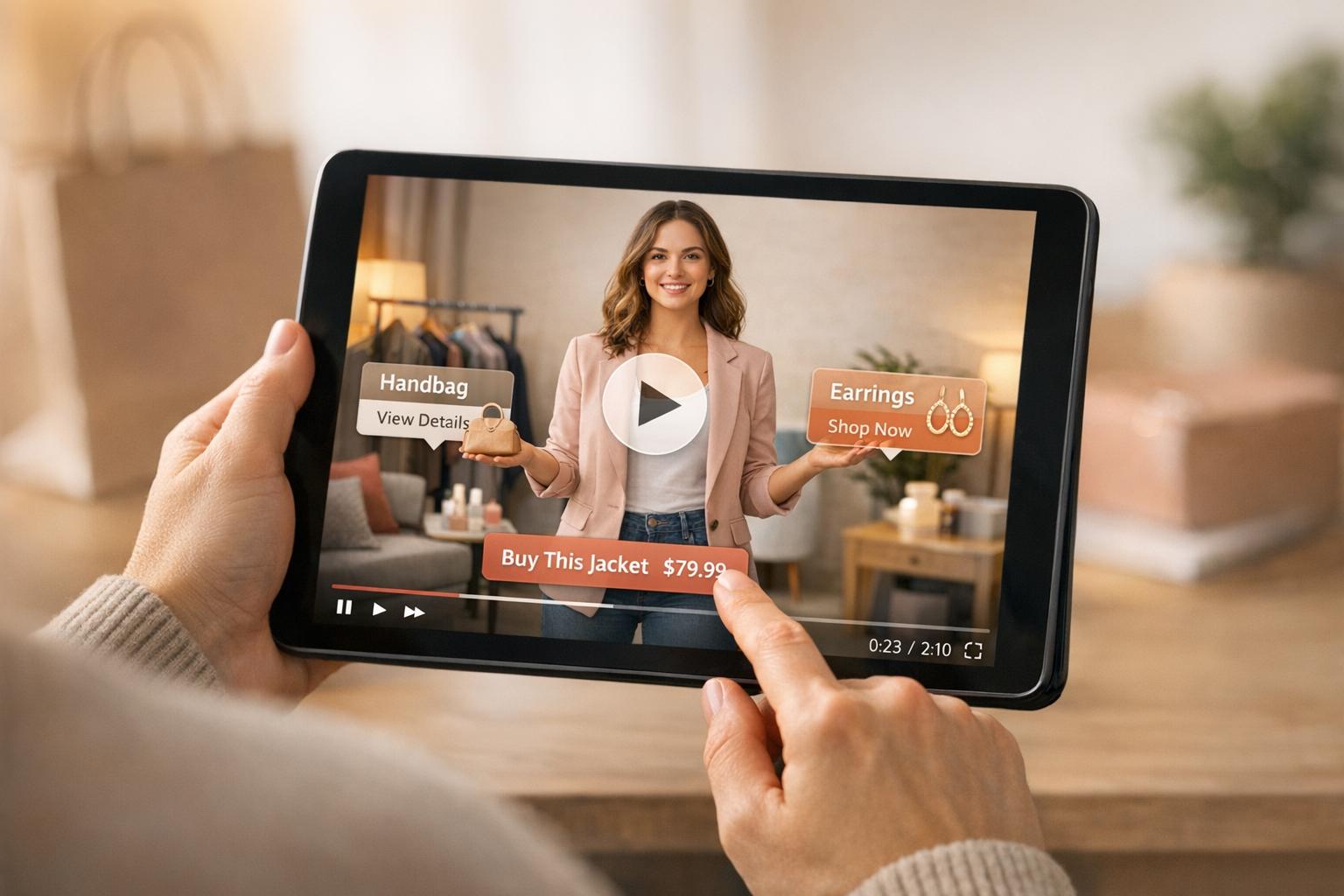
Video testimonials are one of the easiest ways to build trust and increase sales for your Shopify store. Why? Because they show real customers sharing their experiences, which helps potential buyers feel confident in their decision. Research proves their impact:
- 92% of consumers trust peer recommendations over ads.
- Websites with video testimonials see conversion rates increase by up to 80%.
- People retain 95% of a message when watching a video, compared to just 10% when reading text.
Key reasons they work:
- They feel more real than text reviews, which can seem fake.
- Videos grab attention faster and keep viewers engaged longer.
- Emotional connections created through video make people more likely to buy.
If you’re struggling with low conversion rates, adding video testimonials to your Shopify store - on product pages, the homepage, or even checkout pages - can help turn visitors into customers. Tools like UWidget make embedding these videos simple, and tracking their performance through Shopify Analytics ensures you see the results.
The bottom line: Video testimonials aren’t just nice to have - they’re a proven way to boost sales.
The Conversion Problem in Shopify Stores

What Are Low Conversion Rates?
A conversion rate measures the percentage of visitors who take the desired action - in this case, making a purchase. On average, across industries, this rate hovers around 3.28%. For Shopify stores, it’s slightly lower, typically falling between 2.5% and 3%.
Let’s break that down: if your store gets 10,000 visitors a month and has a 2.5% conversion rate, you’re looking at about 250 sales. That means 97.5% of your traffic leaves without buying, resulting in missed revenue opportunities. The real challenge isn’t just driving traffic - it’s getting those visitors to actually click “Buy.” Understanding why most visitors don’t convert is key to solving this problem.
Main Causes of Low Conversions
Several factors contribute to low conversion rates, and they often boil down to issues with trust and engagement.
1. Poor Website Design and Navigation
First impressions matter. If your site is hard to navigate or visually unappealing, visitors won’t stick around. A complicated checkout process is another dealbreaker - 21% of shoppers will abandon their carts because of it. Speed is equally critical. If your pages take more than three seconds to load, 40% of users will leave.
2. Insufficient Product Information
When customers can’t fully understand or visualize a product, they hesitate to buy. Static images and text descriptions can leave too much to the imagination. Without clear details about size, texture, or quality, potential buyers feel uncertain, which often leads them to click away.
3. Lack of Trust and Social Proof
Trust is everything in e-commerce. As Talia Shani, Head of UK Marketing at Yotpo, puts it:
“Shoppers on your site know that you’re gonna say your products are awesome, but what’s going to get them to convert is seeing that your past customers said it”.
The data supports this: 63% of consumers are more likely to buy from a site with reviews and ratings, and 90% trust customer feedback over a business’s own claims.
But here’s the catch - traditional text reviews can feel staged or unreliable. That’s where video testimonials shine. They provide a more genuine, verifiable look at real customer experiences, helping to build the trust needed to turn browsers into buyers.
The Power of Customer Testimonial Videos (and how to get started!)
Why Video Testimonials Work Better Than Text Reviews
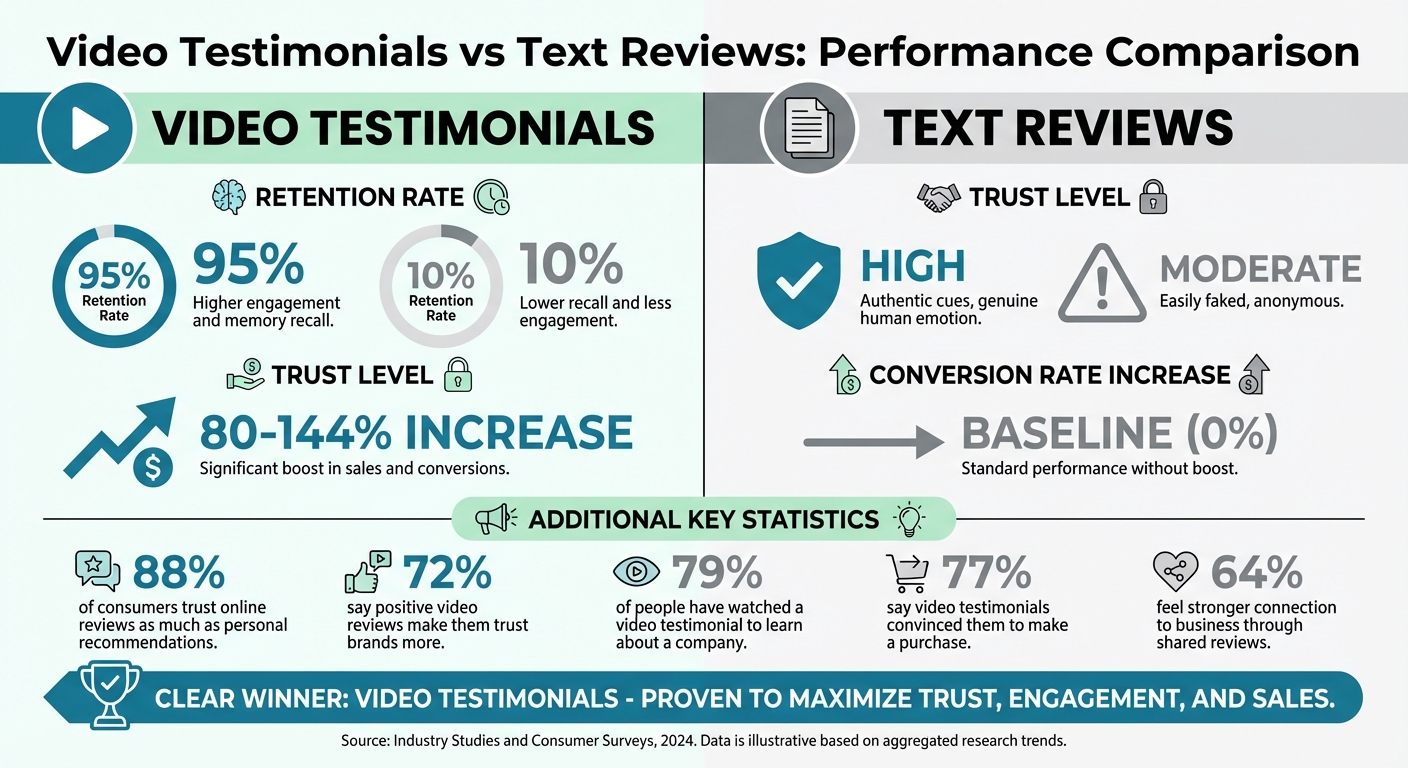
Video Testimonials vs Text Reviews: Impact on Conversion Rates and Customer Trust
Building Trust with Real Customer Stories
Text reviews can sometimes feel impersonal or even suspicious since they’re easy to fake. On the other hand, video testimonials feature real people whose expressions, tone, and gestures make their stories feel more genuine. These visual and emotional clues build trust in ways that plain text simply can’t match.
The stats back this up. Websites that use video testimonials see conversion rates jump by an average of 80%, with some studies showing increases as high as 144% compared to text-only reviews. Consumers clearly respond to video: 88% trust online reviews as much as personal recommendations, 72% say positive video reviews make them trust brands more, and 97% of B2B buyers consider user-generated video content more reliable than traditional marketing materials.
"Video testimonials don't just tell prospects what to think - they show them how to feel." - Cristian Magdil, Cofounder of Testimonial Star
Here's a quick comparison of text reviews versus video testimonials:
| Feature | Text Reviews | Video Testimonials |
|---|---|---|
| Retention Rate | 10% | 95% |
| Trust Level | Moderate (Easily faked) | High (Authentic cues) |
| Conversion Increase | Baseline | 80–144% increase |
This added trust translates into more engaged viewers, which is explored further below.
Higher Engagement with Video Content
Videos grab attention fast, making it easier for potential customers to understand your product's value. A whopping 79% of people have watched a video testimonial to learn about a company or product. Even more impressively, 77% say these videos helped convince them to make a purchase, and 47% report that video testimonials help them picture how a product or service fits into their lives.
A great example? In 2025, Dropbox saw a 10% boost in premium plan conversions after combining explainer videos with short customer testimonials that addressed common concerns.
But video doesn’t just engage - it creates emotional resonance, which is even more impactful.
Creating Emotional Connections Through Stories
Video testimonials go beyond facts and figures - they tap into emotions. Watching someone share their positive experience triggers mirror neurons in your brain, making you feel their excitement, satisfaction, or relief. This emotional connection is something text reviews simply can’t replicate.
Consider this: 64% of customers say they feel a stronger connection to a business because of shared reviews and values. And when testimonials are credible, buying intent can jump by over 92%.
"The power of a testimonial is in the fact that it is organic and human - don't take away from that with overly staged videos that feel too stiff or overproduced." - Testimonial Hero
sbb-itb-d9e5b3a
How to Add Video Testimonials to Your Shopify Store
Adding video testimonials to your Shopify store can build trust and encourage conversions when done right.
Getting Quality Video Testimonials from Customers
Timing is everything when asking for video testimonials. Research shows that requests sent during key satisfaction moments - like after a positive support interaction or a milestone - can yield a 65% and 58% response rate, respectively.
Make it easy for customers by offering mobile-friendly forms where they can record their videos instantly. Ask 3–4 specific questions, such as, "What problem did our product solve for you?", to guide their responses. Short and focused requests, like asking for a quick 30-second video, can make customers more willing to participate. Once they’re comfortable, you can follow up for longer testimonials.
Automating these requests can save time. Shopify apps can send reminders 30–90 days after a purchase, ensuring you don’t miss the opportunity to gather testimonials. And don’t forget to follow up! A three-touch follow-up strategy over two weeks, paired with personalized incentives like store credits or discounts, can significantly boost your chances - 80% of testimonials are collected during follow-ups.
"The challenge isn't that customers don't want to share their experiences... The real obstacle? Most businesses lack a systematic approach to collecting, managing, and showcasing these powerful trust signals." - Cristian Magdil, Cofounder of Testimonial Star
Once you have the testimonials, the next step is displaying them effectively.
Embedding Testimonials with UWidget
After collecting your video testimonials, tools like UWidget make it simple to showcase them on your Shopify store. Whether you want a carousel, a grid gallery, or a slider, this app helps you create visually appealing displays that highlight your customer stories.
UWidget is mobile-optimized, ensuring videos load quickly and look great on all devices - important since many shoppers browse on their phones. High-quality thumbnails can also make a big difference, as clearly labeled customer testimonial thumbnails often attract more clicks.
Setting up UWidget is quick and straightforward. Connect your YouTube channel, select the videos you want to feature, choose a layout, and embed the widget on your desired pages. The process takes just a few minutes, and you can customize the widget to match your store’s branding.
Where to Place Video Testimonials and How to Optimize Them
Strategic placement of your testimonials ensures they make the biggest impact. Your homepage is the ideal spot, especially above the fold, so visitors see them right away - this builds instant credibility. On product pages, testimonials act as targeted social proof, helping shoppers feel confident about their choices.
Consider creating a dedicated "Wall of Love" page where customers can browse testimonials by product category or customer type. This central hub showcases detailed customer experiences and can be a valuable resource for potential buyers. Testimonials on checkout and cart pages can also help reduce cart abandonment by reassuring hesitant buyers.
Keep your videos short and purposeful. For your homepage, use brief clips under 30 seconds to introduce your brand. On product pages, go for 45–60 seconds to focus on specific features or benefits. Save longer videos (around 2 minutes) for landing pages where shoppers are closer to making a decision.
To drive conversions, consider adding a "Buy Now" or "Add to Cart" button next to the video. This makes it easier for customers to act immediately while they’re feeling inspired by the testimonial.
| Testimonial Type | Ideal Length | Best Placement |
|---|---|---|
| Introduction/Brand Awareness | Under 30 seconds | Homepage (Above the fold) |
| Feature/Service Specific | 45–60 seconds | Specific Product/Service Pages |
| Decision-Making/Deep Dive | ~2 minutes | Checkout or Landing Pages |
Tracking Video Testimonial Performance
After building trust with video testimonials, the next step is to measure their impact on conversions. Once your testimonials are live, tracking their performance helps you understand how they influence sales.
Metrics to Monitor
To gauge the effectiveness of your testimonials, focus on key metrics like conversion rate lift, video completion rates, and engagement time. Conversion rate lift shows how much sales increase on pages featuring video testimonials compared to those without them.
Keep an eye on video completion rates to see how much of each testimonial viewers actually watch. If viewers are dropping off early, consider trimming or reworking the content. Testimonials under 2 minutes tend to perform well. Additionally, engagement metrics, such as dwell time (how long visitors stay on pages with video content), offer valuable insights. Studies indicate that video can boost organic search traffic by as much as 157%.
If you’re using shoppable video features with tools like UWidget, track direct interaction metrics such as clicks on "Add to Cart" or "Buy Now" buttons. These clicks provide a clear picture of purchase intent. You can then analyze this data further using Shopify Analytics, as discussed in the next section.
Using Shopify Analytics to Track Results
Shopify Analytics takes things a step further by connecting video performance directly to sales data. With Shopify's built-in tools, you can use behavioral segmentation to group customers based on their interactions with video content. This helps identify which testimonials resonate most with specific audience segments.
It’s also important to track how testimonials influence site engagement and the customer journey. Data shows that consumers who interact with a review are 58% more likely to make a purchase compared to those who don’t. Embedding shoppable "Buy Now" buttons within the video allows you to directly measure sales generated from the testimonial.
A/B Testing for Better Results
Once you’ve gathered performance data, A/B testing can help optimize your video testimonials for maximum impact. Test one variable at a time - such as video placement, length, or thumbnail design - to see what drives better results. For example, you might compare placing a video above the "Add to Cart" button versus below it to determine which placement eases purchase hesitation more effectively.
Each test should start with a clear hypothesis. For instance: "Placing a customer testimonial near the pricing section will boost conversions by 15% because it addresses cost concerns at a critical decision point". Run your tests for at least 7 to 14 days to account for traffic variations and collect reliable data.
In 2023, Trustmary highlighted a case where a client achieved a 20% sales increase simply by adding a video testimonial to their checkout page. It’s also worth experimenting with different speakers - like everyday customers versus industry experts - to see who resonates more with your audience.
"A/B testing quickly confirms what your audience prefers."
- Ritika Tiwari, Content Writer and Strategist, Socialinsider
Conclusion
Video testimonials are a powerful way to increase conversions by highlighting real customer experiences. Research shows that viewers retain an impressive 95% of a video's message, compared to just 10% when reading text. Additionally, 77% of people say these videos directly influence their buying decisions. Unlike text reviews, video testimonials tap into mirror neurons, letting viewers emotionally connect with the satisfaction of others - a unique impact that text alone can't achieve.
For Shopify store owners, this means prioritizing the collection and display of video testimonials on key pages. Tools like UWidget make it easy to embed shoppable galleries, allowing customers to purchase directly from the testimonial. With potential conversion boosts of up to 80% and the fact that 9 out of 10 people trust customer testimonials over brand messaging, video testimonials are a must-have for reducing hesitation and driving more sales.
FAQs
How do video testimonials help build trust and increase engagement?
Video testimonials are a powerful way to build trust by showcasing real customers sharing their experiences. Unlike written reviews, they bring a personal element - viewers can see the person’s face, hear their voice, and pick up on their expressions. This creates a sense of connection and authenticity that helps ease skepticism and boosts confidence in your brand.
They’re also incredibly engaging. Video is a format that grabs attention quickly and is easy to absorb, especially for mobile users. A short testimonial can pack a lot into just a few seconds - emotions, relatable stories, and key product highlights. Plus, research shows that people are much more likely to remember visual content, with video testimonials increasing conversions by up to 34%.
If you’re a Shopify merchant, Fractal Apps: Exclusive Shopify Apps can make integrating video testimonials a breeze. Their UWidget app lets you embed customer videos directly into your store, whether as banners or galleries. This transforms your product pages into trust-building assets that encourage shoppers to hit “buy.”
How can I effectively collect video testimonials to boost conversions?
Collecting video testimonials can be a game-changer for building trust and boosting customer confidence on your Shopify store. When done right, they can lead to higher conversions. Here’s how to streamline the process and make it effective:
- Pick the right customers: Reach out to happy buyers who represent your target audience. Timing is everything - ask for testimonials soon after they’ve had a positive experience with your product or service.
- Simplify the process: Make it as easy as possible for customers to record and send their videos. Use tools that don’t require downloads or complex instructions.
- Give them direction: Provide a few open-ended prompts to guide their responses. For example, ask, “What challenge were you facing? How did our product solve it?” This helps capture genuine, relatable stories.
- Focus on quality over length: Keep videos short and to the point - 30 to 90 seconds is ideal. Ensure good lighting, clear sound, and minimal editing to keep the content authentic.
Once you have their videos, display them prominently on your Shopify store. Tools like Fractal Apps’ UWidget make it easy to embed video galleries or carousels. By showcasing these testimonials, you not only create engagement but also tap into the persuasive power of video to drive more conversions.
Where should I add video testimonials on my Shopify store to increase conversions?
Adding video testimonials to key spots on your Shopify store can help build trust and increase conversions. Here are some prime areas to consider:
- Homepage: Feature a short, compelling testimonial in the hero section to make a strong first impression and establish credibility with new visitors.
- Product pages: Place testimonials near product descriptions or image galleries to provide relatable proof of quality while customers are weighing their options.
- Cart or checkout page: Add a quick testimonial near the checkout button to ease last-minute doubts and encourage buyers to complete their purchase.
Tools like UWidget make it simple to embed these videos as carousels, sticky elements, or banners - no coding required. By showcasing testimonials at critical decision points, you’ll boost customer confidence and see better results.