When selling products online, the media you use on your Shopify store can make or break conversions. Video widgets outperform static images in driving sales and engagement. Here's why:
- Video widgets: Boost conversions by up to 80%, keep visitors on pages longer (1:34 vs. 38 seconds), and are ideal for dynamic products like beauty tools or gadgets.
- Static images: Load faster, cost less to produce, and work well for simple products or technical specs.
Quick Comparison
| Metric | Video Widgets | Static Images |
|---|---|---|
| Engagement Time | 1:34 per page | 38 seconds per page |
| Conversion Rate | Up to 8.2% | 1.4% (Shopify average) |
| Best Use Cases | Complex, dynamic products | Simple, straightforward items |
| Load Speed | Slower, requires optimization | Faster |
| Cost | High (up to $50,000 per minute) | Low ($0–$500 per image) |
Key takeaway: Use video widgets for products that need demonstration and storytelling. Stick to static images for simpler items or when working with a tight budget. A mix of both often works best.
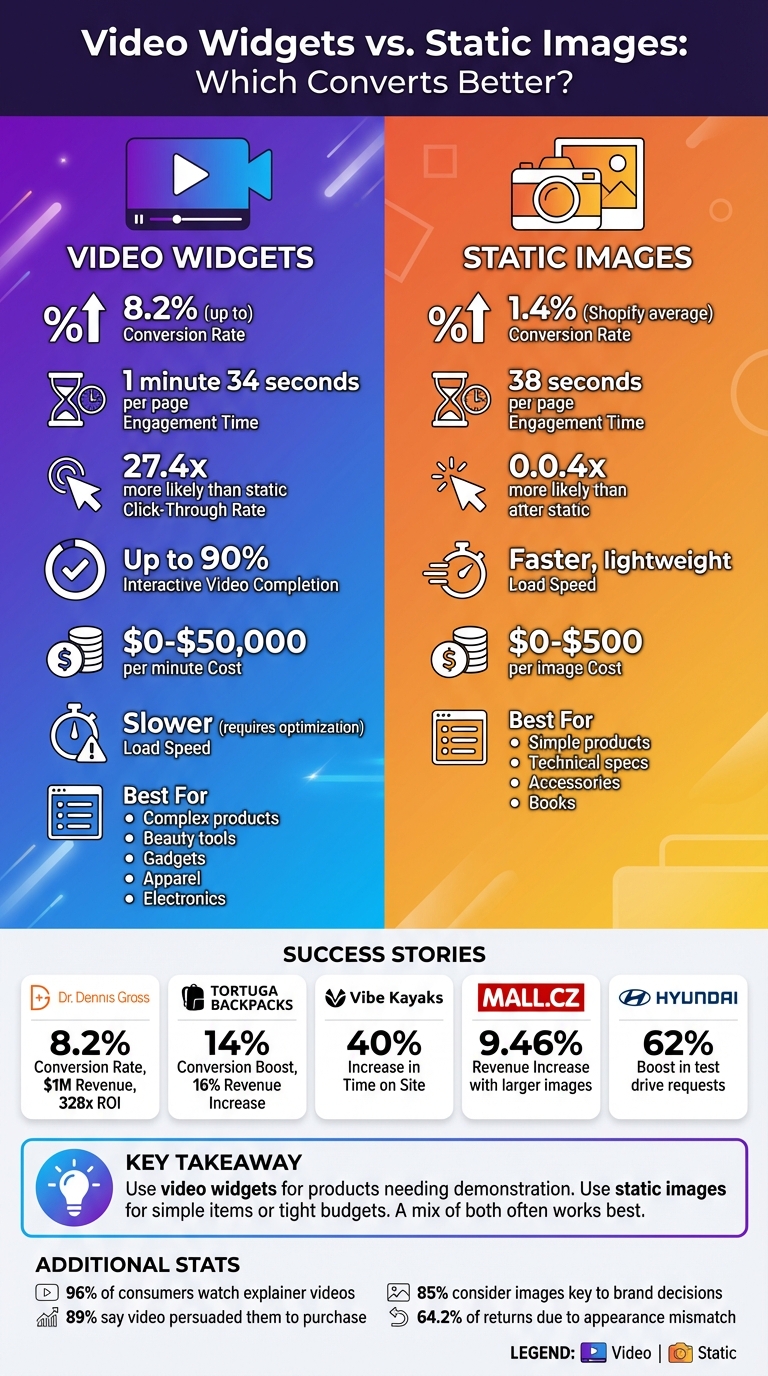
Video Widgets vs Static Images: Conversion Rate and Engagement Comparison
Video vs Images Text The Key to Higher Conversions
Video Widgets: How Dynamic Content Drives Engagement
Video widgets offer an engaging, interactive experience that not only grabs attention but also builds buyer confidence. Unlike static images, which provide only a single perspective, video widgets bring products to life - demonstrating them in action, addressing common questions, and turning casual browsers into loyal buyers. Let’s dive into how video widgets outperform static images when it comes to driving engagement and boosting revenue.
Video Widgets Increase User Engagement
The numbers don’t lie - video widgets are incredibly effective at capturing attention. They align with how people naturally consume content. For instance, 96% of consumers have watched an explainer video to learn about a product or service, and 41% actively seek out product videos during their shopping journey.
Beyond polished photography, user-generated content adds authenticity. Videos showcasing real-life product use answer the "how does this work?" questions that static images simply can’t. Take Vibe Kayaks as an example: they introduced shoppable video widgets featuring user-generated clips of their kayaks in action. The result? A 40% increase in time spent on their site.
How Video Widgets Affect Conversions and Revenue
Higher engagement often leads to more sales, and video widgets make this connection seamless. Shoppable video widgets allow customers to add items to their cart or purchase directly from the video player. This eliminates unnecessary steps, keeping shoppers focused on the content that inspired them to buy. Tortuga Backpacks saw impressive results after adopting video widgets, reporting a 14% boost in conversion rates and a 16% increase in revenue per visitor.
"Videowise is a no-brainer for us. Unlike many tools we've tested, it's cost-effective and paid for itself from the time we installed it."
- Co-founder Jeremy Michael Cohen
Video widgets are particularly effective for products that need motion or detailed visual explanations, like tech gadgets, beauty tools, apparel, or anything with moving parts. The data backs this up: viewers are 27.4 times more likely to click on video ads compared to static ones, and interactive videos can see completion rates as high as 90%.
Best Practices for Video Widgets on Shopify

To get the most out of video widgets, focus on both content and technical optimization. Start with placement: position your video widgets at the top of product pages, integrate them with your image gallery, and use thumbnails with a clear "play" icon. Shockingly, 35% of major ecommerce sites fail to embed videos properly, making them difficult for shoppers to find.
Keep your videos short and to the point - 30 to 60 seconds is ideal for product demos. The first few seconds are critical, so lead with your most visually striking or compelling benefit. Since many users browse with their sound off - especially on mobile, which accounts for nearly 75% of all ecommerce visits - be sure to include captions or text overlays.
On the technical side, optimize for speed. Use lazy loading to prevent videos from slowing down your page and implement "thumbnail-first" rendering so visitors see an image immediately while the video loads in the background. And don’t forget a clear call-to-action, like "Shop Now" or "Add to Cart", to encourage immediate action.
For Shopify merchants, UWidget makes video integration simple. This app supports YouTube videos, Shorts, playlists, and various widget styles like galleries, carousels, and sticky videos. With a perfect 5.0/5 star rating on the Shopify App Store, UWidget offers built-in lazy loading and plans starting at just $5.99/month. Whether you’re on the Starter, Pro, or Premium plan, UWidget ensures you can add video content without slowing down your store.
These tips set the foundation for a deeper comparison between video widgets and static images, especially when evaluating their performance and effectiveness.
Static Images: Fast Loading and Clear Product Display
While video widgets grab attention with their motion and interactivity, static images have long been the cornerstone of ecommerce product pages. They’re quick to load, deliver essential product details almost instantly, and work seamlessly across all devices and internet speeds. Static images ensure a smooth, reliable experience for shoppers.
Why Static Images Work for Ecommerce
Static images excel at presenting product details quickly and efficiently, using very little bandwidth. And speed matters - a one-second improvement in load time can increase mobile conversions by up to 27%, encouraging repeat purchases.
The statistics back up their importance. 85% of shoppers consider product information and images key factors when deciding between brands, and businesses using visual content report 7 times higher conversion rates compared to those that don’t. High-resolution images allow customers to zoom in on textures, stitching, and materials. This level of detail builds confidence, making shoppers more likely to click "Add to Cart." For example, in 2025, Mall.cz partnered with the CRO agency Optimics to test larger product images with descriptions shown on mouseover. The result? A 9.46% revenue increase. Similarly, Hyundai replaced smaller product photos with larger, clearer ones, leading to a 62% boost in test drive requests.
Static images also shine in low-bandwidth scenarios. Shoppers using older devices or slower connections can browse without interruptions. Plus, most Shopify themes come equipped with excellent image gallery functionality - 80% of Shopify stores pass UX checks for offering multiple product images. Compare that to video widgets, where 35% of major ecommerce sites struggle with proper embedding.
Where Static Images Fall Short
Despite their strengths, static images have limitations. They can’t show motion, which is crucial for illustrating how products like kitchen gadgets or flowing apparel work. This shortfall can lead to 64.2% of returns when the product’s appearance doesn’t meet expectations.
Engagement is another challenge. Unlike videos, which captivate through dynamic content, static images rely entirely on clarity and speed. Shoppers may scroll past them quickly, spend less time on the page, and leave without fully understanding the product. For complex or interactive items, static images can’t compete with the immersive experience videos provide.
How to Optimize Static Images for Better Conversions
Even with their drawbacks, static images can deliver strong results when optimized effectively. Start by compressing image files using tools like TinyPNG or Kraken.io. Use JPEG for standard product photos to balance quality and file size, and PNG for images requiring transparency. Implement lazy loading so images load only when they come into view, improving initial page speed.
Enable zoom functionality for high-resolution images - shoppers are 3 times more likely to convert on sites with high-quality imagery and zoom options. Provide multiple angles to give customers a complete view of the product, and include lifestyle images that show the product in action. For instance, Express Watches added a "Seiko Authorized Dealer" badge to their product images, which led to a 107% increase in sales.
"My experience as a web designer has taught me that when it comes to ecommerce, people do judge a book by its cover, so invest in solid product photography." - Mark Perini, Founder, ICEE Social
Static images work best when paired with video widgets rather than replacing them. Use static images for their speed and clarity, and add videos for products requiring demonstrations. Together, they create a balanced strategy that enhances both user experience and conversion rates.
sbb-itb-d9e5b3a
Video Widgets vs. Static Images: Direct Comparison
By examining their strengths and limitations, we can directly compare video widgets and static images. The table below highlights how each performs across key metrics that matter most to Shopify merchants.
| Metric | Video Widgets | Static Images |
|---|---|---|
| Conversion Rate Impact | 8.2% (high-performing brands) | 1.4% (Shopify average) |
| Engagement Time | 1 minute 34 seconds | 38 seconds |
| Product Understanding | Better for complex/dynamic products | Adequate for simple products |
| Load Performance | Slower; requires optimization | Faster, lightweight format |
| Best-fit Use Cases | Apparel, beauty, electronics, gadgets | Simple products, technical specs |
The numbers reveal that video widgets significantly outshine static images in engagement and conversion rates - holding attention for more than twice as long and driving nearly six times the conversions. That said, static images still have their place - they load quickly, work seamlessly across devices, and provide quick-reference details that shoppers often need. Let’s break down these metrics further.
Performance Metrics Comparison
As the table illustrates, video widgets dominate when it comes to driving engagement and conversions. For example, in 2023, skincare brand Dr. Dennis Gross used shoppable video widgets on their Shopify store, achieving an 8.2% conversion rate and generating over $1 million in revenue, with a remarkable 328x ROI. Of this, $50,000 came directly from purchases made through the video interface. Similarly, Tortuga Backpacks saw a 3.5% overall boost in conversion rates, a 14% increase on product pages, and a 16% rise in revenue per visitor after integrating video content.
"Videowise is a no-brainer for us. Unlike many tools we've tested, it's cost-effective and paid for itself from the time we installed it." - Jeremy Michael Cohen, Co-founder, Tortuga Backpacks
Interestingly, static images tend to perform better for desktop users, who convert 58% more often than mobile users. On the other hand, video widgets - especially those optimized for vertical formats - excel on mobile, capturing attention more effectively in a mobile-first shopping environment.
When Video Widgets Perform Best
Video widgets shine in situations where motion and storytelling are essential. Products that benefit from dynamic demonstrations - like apparel (showing fabric movement and fit), beauty products (demonstrating application techniques), or electronics (highlighting functionality) - see the most success.
For example, Vibe Kayaks leveraged user-generated video content to boost on-site time by 40%. Interactive videos can achieve up to 10 times higher click-through rates compared to static content, and 89% of consumers say watching a video has persuaded them to make a purchase.
When Static Images Are More Effective
Static images, however, remain a solid choice for simpler products and cost-conscious merchants. They work well for items like books, basic home goods, or accessories that don’t require demonstration. High-quality images with zoom functionality can efficiently showcase product details without the need for video.
For merchants just beginning to optimize their media approach, static images are a practical and cost-effective starting point. Production costs for static images range from $0 to $500 per image, while video production can range from DIY efforts to professional work costing upwards of $50,000 per minute. For those with tighter budgets, starting with static images and gradually integrating video widgets on high-value product pages is a smart strategy. Affordable tools like UWidget make it easy to add YouTube videos to your Shopify store, starting at just $5.99/month for their Starter plan.
Conclusion: Choosing the Right Media for Your Shopify Store
Key Insights for Shopify Merchants
When it comes to media formats, the numbers don’t lie: video widgets drive higher engagement and conversions, but static images still hold their place in the right scenarios. Video widgets have been shown to outperform static images across key metrics like click-through rates and conversions. That said, your choice should align with your product type, audience, and budget.
Here’s a simple rule of thumb: use videos for dynamic, visually engaging products - think gadgets, beauty items, or apparel. On the other hand, static images work better for straightforward items like books, accessories, or products with technical specs. Budget considerations also play a big role. Static images are relatively affordable, costing between $0 and $500 per image. Video production, however, can vary widely, from DIY options costing $0–$1,000 per minute to professional shoots exceeding $50,000 per minute.
A hybrid approach often delivers the best results. Use static images as your baseline and strategically incorporate videos on high-value product pages where the investment makes sense. To refine your strategy, monitor metrics like click-through rates, add-to-cart rates, and overall conversions. Keep in mind that desktop users tend to favor static images, converting 58% more often, while mobile users respond better to vertical video formats.
Leveraging Fractal Apps for Smarter Media Use
To make the most of your media strategy, Shopify merchants can turn to specialized tools designed for seamless media integration. For example, UWidget allows you to easily embed YouTube videos directly on your product pages. This app supports features like galleries, carousels, sticky videos, and YouTube Shorts, giving you plenty of ways to showcase your products in action - all without the need for pricey video hosting services.
In addition to UWidget, tools like ILikeThat can help you gauge product appeal, while DivideItUp simplifies your page layouts for a cleaner, more engaging presentation. These apps are designed to optimize your media mix without requiring technical know-how, letting you focus on what matters most - driving sales and growing your business.
FAQs
How do video widgets enhance the mobile shopping experience?
Video widgets are changing the game for mobile shopping by creating a more interactive and engaging experience. They help keep users on the page longer and encourage more purchases. Considering that over 75% of e-commerce traffic now comes from mobile devices, adding short, mobile-friendly videos near product images can make a big difference. Here's a striking fact: shoppers who watch a product video are 64% more likely to add the item to their cart, and these videos can extend the average visit by about two minutes.
For Shopify store owners, tools like UWidget from Fractal Apps make it super simple to embed YouTube videos directly onto product pages, homepages, or even collection grids. These widgets are designed with mobile users in mind, featuring lazy-loading and compression to ensure quick load times without compromising the shopping experience. Adding video widgets not only boosts engagement but also helps drive higher conversion rates, offering a smooth, tap-to-shop experience that's perfect for mobile shoppers.
What are the cost differences between using video widgets and static images?
Video widgets often come with steeper production costs. This includes expenses for editing, sound design, and handling larger file sizes, which can drive up hosting or bandwidth fees. Depending on the production quality, creating video content can cost anywhere from $0 to $50,000 per minute.
On the other hand, static images are a more budget-friendly option. Whether crafted through basic graphic design or professional photography, they’re not only cheaper to produce but also load much faster, keeping overall costs in check. For businesses, the decision usually boils down to weighing budget limitations against the potential for better engagement and conversion rates.
What are the best ways to ensure video widgets load quickly on my Shopify store?
To make video widgets load faster on your Shopify store, focus on a few key techniques: compressing files, choosing efficient formats, and loading videos smartly. Start by compressing video files - export them in MP4 format using the H.264 codec and aim for file sizes under 5 MB. This strikes a good balance between quality and loading speed.
Next, implement lazy-loading techniques. Instead of loading the entire video upfront, display a static thumbnail first. The video itself should load only when users scroll to it or interact with it. This approach helps keep your page performance intact.
Another tip? Serve videos through a CDN (Content Delivery Network). CDNs deliver videos from servers closer to your customers, reducing loading times. Also, set explicit width and height attributes for videos to prevent layout shifts, which can disrupt the user experience. On mobile devices, avoid autoplay and looping to save data and reduce unnecessary requests.
Finally, keep an eye on your store’s performance by using tools like Shopify’s Speed Report. Regular testing ensures your videos aren’t dragging down page speed or affecting conversions. By following these steps, you can offer engaging video content without compromising your store’s performance.