Selling multi-variant products on Shopify can be challenging due to its built-in limitations, like a cap of 100 variants per product and only 3 option types (e.g., Size, Color, Material). To overcome these restrictions and improve the shopping experience, specialized apps allow you to:
- Display each variant as a separate product on collection pages.
- Replace dropdown menus with swatches or buttons.
- Auto-hide out-of-stock variants.
- Add "Add to Cart" buttons directly to collection pages.
- Exceed Shopify's 100-variant limit.
Popular apps include Varco, Globo Product Options, and EX Show Variants, each offering tools to simplify variant management, improve navigation, and boost conversions. For example, Varco splits variants into individual listings, making browsing easier and faster for your customers.
Quick Tip: Most apps offer free trials, so you can test features like dynamic image switching, bulk editing, and conditional logic to find the best fit for your store.
How To Show Product Variants As Separate Products On Shopify Collection Page

sbb-itb-d9e5b3a
What to Look for in a Variant Management App
Choosing the right variant management app for your Shopify store can streamline operations and improve the shopping experience. Here’s a rundown of the essential features to keep in mind.
Display Customization Options
Engaging displays - like swatches, images, or text buttons - can replace standard dropdown menus, making it easier for customers to interact with your products. Some apps even allow variant splitting, which displays each variant as its own card on collection pages. This makes browsing feel more intuitive and boosts visibility.
Other handy features to look for include dynamic image switching, where the main product photo updates as customers select different variants. Conditional logic is another standout - it hides or shows options based on customer selections, keeping the interface clean and easy to navigate. Additionally, having "Add to Cart" buttons directly on collection pages can cut down on unnecessary clicks and speed up the purchase process.
"How you display your product variants can be the difference between a bounce and a conversion." – Abhijeet Singh, CEO, Appbrew
For the best results, prioritize apps that combine these visual features with seamless installation and smooth integration.
Easy Setup and Integration
While visual elements grab attention, a hassle-free setup ensures your store runs smoothly. Look for apps that are compatible with non-standard or customized Shopify themes. Many top-rated apps offer no-code installation options, like app embeds or simple toggles, making them accessible even for non-technical users.
For example, Stamp – Variants on Collection has earned a stellar 5.0 rating from 89 reviews, with merchants frequently praising its ease of use and compatibility with other apps.
"I tried multiple other apps for this functionality... The other apps I tried either conflicted with our theme or other apps in our store. This app does exactly what it says and is easy to setup." – Quite Cozy
Apps with a "Built for Shopify" badge are a safe bet, as this certification ensures they meet Shopify’s standards for performance and integration. Features like bulk management tools and CSV import/export capabilities can save significant time when dealing with large product catalogs. Lastly, responsive customer support is a must - many reviews of EX Show Variants specifically highlight its smooth integration process.
A well-integrated app doesn’t just enhance visuals - it keeps your store running efficiently as your business grows.
Performance with Large Inventories
If your store has a large inventory, scalability becomes a top priority. Some apps bypass Shopify’s 100-variant limit, allowing you to offer unlimited product options. For instance, Globo Product Options is known for handling extensive inventories with ease.
Performance optimization is equally important. Features like infinite scroll and optimized loading scripts ensure that displaying numerous variants won’t slow down your site. Apps like EX Show Variants (4.6 stars from 199 reviews) are praised for maintaining fast loading times even with heavy product catalogs.
Other useful tools include automated rules that hide out-of-stock variants or group products by specific attributes. If you’re using Shopify Plus, look for apps that support enterprise-level scaling with features like bulk editing and API access. Also, double-check the paid plans - some entry-level options limit you to 30 active collections, which may not be enough for larger stores.
For large inventories, apps like Varco stand out by offering robust features and unlimited collection support, ensuring your store can handle growth without compromising performance.
Best Shopify Apps for Product Variants
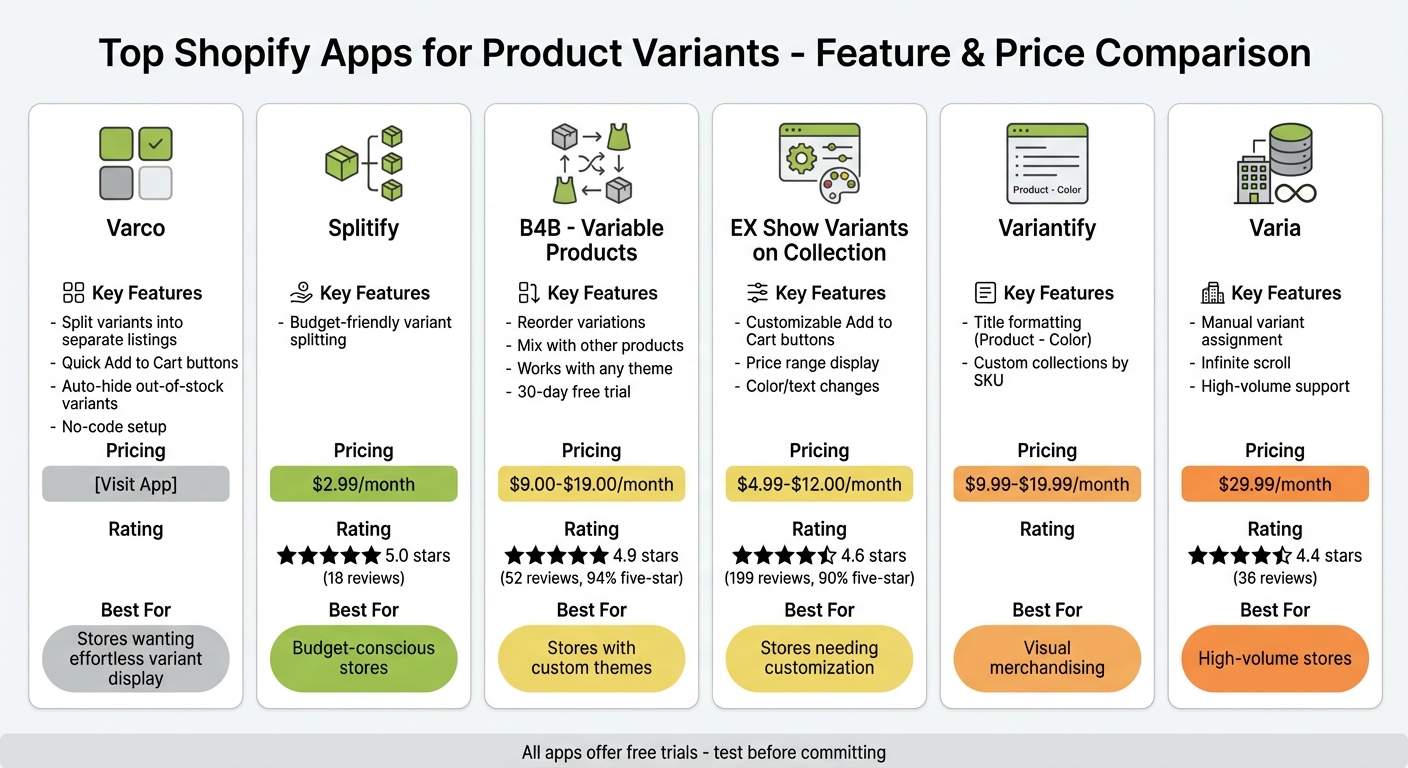
Comparison of Top Shopify Variant Management Apps: Features, Pricing, and Ratings
Finding the right product can be frustrating when variants like color, size, or style are hidden behind dropdown menus. Luckily, several Shopify apps tackle this issue by displaying each variant as a separate listing on collection pages, making browsing and purchasing much easier.
Varco: Show Variants on Collection Pages
Varco by Fractal Apps changes how variants appear on collection pages. Instead of requiring customers to click through individual product pages, Varco splits variants into separate listings and adds "Quick Add to Cart" buttons. For example, if a dress comes in five colors, each color gets its own listing, giving shoppers a clear view of your entire catalog. Plus, it automatically hides out-of-stock variants, keeping your store clean and user-friendly.
Varco is designed for Shopify Online Store 2.0 themes and installs easily via app embeds, making it accessible even for store owners without technical skills. This tool is a game-changer for improving customer browsing and boosting sales.
If Varco’s features don’t align with your needs, there are other great apps for managing product variants.
Other Product Variant Apps
- Splitify: With a perfect 5.0-star rating from 18 reviews, Splitify is a budget-friendly option at just $2.99/month.
-
B4B ‑ Variable Products: Priced between $9.00–$19.00/month, this app boasts a 4.9-star rating from 52 reviews, with 94% being five stars. It excels at reordering variations and mixing them with other products. A 30-day free trial is included.
"The only one who works out-of-the-box on any theme (and trust me our theme is NOT standard)" – The French Factory
-
EX Show Variants on Collection: This app, costing $4.99–$12.00/month, has a 4.6-star rating across 199 reviews, with 90% of users giving it five stars. Merchants love its customization options for "Add to Cart" buttons, including color and text changes, and its ability to display price ranges for variants.
"Great tool to split products by color variant. Customer service handled my most recent issue fast and easily" – The Great PNW
-
Variantify: At $9.99–$19.99/month, this app focuses on user-friendly features like formatting titles as "Product - Color" and creating custom collections by SKU.
"Definitely a visual lever to better sell your products" – GG Luxe Watch
"Issues have been fixed very quickly and with good quality" – Rosemunde -
Varia: Designed for high-volume stores, Varia costs $29.99/month and allows manual assignment of variants to specific collections. It also includes infinite scroll features. While it has an older interface, its 4.4-star rating from 36 reviews highlights its responsive customer support.
"Very helpful and responsive customer support" – Anonymous
These apps cater to a variety of needs, whether you're looking for budget-friendly options, advanced customization, or tools for large inventories. Each offers unique features to enhance the way your store handles product variants.
Why Varco by Fractal Apps Works Well
Varco solves a common problem in online retail: ensuring every product option gets noticed without requiring extra clicks. By showing each color, size, or style as a separate listing on your collection page, the app ensures every variant has equal visibility.
Effortless Variant Display and Control
Varco puts you in charge of how variants appear on your collection pages. You can either automatically display all variants or handpick specific ones for special collections. For instance, if you're curating a "Red Collection" for the holidays, you can showcase only red variants from your product catalog. Each displayed variant links directly to its product page, making navigation seamless and intuitive. This level of control enhances the browsing experience for customers.
Smoother Shopping and Higher Conversions
By clearly presenting product options, Varco enhances the shopping experience further with "Add to Cart" buttons placed directly on collection pages. Shoppers can add items to their cart without needing to visit individual product pages, cutting out unnecessary steps. This streamlined process not only improves convenience but also helps increase conversion rates by simplifying the path to purchase.
Easy Setup and Reliable Support
Varco doesn’t just improve the user experience - it’s also designed to be easy for store owners to implement. The app features a no-code setup, making installation straightforward. While some Shopify themes may require slight adjustments, the support team is ready to assist. They handle technical challenges, like fixing lazy loading issues, to ensure your variants display perfectly. These features make Varco a game-changer for managing and showcasing variants on Shopify collection pages.
Choosing the Right App for Your Store
Main Points
Shopify's built-in limitations - like the cap of 3 options and 100 variants per product - can be a real hurdle for stores looking to grow. Picking the right variant management app is crucial for overcoming these restrictions and creating a smooth shopping experience. The right app not only removes these limits but also helps customers easily find and purchase what they need.
When choosing an app, focus on features like customizable displays, mobile responsiveness, and seamless integration with collection pages. A well-optimized mobile display can make a big difference in conversions and overall customer satisfaction. For fashion and beauty brands, tools like color swatches and real-time image updates are a must. Stores offering personalized products should look for apps with text input options and file upload capabilities.
What to Do Next
To find the perfect app for your store, start by taking advantage of free trials. Most variant apps offer trial periods ranging from 7 to 14 days, giving you enough time to test their compatibility with your store's theme and evaluate their performance without any financial commitment. During this trial period, pay close attention to the quality of customer support. A responsive support team can assist with theme adjustments and technical tweaks, ensuring everything runs smoothly.
For example, Varco provides a no-code solution that simplifies the process. Its split-listing feature can make browsing easier for customers, potentially boosting your conversion rates. You can test Varco during its trial period to see how it works with your current setup. By splitting variants into separate listings, you can evaluate whether it enhances your store's browsing experience and drives better results. Use the trial period to confirm that your chosen app delivers the improvements your store needs, just as Varco has done for many merchants.
FAQs
Will splitting variants hurt my SEO?
Splitting product variants into separate listings can give your SEO a boost. By doing this, each variant gets the chance to rank independently in search results. Plus, you can optimize each listing with variant-specific SEO tags, making it easier to attract traffic that's more aligned with what shoppers are searching for.
Will variant apps slow down my collection pages?
Well-designed and properly optimized variant apps typically won't impact the speed of your collection pages. However, apps that are overly complex or not optimized can slow things down. To prevent this, stick to apps that are recognized for their efficiency and performance.
How do I choose the right variant app for my theme?
To pick the best variant app for your store, start by evaluating your specific needs and ensuring the app works well with your theme. Look for features like the ability to show variants on collection pages, user-friendly controls, and options such as unlimited choices or conditional logic. User reviews can help you gauge the app's reliability. Also, make sure the app integrates smoothly with your theme and provides a mobile-friendly design to keep customers engaged.