Displaying product variants directly on Shopify collection pages can simplify and improve the shopping process for customers. By default, Shopify only shows one main product image per item, hiding options like color or size until visiting the product page. Apps like Varco help solve this by showcasing each variant as a separate listing, making it easier for shoppers to browse, compare, and purchase.
Key Benefits:
- Improved Visibility: Show all product options (e.g., colors, sizes) directly on collection pages.
- Faster Shopping: Enable customers to add specific variants to their cart without extra clicks.
- Dynamic Updates: Automatically hide out-of-stock variants to reduce clutter.
How It Works:
- Install the Varco app via the Shopify App Store.
- Enable variant display for specific collections in the app's dashboard.
- Customize settings (e.g., variant titles, filters for out-of-stock items).
- Preview changes to ensure proper display and functionality.
Pricing:
- Pro Plan: $9.99/month for up to 30 collections.
- Advanced Plan: Unlimited collections, with extra support for custom themes.
How To Show Product Variants As Separate Products On Shopify Collection Page

sbb-itb-d9e5b3a
Getting Started with Varco

Varco is a Shopify app that turns product variants into individual listings. These listings appear on collection pages, homepages, and search results, making it easier for customers to find and select the exact product they want.
Why Use Varco for Shopify
Varco simplifies the shopping process by creating separate product cards for each variant. These cards link directly to the main product page, with the selected variant already pre-chosen. This means customers can add items to their cart instantly, without navigating through multiple pages.
This setup changes the way customers browse your store. Instead of switching back and forth between pages, they can view all options side-by-side, making comparisons quicker and shopping more straightforward.
Varco Features and Theme Compatibility
Varco allows you to customize how variant titles appear, such as "Product Name – Variant Color", and offers advanced filters to hide out-of-stock items or highlight discounted variants. It works seamlessly with Shopify themes, including Online Store 2.0. However, minor tweaks might be necessary if you're using custom features.
The app is designed for easy integration with your existing setup. To install it, you'll need administrative permissions, as it requires access to store owner data and the ability to edit products, collections, and your Online Store theme.
How to Install and Set Up Varco
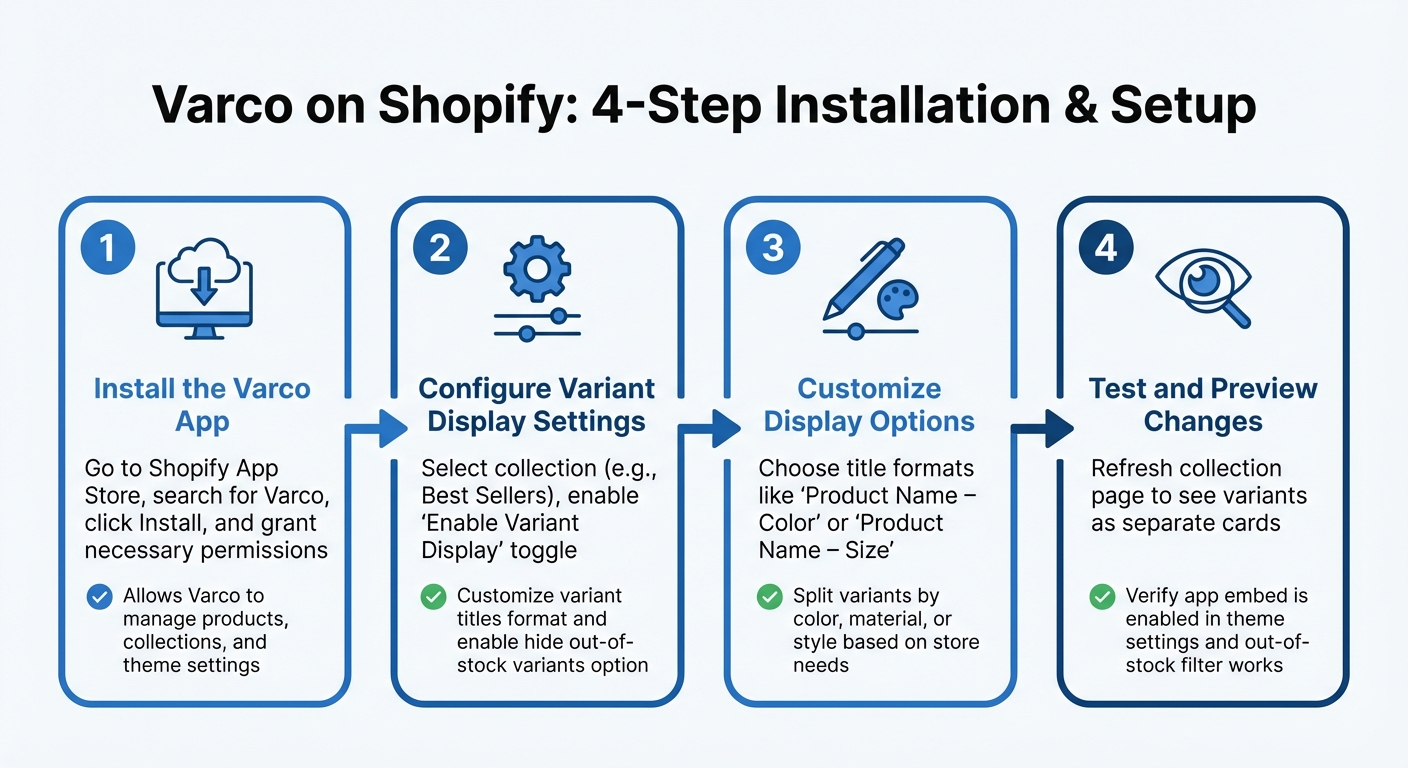
How to Set Up Varco on Shopify: 4-Step Installation Guide
Setting up Varco allows your store to display each product variant individually, making it easier for customers to browse and choose their preferred options.
Installing the Varco App
First, go to the Shopify App Store and search for Varco. Click Install and grant the necessary permissions. This allows Varco to manage products, collections, and theme settings so it can automatically adjust how variants are displayed.
Once installed, open Varco from your Shopify Admin panel. From there, you can start managing how your product variants appear in collections.
Configuring Variant Display Settings
In the Varco dashboard, select the collection you want to update - like "Best Sellers" or "New Arrivals." Turn on the Enable Variant Display toggle to activate the variant splitting feature.
You can then customize how variant titles appear on collection pages. For instance, you might choose formats like "Product Name – Color" or "Product Name – Size" to make browsing easier for your customers. Additionally, you can enable the option to hide out-of-stock variants to keep your collection pages tidy and avoid frustrating customers with unavailable items. Varco also lets you split variants based on attributes like color, material, or style, depending on your store's needs.
Testing and Previewing Changes
After updating your settings, refresh the relevant collection page. You should now see each variant displayed as a separate card within the collection grid. Clicking on a variant card should take customers directly to the product page with that specific variant pre-selected.
Make sure the app embed is enabled in your Shopify theme settings. If you’ve turned on the out-of-stock filter, double-check that unavailable variants no longer appear on the collection page.
Advanced Customization Options
Once you've completed the basic setup with Varco, you can dive into advanced customization options to refine how variants are displayed on your Shopify collection pages. These tools allow you to shape a more curated and seamless shopping experience for your customers.
Sorting and Filtering Variants
Varco offers rule-based configurations that give you control over which variants are visible and how they are arranged. These rules can be applied globally, to specific collections, or even to individual variants. For instance, if you're running a Valentine's Day promotion, you could set a rule to display only red-colored variants, creating a cohesive, themed collection without the need for manual adjustments.
The app also provides advanced sorting capabilities, allowing you to reorder or randomize variant displays. Randomizing ensures that no single product dominates multiple rows, which is particularly helpful for items with numerous variants. You can also organize variants based on primary attributes like color or material while keeping secondary options, such as size, within the product's detail page. This keeps your collection grid clean and easy to navigate.
Another handy feature is the ability to "hide sold-out variants." As inventory changes, this option dynamically removes unavailable items from collection pages, reducing clutter and avoiding customer frustration. PARADE highlighted how Varco effectively showcases a variety of variant options while automatically hiding out-of-stock items. Additionally, enabling the "Display variants in search results" toggle allows customers to find specific variants directly through your store's search bar, making the shopping experience even more efficient.
These tools not only streamline variant management but also lay the groundwork for additional features that further enhance user satisfaction.
Adding Features to Improve User Experience
Varco includes several features designed to simplify and elevate the shopping process. One standout option is infinite scroll, which replaces traditional pagination. This allows customers to browse extensive catalogs without needing to click through multiple pages, offering a smoother, app-like browsing experience.
Customizable "Add to Cart" buttons and inherited theme styling ensure a seamless integration with your brand. You can tweak button text and colors to align with your branding, while the app automatically adopts your Shopify theme's typography and styling for a consistent, polished look.
For stores with more complex inventories, the price range display feature - available in higher-tier plans - shows the lowest and highest prices when variants have different price points. This provides customers with instant pricing transparency, eliminating the need to click into individual product pages to view costs.
These advanced options not only enhance functionality but also create a more intuitive and enjoyable shopping experience for your customers.
Varco Pricing Plans
Varco offers two pricing options tailored to stores of varying sizes. Once you've set up your variant displays, you can choose a plan that aligns with your store's needs. Both plans include a 7-day free trial, giving you ample time to test compatibility with your theme and see how the variant displays function before any charges kick in.
Pro vs. Advanced Plan Comparison
The Pro Plan costs $9.99/month and is ideal for stores managing up to 30 active collections. This plan includes essential features like splitting variants by options (e.g., color, size, or material), setting custom variant titles, and hiding out-of-stock items. It's a great fit for growing stores that need flexible, straightforward variant management.
On the other hand, the Advanced Plan is designed for larger brands with extensive catalogs. It removes limits on the number of collections and offers dedicated theme compatibility setup services. This is especially useful if you're working with custom liquid code or a unique theme structure, ensuring smoother integration.
The main difference between the plans lies in the number of collections supported. If your store operates within the 30-collection limit, the Pro Plan delivers all the core tools at an affordable price. But if you're managing a broader inventory or planning significant growth, the Advanced Plan’s unlimited collection support is a better long-term choice.
Both plans share the same core features for splitting and customizing variants, so your decision ultimately depends on your store's scale. The free trial lets you explore the settings, test variant displays, and confirm compatibility with your Shopify theme before committing to either plan. Choose the plan that aligns with your store's current size and future goals.
Conclusion
Displaying product variants directly on collection pages can transform the way customers interact with your Shopify store. This setup allows shoppers to see all available options at a glance, making it easier and faster for them to make decisions. By reducing friction in the browsing process, you create a smoother shopping experience and increase the likelihood of conversions.
With Varco, setting this up is simple thanks to its one-click installation. The app integrates seamlessly with your inventory, ensuring no duplicate SKU issues. It also enables one-click add-to-cart functionality, lets you control which variants appear in specific collections, and automatically hides out-of-stock items. This keeps your storefront clean and responsive to inventory changes, all while maintaining a professional look.
Making variants visible on collection pages enhances usability and encourages quicker purchase decisions. You can try it out with a 7-day free trial and see how it impacts your sales.
Whether you're running a small boutique or managing a large product catalog, this feature is a practical upgrade for improving your store's functionality. Start your free trial today and discover how Varco can elevate your customers' shopping experience.
FAQs
Will showing variants increase duplicate products?
When showcasing variants on Shopify collection pages, you’re not actually creating duplicate products. Instead, each variant - such as varying colors or sizes - is displayed as an individual listing. This approach enhances the shopping experience by making it easier for customers to discover all available options. When done correctly, it avoids confusion or the impression of redundancy, allowing shoppers to see everything at a glance. This clarity can make browsing smoother and even encourage more purchases.
Can I split by color only and keep size on the product page?
Yes, you can separate product variants by color while still keeping size options intact on the product page. Tools like Varco let you showcase color variants as individual products on collection pages. This setup makes it easier for customers to shop by color, while the size options remain accessible on the main product page for a smoother shopping experience.
Will this slow down my collection pages?
Using tools such as Varco to showcase product variants on Shopify collection pages can sometimes affect load times if not properly optimized. However, many apps are built to handle variants efficiently, reducing potential performance concerns while enhancing the shopping experience. By ensuring the tools are set up correctly and optimized, you can keep your site running smoothly, even with detailed variant displays.